Chapter 15: Malware Analysis#
“To defeat malware, you must first understand it.” malware analysis doctrine
Learning Objectives#
After completing this chapter, you will be able to:
Classify malware by type and describe the behavior and impact of each category.
Set up a safe, isolated analysis environment.
Perform static analysis to extract strings, imports, and metadata without executing a sample.
Perform basic dynamic analysis by observing system and network behavior during execution.
Identify common malware persistence mechanisms and their detection signatures.
Describe common evasion and anti-analysis techniques used by modern malware.
Produce a structured malware analysis report.
Explain how threat intelligence and YARA rules capture malware knowledge.
Read the Windows thread state machine, lay out a process’s memory and the pointers and registers that address it, and tell a shell, a shell script, and shellcode apart.
Key Terms#
Malware: malicious software designed to damage, disrupt, or gain unauthorized access.
Virus: malware that attaches to a legitimate file and spreads when that file is executed.
Worm: self-replicating malware that spreads across networks without user action.
Trojan: malware disguised as a legitimate program.
Ransomware: malware that encrypts victim files and demands payment for the key.
RAT: Remote Access Trojan; provides the attacker with remote control.
Rootkit: malware that hides its presence from the operating system and security tools.
Botnet: a network of compromised machines (bots) under central attacker control.
Dropper / Loader: malware that downloads or decrypts additional payloads.
Static analysis: analyzing a sample without executing it.
Dynamic analysis: executing a sample in a controlled environment and observing its behavior.
Sandbox: an isolated virtual environment for safe malware execution.
YARA: a pattern-matching language for malware identification.
IOC: Indicator of Compromise; artefact useful for detection or threat hunting.
Thread state: the scheduler’s record of what a thread is doing, such as Ready, Running, or Waiting.
Pointer: a value that is the memory address of data or code rather than the data itself.
Shellcode: a small, position-independent piece of machine code used as the payload of an exploit.
15.1 Malware Taxonomy#
Viruses and Worms#
Viruses require a host file and spread when the infected file is executed. File infectors, macro viruses (embedded in Office documents), and boot-sector viruses are subcategories. Viruses were the dominant threat category before ubiquitous internet connectivity.
Worms are self-contained and propagate autonomously across networks by exploiting vulnerabilities or default credentials. The Morris Worm (1988) demonstrated catastrophic worm propagation on the early internet; WannaCry (2017) used the EternalBlue exploit (CVE-2017-0144) to spread across unpatched Windows networks worldwide, encrypting files as it went.
Trojans and RATs#
Trojans masquerade as legitimate software: a cracked game, a fake codec, a malicious email attachment. The user executes the Trojan voluntarily. A RAT (Remote Access Trojan) is a Trojan that establishes a persistent, attacker-controlled remote session, giving full control over the infected host: keylogging, screen capture, camera access, file management, and command execution.
Ransomware#
Ransomware encrypts victim files and demands a ransom for the decryption key. Modern ransomware campaigns combine encryption with exfiltration (double extortion) and sometimes threats of DDoS against the victim (triple extortion). The ransomware-as-a-service (RaaS) model allows operators to license the ransomware and infrastructure, taking a percentage of ransom payments, enabling technically unsophisticated actors to run sophisticated campaigns.
Ransomware Attack Chain#
Initial access via phishing, exploitation, or compromised credentials.
Privilege escalation to domain administrator.
Lateral movement to spread across the network.
Data exfiltration before encryption (double extortion).
Disable backups and shadow copies.
Deploy and execute ransomware payload.
Ransom note delivered.
Rootkits#
Rootkits operate at a high privilege level (kernel, hypervisor, firmware) and hide their presence
by intercepting and modifying OS calls. A kernel rootkit that hooks the process-listing syscall
can make itself invisible to ps, tasklist, and most security tools. Detection requires
inspection from a known-good context: a memory forensics tool loaded into a clean VM, or a
bootable forensic toolkit that bypasses the compromised OS.
Botnets and Command and Control#
A botnet is a collection of compromised hosts (bots or zombies) under centralized attacker control. The bots communicate with a Command and Control (C2) server to receive instructions: send spam, participate in DDoS, mine cryptocurrency, or propagate ransomware. Modern C2 frameworks use HTTPS to blend with legitimate traffic, fast-flux DNS to rotate C2 IP addresses rapidly, and domain generation algorithms (DGA) to create thousands of possible C2 domains, making blocking impractical without threat intelligence.
15.2 Analysis Environment Setup#
A virtual machine used for analysis is a rehearsal room: whatever happens inside is meant not to reach anything outside, which is what makes detonating malware a reasonable thing to do. The analogy is useful because it carries both failure modes. Rooms leak, and a hypervisor escape is exactly that. More commonly, a band that can tell it is in rehearsal plays something other than the real set, which is what the anti-virtual-machine checks of Section 15.5 do when malware detects the artifacts of virtualization and behaves harmlessly. What the picture does not carry is that a rehearsal room does not pretend to be a concert hall, and much of the work in analysis tooling is making the room indistinguishable from the hall.
Safe Lab Requirements#
Malware analysis requires a completely isolated environment where the sample cannot reach the internet, infect the analyst’s machine, or escape to the network. Requirements:
Network isolation: no connection to production networks; analysis network firewalled to a controlled fake internet or completely air-gapped.
Snapshot capability: take a clean snapshot before analysis; revert after each sample.
Controlled internet simulation: INetSim or Remnux tools simulate DNS, HTTP, SMTP (simple mail transfer protocol), and IRC (internet relay chat) to allow malware to behave normally without reaching the real internet.
Host-only networking: the VM can reach the analyst’s host but nothing beyond.
REMnux and FlareVM#
REMnux (Linux) and FlareVM (Windows) are curated distributions pre-loaded with malware analysis tools. REMnux includes Wireshark, Volatility, Ghidra, YARA, INetSim, and hundreds of Python analysis libraries. FlareVM adds Windows-native tools: x64dbg, IDA Free, PE Studio, PEiD, and the Sysinternals Suite.
15.3 Static Analysis#
File Identification#
Before executing a sample, identify it from metadata alone:
Magic bytes: the first bytes of a file identify its format. PE files start with
MZ(0x4D5A); ELF files with\x7fELF; ZIP/JAR/DOCX withPK. Malware often uses misleading extensions.Hash lookup: compute the SHA-256 hash and query VirusTotal, MalwareBazaar, and Hybrid Analysis. A known hash gives immediate classification and prior analysis.
File size and entropy: high entropy (close to 8 bits/byte) indicates encryption or packing. Legitimate executables have lower entropy in their code section.
PE Analysis#
PE (Portable Executable) is the Windows executable format. Key fields:
Imports (IAT): functions imported from DLLs.
CreateRemoteThread+VirtualAllocEx+WriteProcessMemorysuggests process injection.RegSetValueExsuggests persistence.CryptEncrypt+FindFirstFilesuggests ransomware.Sections:
.text(code),.data(initialized data),.rsrc(resources). A PE with only one section, a packed name (.upx0), or mismatched virtual-size/raw-size is likely packed.Exports: functions the PE exports. Malware DLLs may export a minimal API for the loader.
Strings: extractable ASCII and Unicode strings often include URLs, registry keys, mutex names, error messages, and command-and-control infrastructure.
YARA Rules#
YARA matches patterns in files to classify malware families:
rule RansomwareCandidateStrings {
    strings:
        $enc1 = "Your files have been encrypted" nocase
        $enc2 = ".onion" nocase
        $crypt = { 43 72 79 70 74 41 63 71 75 69 72 65 43 6F 6E 74 65 78 74 }
    condition:
        2 of them
}
YARA rules can match on strings, byte patterns, hex sequences, and regular expressions. The
condition block combines matches with boolean logic.
Reverse Engineering Malware with Ghidra#
When strings and signatures are not enough, an analyst disassembles and decompiles the sample to read its logic directly. Always do this on an isolated analysis VM with no production network access (Section 15.2). A practical workflow follows.
Triage first. Before opening a disassembler, record the file hash, run
file, list imports and sections (PE or ELF headers), and extract strings. Imports such asCryptAcquireContext,WinHttpOpen, orCreateRemoteThreadalready hint at encryption, network, or process-injection behavior.Import into Ghidra. Create a project, import the binary, and let auto-analysis run. Ghidra disassembles the code and lifts it into its P-Code intermediate representation, which powers a built-in decompiler that shows readable C-like pseudocode beside the assembly.
Find the interesting code. Start from what you already know: double-click a suspicious string or an imported API in the Symbol Tree or Imports view to jump to every place it is used. Following
CryptAcquireContextor a ransom-note string usually lands you in the encryption routine.Read and annotate. In the Decompiler window, rename functions and variables (for example
FUN_00401abcbecomesencrypt_files), add comments, and define data types as you understand them. Good naming turns machine code into a readable narrative and is the heart of reverse engineering.Trace behavior. Follow calls to map the program: configuration parsing, persistence (registry keys, scheduled tasks), command-and-control URLs, and the cryptographic scheme. Ghidra’s cross-references (“References to”) show how functions connect.
Confirm dynamically. Static reading tells you what the code can do; confirm it by detonating the sample in the sandbox (Section 15.4) or stepping through a debugger, watching the API calls and network traffic you predicted statically.
Choosing a Reverse-Engineering Tool#
Ghidra is a comprehensive, free option, but several decompilers each have distinct strengths:
Tool |
Best for |
Notes |
|---|---|---|
Ghidra (NSA) |
General cross-architecture analysis |
Free and open source; P-Code IR; disassembler plus a native decompiler |
IDA Pro (Hex-Rays) |
Complex, commercial-grade analysis |
Industry standard; polished pseudocode; Lumina signature matching; commercial |
Binary Ninja |
Scripting and workflow |
Clean UI and a strong API; commercial, with a free cloud tier |
JADX |
Android applications |
Lifts the Dalvik bytecode in APKs into readable Java source; open source |
Cutter (rizin) |
Lightweight free GUI |
Open-source alternative; can use the Ghidra decompiler through a plugin |
Match the tool to the target: a Windows PE or ARM firmware image suits Ghidra, IDA Pro, or Binary Ninja, while an Android APK is usually fastest to read in JADX. Reverse-engineer only samples you are authorized to analyze, and only inside an isolated lab.
15.4 Dynamic Analysis#
Behavioral Monitoring Tools#
During dynamic analysis, the analyst monitors:
Process activity: Process Monitor (ProcMon) logs file system, registry, and process/thread activity. New process spawning, registry Run key writes, and file creation in temp directories are suspicious.
Network activity: Wireshark captures all traffic; INetSim provides fake services for malware to interact with. DNS queries reveal C2 domains; HTTP requests reveal payloads.
API calls: API Monitor or a debugger traces every Windows API call the malware makes.
Common Malware Behaviors to Watch#
Behavior |
What to observe |
Significance |
|---|---|---|
Persistence |
Registry Run keys, Scheduled Tasks |
Survival across reboots |
Privilege escalation |
UAC prompts, token impersonation |
Gaining higher access |
Process injection |
CreateRemoteThread, WriteProcessMemory |
Hiding in legitimate processes |
C2 communication |
Outbound HTTPS, DNS DGA queries |
Command receipt, data exfiltration |
Anti-VM check |
CPUID, VMware registry keys, sleep |
Evasion of sandbox analysis |
Encryption |
High CPU, file extensions changed |
Ransomware payload execution |
15.5 Anti-Analysis and Evasion Techniques#
VM and Sandbox Detection#
Many malware samples check whether they are running in a virtual machine or automated sandbox and behave differently (or do nothing) if detected. Techniques include: checking for VMware registry keys, querying CPUID for hypervisor bit, checking the number of running processes (sandboxes often have few), checking the disk size (sandboxes often have small disks), and sleeping for long periods to outlast automated analysis timeouts.
A packed executable is a suitcase. Static inspection sees the suitcase itself, which is why the strings are meaningless, the imports are a short list and the entropy is high: those are the properties of packed contents rather than of a program. The program unpacks itself into memory at run time and then transfers control to what it unpacked. That is why the response is to let it open the suitcase and then look, which is what dumping from memory after the unpacking stub completes amounts to. A suitcase is opened once, though, and many packers unpack in stages or decrypt each function as it is called, so there may be no single moment when the whole program is in the clear. Packing is also not itself malicious, since commercial software packs for size and license protection.
Packers and Obfuscators#
A packer compresses and encrypts the original payload, decrypting it at runtime. The static analysis sees only the decryption stub, not the real payload. Unpacking may require: running the sample until it unpacks itself (then dumping the decrypted PE from memory), using a known unpacker for common packers (UPX), or manual unpacking in a debugger.
Fileless Malware#
Fileless malware executes entirely in memory via legitimate system binaries (Living off the Land binaries, LOLBins): PowerShell, WMI, mshta, regsvr32, certutil. No file is written to disk, evading file-based detection. Detection requires memory forensics or behavioral monitoring of the living-off-the-land binary (LOLBin) activity.
15.6 Malware Analysis Report Structure#
A structured analysis report includes:
Executive summary: one paragraph, family, capabilities, severity.
Sample metadata: file name, size, type, MD5/SHA-256, compile time.
Static analysis: imports, strings, sections, packer, YARA matches.
Dynamic analysis: persistence mechanisms, C2 communication, file activity.
IOCs: all extracted indicators (IPs, domains, hashes, file paths, registry keys).
MITRE ATT&CK mapping: technique IDs for each observed behavior.
Recommendations: detection rules (YARA, Sigma), remediation steps.
Worm / virus / Trojan: self-propagating, host-file-attached, and disguised malware.
Ransomware / RaaS / double extortion: file-encrypting extortion malware, sold as a service, that also leaks stolen data.
RAT / botnet / spyware / cryptominer / wiper / logic bomb: malware action categories.
Fileless malware: memory-resident malware abusing built-in tools to evade signatures.
15.7 Antivirus and Antimalware Defenses#
Having dissected how malware is built and analyzed, we turn to the defenses that try to stop it, the antivirus/antimalware layer. NIST’s Computer Security Resource Center defines malware as “a program that is inserted into a system, usually covertly, with the intent of compromising the confidentiality, integrity, or availability of the victim’s data, applications, or operating system, or otherwise annoying or disrupting the victim.” Malware is classified by how it propagates and what actions it performs, spanning attack kits, viruses, worms, and rootkits (the taxonomy of this chapter), and defenders face tens of thousands of new samples every day, which is why static signatures alone cannot keep up.
Antivirus technology has evolved through four generations: simple scanners that matched known signatures, heuristic engines that judged suspicious structure, activity/anomaly-based detection that watched behavior, and today’s next-generation (NextGen) AV that blends behavioral analytics and machine learning. Antimalware is best understood as the last line of defense: no single method is good enough by itself, NextGen capabilities are now necessary, and real-time scanning is essential rather than periodic sweeps.
Behaviorally, malware betrays itself through actions an antimalware engine can watch for: writing to restricted locations such as the registry or startup folders, modifying executables, opening/deleting/editing files in suspicious patterns, writing to the boot sector, and creating or injecting macros into documents. Two practical cautions close the topic: not all antivirus is created equal, so evaluate products before deploying, and while AV can be costly for an organization it remains a necessity, the final safety net beneath the firewalls, IDS/IPS, and detection methods of Chapters 11 and 12. The detection methods themselves (signature, heuristic, and anomaly/ML) are exactly those analyzed in Chapter 12, applied here at the endpoint.
Knowledge Check
According to NIST, what intent defines a program as malware?
List the four generations of antivirus technology in order.
Name three behaviors an antimalware engine watches for to identify malicious activity.
Answers: (1) Being inserted into a system, usually covertly, to compromise the confidentiality, integrity, or availability of the victim’s data, applications, or OS (or otherwise disrupt the victim). (2) Simple scanners, heuristics, activity/anomaly-based, and next-generation (NextGen) AV. (3) Any three of: writing to the registry or startup files, modifying executables, suspicious file open/delete/edit, writing to the boot sector, and creating/injecting document macros.
The Anti-* Family: Beyond Antivirus#
Antivirus is the best-known endpoint defense, but in practice it is one member of a family of complementary “anti-” controls, each tuned to a different threat, and a layered defense (defense-in-depth) runs several at once. Modern endpoint protection platforms (EPP) and endpoint detection and response (EDR) suites typically bundle most of them.
Antivirus / antimalware detect and remove malicious executables using the signature, heuristic, and anomaly methods of Chapter 12. The terms are now used almost interchangeably, “antimalware” simply emphasizing the broader modern scope (ransomware, trojans, worms, and more) beyond classic file viruses.
Anti-spyware targets software that covertly collects information, keyloggers, tracking cookies, info- stealers, and stalkerware, watching for the telltale behaviors of data capture and exfiltration rather than destruction.
Anti-phishing defends the human attack vector of Chapter 4: email and web filters that score messages and links, block known malicious and look-alike (typosquatted) domains, warn on credential-harvesting pages, and enforce sender-authentication checks (SPF, DKIM, DMARC). Because most intrusions begin with phishing, this control is disproportionately valuable.
Rootkit detectors hunt the hardest class of malware, rootkits that subvert the operating system (or below it) to hide their own presence (Chapter analysis of stealth malware). Because a kernel-level rootkit can lie to any tool running on the same system, detectors use techniques a compromised OS cannot easily fake: cross-view analysis (comparing what the OS reports against a lower-level enumeration to spot hidden files, processes, or registry keys), integrity checking against known-good baselines (Tripwire/AIDE-style), behavior monitoring, and offline or boot-time scanning from trusted media. Tools such as GMER, chkrootkit, and rkhunter illustrate the approach.
The unifying lesson is the precision-versus-recall trade-off seen throughout the book: every one of these tools balances false positives against false negatives, none is sufficient alone, and the strongest posture layers them with the network controls of Chapters 11 and 12, the detection methods that power them, and user awareness, so that what one layer misses another can catch.
15.8 A Field Guide to Malware Types#
The taxonomy section above introduced classification by propagation and action; here we name the families an analyst meets, because identifying the type guides both analysis and response. The classic distinction is by how it spreads: a virus attaches to a host file and runs when that file is opened; a worm spreads by itself across a network with no user action (the property that makes worms so explosive); and a Trojan masquerades as benign software the user installs willingly. Layered on top is what it does:
Ransomware encrypts the victim’s files (or whole disks) and demands payment, now usually with double extortion (also stealing data and threatening to leak it) and sold as Ransomware-as-a-Service (RaaS).
Rootkits subvert the operating system (or below it) to hide, the stealth class the rootkit detectors of this chapter target.
Remote Access Trojans (RATs) give an attacker interactive control of a host.
Botnets enlist many compromised machines under a command-and-control (C2) server for DDoS, spam, or fraud (Chapters 3 and 11).
Spyware/infostealers and keyloggers covertly harvest data and credentials.
Cryptominers steal compute to mine cryptocurrency (“cryptojacking”).
Wipers destroy data outright (sometimes disguised as ransomware), and logic bombs trigger on a condition.
Fileless malware lives only in memory and abuses built-in tools (PowerShell, WMI), leaving little on disk and defeating signature scanners, which is why memory forensics (Chapter 13) and behavior-based detection (Chapter 12) matter.
Most real malware is blended, a phishing Trojan that drops a RAT that deploys ransomware, so these labels describe capabilities a single sample often combines.
15.9 The Malware Lifecycle and a Ransomware Deep Dive#
Malware rarely acts in one step; it follows a lifecycle that mirrors the kill chain of Chapter 12 and the post-exploitation of Chapter 9: delivery (phishing, drive-by, or exploiting a public service), execution and installation, persistence, command and control, privilege escalation and lateral movement, and finally actions on objectives (encrypt, exfiltrate, destroy). Ransomware is the most consequential modern example and repays a closer look. A typical intrusion gains initial access (often through phishing or an exposed service, Chapter 8), escalates and spreads over hours, exfiltrates data first (for double extortion), disables backups and security tools, and only then detonates encryption across the estate. The encryption itself uses sound cryptography against the victim: a fast symmetric cipher (AES) per file with the file keys wrapped under the attacker’s public key (Chapter 2), so victims cannot recover files without the attacker’s private key.
        flowchart LR
    A[Phishing / exposed service] --> B[Execute + persist] --> C[Escalate + spread]
    C --> D[Exfiltrate data] --> E[Disable backups + tools] --> F[Encrypt everything] --> G[Ransom + leak threat]
The defenses follow directly from the lifecycle and from earlier chapters: phishing-resistant authentication and user training (Chapter 4), patching and least privilege to limit spread (Chapters 1 and 9), EDR/behavioral detection to catch the staging (Chapter 12), and, decisively, tested, offline/immutable backups so that encryption is a recoverable outage rather than a catastrophe (the durability and resiliency of Chapter 17). Paying ransoms is discouraged, funds the ecosystem, may be legally restricted, and does not guarantee recovery.
Notable Ransomware Strains: LockBit 3.0 and Rorschach#
Two strains illustrate how modern ransomware industrializes the lifecycle above. LockBit 3.0 (also called LockBit Black), which appeared in 2022, was one of the most prolific ransomware-as-a-service (RaaS) operations of the early 2020s. It ran an affiliate program, used AES with elliptic-curve key wrapping, added cryptocurrency options such as Zcash, and even advertised a “bug bounty” inviting researchers to report flaws in its own code. Its builder leaked in September 2022, letting other criminals create custom variants. In February 2024 an international law-enforcement action named Operation Cronos, led by the UK National Crime Agency and the U.S. FBI with partners, seized LockBit’s infrastructure, servers, and accounts and disrupted the operation, later naming its lead operator.
Rorschach (also tracked as BabLock), reported by Check Point Research in 2023, shows how fast and stealthy encryption has become. At disclosure it was the fastest encryptor publicly measured, achieved through partial (intermittent) encryption of each file, efficient multithreading, and a hybrid scheme combining the curve25519 key exchange with the HC-128 stream cipher. It was delivered by DLL side-loading that abused a digitally signed component of a legitimate security product to load its malicious loader, used direct system calls to evade monitoring, and could self-propagate across a Windows domain, skipping machines configured with Commonwealth of Independent States (CIS) languages.
Free Recovery: The No More Ransom Project#
Before paying anyone, victims should check whether the files can be recovered for free. No More Ransom (https://www.nomoreransom.org), launched in 2016 by Europol’s European Cybercrime Centre, the Dutch National Police, and cybersecurity companies, is a global initiative that hosts hundreds of free decryption tools. Its Crypto Sheriff tool lets a victim upload the ransom note or a sample encrypted file to identify the exact strain and, if a decryptor exists, download it at no cost. The portal also links victims to report the attack to law enforcement in their region, which aids investigations and supports the incident-response and breach-notification duties of Chapter 14. Checking No More Ransom is a standard early step in ransomware response, alongside isolating affected systems and restoring from tested, offline backups, and it reinforces the chapter’s central point: paying is a last resort, not a recovery plan.
15.10 Software Reverse Engineering in Depth#
The analysis techniques earlier in this chapter are applications of a broader discipline: software reverse engineering (SRE), the process of recovering a program’s design and behavior from its compiled form when no source code is available. SRE is used defensively to understand malware, find vulnerabilities, check for license or patent violations, and interoperate with closed formats, and offensively to develop exploits. This section consolidates the discipline, filling in the low-level foundations that the malware workflow assumes. Because reverse engineering is a laboratory skill, every subsection below names the tools and the hands-on exercise that builds it; all of it must be practiced only on software you own or are authorized to analyze, inside the isolated environment of Section 15.2.
The Reverse-Engineering Workflow#
Reverse engineering alternates between two complementary modes, introduced in Sections 15.3 and 15.4. Static analysis examines the binary without running it: identifying the file type and architecture, extracting strings and imports, and disassembling the machine code. Dynamic analysis runs the binary under control, watching its behavior in a debugger and a sandbox. Static analysis is complete (it sees all code paths) but defeated by packing and obfuscation; dynamic analysis sees the real behavior (including unpacked code in memory) but only the paths that actually execute. Skilled analysts iterate: static triage suggests where to set breakpoints, and dynamic execution reveals code that static tools could not reach, which is then re-examined statically.
An x86 and x86-64 Assembly Primer#
Disassemblers reconstruct assembly, so reading it is the core SRE skill. A CPU executes a stream of instructions that move data between registers and memory and perform arithmetic and control flow. On x86-64 the general-purpose registers are RAX, RBX, RCX, RDX, RSI, RDI, RBP, and RSP, plus R8 through R15; RIP is the instruction pointer (the address of the next instruction), and RFLAGS holds condition bits set by comparisons. Each 64-bit register has 32-, 16-, and 8-bit sub-registers (RAX, EAX, AX, AL), a frequent source of confusion when reading disassembly. The 32-bit x86 predecessor uses the same registers with an E prefix (EAX, ESP) and only eight of them.
Category |
Representative instructions |
Purpose |
|---|---|---|
Data movement |
|
Load, store, and stack manipulation |
Arithmetic and logic |
|
Computation; |
Comparison |
|
Set flags for a following conditional jump |
Control flow |
|
Unconditional and conditional branches, function calls |
Two conventions must be internalized. First, syntax: Intel syntax writes mov dst, src while AT&T syntax
writes mov src, dst with % and $ sigils; disassemblers can show either, and mixing them up inverts
operands. Second, the calling convention, which fixes how arguments pass to functions. On 32-bit x86, cdecl
and stdcall push arguments onto the stack (differing in who cleans up), while fastcall uses registers. On
x86-64 there are two dominant conventions: the System V ABI (Linux and macOS) passes the first integer
arguments in RDI, RSI, RDX, RCX, R8, and R9, whereas the Microsoft x64 convention passes them in RCX, RDX, R8,
and R9. Both return the result in RAX. Recognizing the convention is what lets an analyst label the arguments
to an API call in a disassembly. Lab: disassemble a small C program you compiled yourself and match each
source statement to its assembly, then repeat with optimizations enabled to see how the compiler transforms it.
The PE Format and the Windows API#
Section 15.3 introduced the Portable Executable (PE) format; reverse engineering leans on it heavily. The PE
headers describe how Windows loads the file: the sections (.text for code, .data and .rdata for data,
.rsrc for resources), the entry point, and, critically, the Import Address Table (IAT), the list of
functions the program imports from system DLLs. The IAT is the analyst’s fastest route to intent, because a
binary importing CreateRemoteThread, VirtualAllocEx, InternetOpenUrl, or CryptEncrypt announces its
capabilities before a single instruction is read. Programs interact with the operating system through the
Windows API (the documented Win32 layer such as kernel32.dll and advapi32.dll) and, beneath it, the
native API in ntdll.dll, whose thin wrappers issue the actual system calls; malware often calls the native
API directly, or resolves API addresses dynamically with GetProcAddress, precisely to keep an empty,
uninformative IAT. Tools: PE-bear, PEview, CFF Explorer, and Ghidra’s headers view.
Disassemblers, Decompilers, and Debuggers#
Three tool classes do the work. A disassembler translates machine code back to assembly; a decompiler goes further, reconstructing C-like pseudocode that is far faster to read. The open-source Ghidra (from the NSA) and the commercial IDA Pro both provide interactive disassembly and decompilation, cross-references, function graphs, and scripting; Binary Ninja and radare2 (with its Cutter front end) are common alternatives. A debugger runs the binary and lets the analyst pause at breakpoints, step one instruction at a time, inspect registers and memory, and modify state; x64dbg and OllyDbg are standard on Windows, WinDbg for kernel work, and GDB on Linux. The Ghidra walkthrough at the end of this chapter is the recommended starting lab.
Code Injection: DLL Injection and Process Injection#
A recurring reverse-engineering target is code that runs inside another process, both to hide and to gain the
victim process’s privileges and trust. The classic technique is DLL injection: the attacker opens a handle
to the target with OpenProcess, allocates memory inside it with VirtualAllocEx, writes the path of a
malicious DLL there with WriteProcessMemory, and then calls CreateRemoteThread (or QueueUserAPC) with
the address of LoadLibrary, so the target itself loads the DLL. Reflective DLL injection removes the
disk artifact by mapping the DLL from memory with a custom loader, leaving nothing for LoadLibrary to open.
Related methods include SetWindowsHookEx (injecting via a message hook), the AppInit_DLLs registry value,
and APC injection (queuing an asynchronous procedure call to a thread). A distinct family replaces a
process’s contents rather than adding to them: process hollowing (also called RunPE) starts a legitimate
process in a suspended state, unmaps its original image, writes a malicious image in its place, rewrites the
thread’s entry point, and resumes it, so a trusted-looking process such as svchost.exe is actually running
attacker code. These covert launching methods are why analysts correlate process trees, memory-resident
code, and API-call sequences (Section 15.4) rather than trusting a process name.
Obfuscation and Deobfuscation#
Authors obscure code to slow analysis. Obfuscation transforms a program to preserve behavior while destroying readability: renaming and control-flow flattening, inserting junk code, encrypting strings and decrypting them at runtime, and virtualization obfuscation that compiles the real logic to a custom bytecode run by an embedded interpreter. Deobfuscation reverses this. String decryption is often recovered by locating the decryption routine and either scripting it or letting the program decrypt the strings under a debugger and dumping them; control-flow flattening is undone by reconstructing the original dispatch order, sometimes with symbolic-execution tools; and constant folding and dead-code elimination clean up junk. The general principle is that dynamic analysis defeats most obfuscation, because the code must eventually deobfuscate itself in memory to run, and that is the moment to capture it. Lab: recover the plaintext strings from a sample that decrypts them at runtime, first statically by reimplementing the routine, then dynamically by breakpointing after the decrypt call.
Anti-Analysis: Anti-Disassembly, Anti-Debugging, and Anti-VM#
Malware actively resists the tools above, and recognizing these tricks is a core skill.
Anti-disassembly exploits the fact that linear disassemblers decode instructions sequentially. Inserting a byte that begins a multi-byte instruction, then jumping past it, desynchronizes the disassembler so it misreads the following real instructions; opaque predicates (a conditional that is always true or always false but not obviously so) and overlapping instructions have the same effect. Recursive-descent disassemblers such as those in Ghidra and IDA, which follow control flow rather than reading linearly, resist these, and forcing the tool to re-analyze from the true instruction boundary fixes the display.
Anti-debugging detects or disrupts a debugger. Direct checks include the IsDebuggerPresent and
CheckRemoteDebuggerPresent APIs and reading the BeingDebugged byte or NtGlobalFlag in the Process
Environment Block; timing checks use RDTSC or GetTickCount to notice the delay that single-stepping
introduces; and structural tricks scan for software breakpoints (the 0xCC byte) or abuse the trap flag and
hardware debug registers. Analysts defeat these by patching the check to always report “no debugger,” using
debugger plugins such as ScyllaHide that hide these indicators, or stepping around the check dynamically.
Anti-VM and sandbox evasion detects an analysis environment: the CPUID hypervisor-present bit, VMware or VirtualBox registry keys, driver files and MAC-address prefixes, low resource counts, absence of user activity, or long sleeps that outlast an automated sandbox’s timeout. Countermeasures are to harden the analysis VM so it looks like a real host, and to fast-forward or patch out sleeps.
Packing and Unpacking#
A packer compresses or encrypts a program and prepends a small stub that reconstructs the original code in
memory at runtime, which both shrinks the file and hides its contents from static analysis; UPX is the common
benign example, and many families use custom or commercial protectors. A packed PE betrays itself through high
entropy in its code section, very few imports, unusual section names (.upx0), and a large gap between a
section’s virtual and raw sizes. Unpacking means letting the stub run until it transfers control to the
reconstructed code, at the original entry point (OEP), then dumping the process image from memory and
rebuilding its import table with a tool such as Scylla. UPX unpacks with upx -d; custom packers require the
manual run-to-OEP-and-dump approach under a debugger. Unpacking is usually the first step before any real
static analysis of a protected sample.
Shellcode, Buffer Overflows, and Network Attacks#
Shell, shell script, and shellcode
The word shell attaches to three very different things, and keeping them apart avoids real confusion. A
shell is the interactive command interpreter that reads what you type and runs it, such as Bash,
PowerShell, or cmd.exe; the window it runs in is the terminal, which is a separate thing from the shell
itself. A shell script is a plain-text file of commands, usually ending in .sh, that the shell reads and
runs line by line. Shellcode, despite the shared word, is neither: it is a small piece of native machine
code used as the payload of an exploit, written to run the moment a bug hands it control. The name is
historical, after early payloads whose only job was to launch a shell for the attacker; today it covers any
such payload. Shellcode is machine code, not the byte code of a managed runtime such as Java or .NET, and it
does not run on its own, because a vulnerability has to redirect execution into it (Chapter 9).
Reverse engineering connects directly to exploitation. Shellcode is a compact, position-independent payload written to run once control is hijacked; because it cannot rely on a normal loader, it resolves the APIs it needs at runtime by walking the loaded-module list in the PEB, a pattern the analyst learns to recognize. Shellcode is typically delivered by a buffer overflow or a related memory-corruption bug, and Chapter 9 develops the mechanics, from stack smashing to return-oriented programming, along with the mitigations (ASLR, DEP, stack canaries) that shape modern exploits. Reverse engineers also analyze a sample’s network behavior, capturing its traffic (Chapter 3) to recover command-and-control protocols, domain-generation algorithms, and the ARP-spoofing, man-in-the-middle, or denial-of-service modules it may carry, then writing detection signatures (Chapter 12) from what they find. Reverse engineering is thus the connective tissue of this book: it turns an opaque binary into the concrete indicators, exploit understanding, and defenses that the surrounding chapters put to work.
Exercises#
Given a disassembly that begins
mov rcx, ...; mov rdx, ...; call CreateFileW, which calling convention is in use and what are the first two arguments to the call?A PE has one section named
.upx1, an entropy of 7.9 in its code section, and only three imports (LoadLibraryA,GetProcAddress,VirtualAlloc). What do you conclude, and what is your next step?Explain why dynamic analysis often recovers obfuscated strings that static analysis cannot, and name the single best moment to capture them.
Name three ways a program can detect that it is running under a debugger, and one way an analyst defeats each.
Put these DLL-injection API calls in order and state what each does:
CreateRemoteThread,OpenProcess,WriteProcessMemory,VirtualAllocEx.What distinguishes process hollowing from ordinary DLL injection, and why does it evade name-based detection?
Answer Key#
The Microsoft x64 convention (arguments in RCX, RDX, R8, R9); the first two arguments are the values placed in RCX and RDX, here the file name pointer and the desired access.
The sample is packed with UPX (packed section name, near-maximal entropy, and an import table reduced to the loader primitives). Unpack it first, with
upx -dor by running to the original entry point and dumping, before attempting static analysis.The code must deobfuscate itself in memory before it can run, so the plaintext exists at runtime even when it never appears in the file; the best capture point is immediately after the decryption routine returns.
Detection:
IsDebuggerPresent/PEBBeingDebugged, timing viaRDTSC, and scanning for the0xCCbreakpoint byte. Defeats: patch the check to return false, use a hiding plugin such as ScyllaHide, and set hardware rather than software breakpoints (or step past the scan).OpenProcess(get a handle to the target),VirtualAllocEx(allocate memory in it),WriteProcessMemory(write the DLL path),CreateRemoteThread(start a thread atLoadLibraryto load the DLL).Hollowing replaces the entire image of a legitimate, suspended process with malicious code rather than adding a DLL, so a trusted process name such as
svchost.exeruns attacker code, defeating any detection that trusts the process name.
15.11 An End-to-End Analysis Walkthrough#
The techniques of Sections 15.3 through 15.10 come together in a single ordered workflow. Given an unknown sample in the isolated lab of Section 15.2, an analyst proceeds from cheapest to most expensive, stopping as soon as the question is answered.
        flowchart TB
    A[Triage: hash, file type, VirusTotal] --> B[Static: strings, imports, PE sections, entropy]
    B --> C{Packed?}
    C -->|yes| U[Unpack: run to OEP, dump]
    C -->|no| D[Disassemble / decompile in Ghidra]
    U --> D
    D --> E[Dynamic: run in sandbox, watch API, files, registry, network]
    E --> F[Extract IOCs and write YARA + network signatures]
    F --> G[Report: capabilities, IOCs, severity]
The steps are: compute a hash and identify the file type (file, TrID), and check the hash against threat
intelligence without uploading the sample if it is sensitive; run static triage for strings, imports, section
names, and entropy (Section 15.3), which reveals capability and whether the sample is packed; if packed,
unpack to the original entry point and dump (Section 15.10); disassemble and decompile in Ghidra to understand
the logic; then detonate in a sandbox (Section 15.4) to observe the real behavior that static analysis cannot
reach, especially for obfuscated or fileless samples. Finally, extract indicators of compromise and turn them
into detections. The discipline is to let each cheap step guide the expensive one.
15.12 Extracting Indicators of Compromise#
The deliverable of malware analysis is not a story but detections: the concrete indicators of compromise (IOCs) that let the rest of the organization find and block the threat (Chapter 12). IOCs include file hashes, embedded IP addresses and domains (command-and-control), URLs, mutex names, registry keys, and file paths. The lab below pulls the common network and hash indicators out of a sample’s raw bytes, the first automated step of report generation.
# Extract simple IOCs from a (benign, synthetic) sample's bytes: hashes, IPv4, URLs, domains.
import hashlib, re

sample = (b"MZ......this is a stand-in for a binary......"
          b"http://malicious.example/gate.php  "
          b"C2 host: 203.0.113.66 backup 198.51.100.9 "
          b"mutex: Global\\r4nS0m_lock  ")

def extract_iocs(data: bytes):
    text = data.decode("latin-1")
    ipv4 = re.findall(r"\b(?:\d{1,3}\.){3}\d{1,3}\b", text)
    urls = re.findall(r"https?://[^\s\"']+", text)
    domains = re.findall(r"\b(?:[a-z0-9-]+\.)+[a-z]{2,}\b", text, re.I)
    return {
        "md5":    hashlib.md5(data).hexdigest(),
        "sha256": hashlib.sha256(data).hexdigest(),
        "ipv4":   sorted(set(ipv4)),
        "urls":   sorted(set(urls)),
        "domains": sorted(set(d for d in domains if not re.match(r"\d+\.\d+", d))),
    }

for key, val in extract_iocs(sample).items():
    print(f"{key:8}: {val}")
Raw extraction over-collects (harmless strings look like domains), so an analyst validates candidates against context and threat intelligence before publishing them. The validated indicators become a YARA rule for files (Section 12.7), Snort or Suricata rules for the network callbacks, and Sigma rules for the host behaviors, closing the loop from a single analyzed sample to organization-wide detection. Because attackers change hashes and domains cheaply but change behavior rarely, the most durable indicators are behavioral, the API-call sequences and parent-child process relationships of Sections 15.4 and 13.13, which is the reasoning behind the pyramid of pain: hashes are trivial for an attacker to alter, while tactics, techniques, and procedures are costly, so detections built on behavior age far better than detections built on literals.
Exercises#
Order these analysis steps from first to last and justify the order: decompile in Ghidra, compute a hash, detonate in a sandbox, extract strings.
A sample’s import table contains only
LoadLibraryA,GetProcAddress, andVirtualAlloc, and its.textsection has entropy 7.9. What do you conclude and what do you do next?Why are behavioral indicators considered more durable than file-hash indicators?
Give one file-level, one network-level, and one host-log-level detection you would produce from a sample that beacons to
bad.exampleover HTTPS and dropsC:\Users\Public\svc.exe.
Answer Key#
Compute a hash (cheapest, enables intel lookup), extract strings (static triage), detonate in a sandbox (observe real behavior), decompile in Ghidra (deepest, most expensive); cheap steps scope and guide the expensive ones.
The sample is packed (loader-only imports plus near-maximal entropy); unpack it to the original entry point and dump before attempting real static analysis (Section 15.10).
Attackers change hashes, domains, and IPs cheaply, but changing behavior (tactics and techniques) is costly, so behavioral detections keep working across samples and campaigns.
File: a YARA rule matching
svc.exe’s distinctive strings or code; network: a Suricata rule or a block on the DNS name or the TLS server name indication (SNI) forbad.example; host log: a Sigma rule for a process writing and then executing fromC:\Users\Public\.
15.13 Ransomware Internals and the Criminal Economy#
Ransomware deserves a closer look because it dominates the modern threat landscape and because its internals are a compact lesson in applied cryptography (Chapter 2). Effective ransomware uses hybrid encryption: it generates a random symmetric key (AES) for each victim, encrypts the files with it for speed, then encrypts that symmetric key with the attacker’s public key (RSA or elliptic-curve). Only the attacker’s private key can recover the symmetric key, so victims cannot decrypt even by reverse-engineering the sample. Poorly built families break this in instructive ways: reusing a key across victims, using a predictable random-number generator (Chapter 2), or leaving the key in memory (recoverable by the memory forensics of Section 13.13), which is exactly how free decryptors on the No More Ransom project come to exist.
The behavior is as important as the cryptography. Before encrypting, modern ransomware deletes volume shadow copies and backups to prevent recovery, and most now practice double extortion: it exfiltrates data first, then encrypts, so victims who restore from backup are still coerced by the threat to publish. The delivery is increasingly human-operated, an intrusion (Chapter 9) that spends days conducting reconnaissance and lateral movement before detonating across the domain at once. Underpinning all of this is ransomware-as-a-service (RaaS), a criminal business model in which operators lease the malware and infrastructure to affiliates for a cut of the proceeds, which is why the same family appears in unrelated attacks and why disrupting one operator (as with the LockBit and law-enforcement actions of this chapter’s News in Focus) ripples across many campaigns.
15.14 Rootkits, Bootkits, and Firmware Malware#
The most evasive malware hides by subverting the layer that is supposed to observe it. A rootkit operates at a privileged level to conceal files, processes, and connections from the operating system and from security tools; a user-mode rootkit hooks library calls, while a far stealthier kernel-mode rootkit manipulates kernel structures directly, so that tools relying on the kernel’s own answers are blind. A bootkit goes lower still, infecting the boot process (the Master Boot Record or the Unified Extensible Firmware Interface (UEFI) firmware) so it loads before the operating system and its defenses exist, persisting even across a full disk reinstall. Firmware implants in the UEFI or in device controllers are the deepest and hardest to remediate. The defenses are architectural: Secure Boot and a measured boot chain anchored in a TPM (Section 11.15) verify each stage before running it, and detection increasingly relies on out-of-band checks and memory forensics rather than on asking a possibly-subverted operating system. The lesson is the trust-anchor principle: a monitor can only be trusted if it sits below what it monitors, which is why hardware roots of trust matter.
Hooking, the technique a user-mode rootkit relies on, is intercepting the mail before it reaches the letterbox. The code is redirected so that a call to a system function reaches the attacker’s code first, which can read the arguments, change them, suppress the call or pass it through unchanged so that nothing appears wrong. The technique is not inherently hostile, since debuggers, antivirus engines and instrumentation all hook, which is why finding a hook is the start of the question rather than the answer. A letter also has one interceptor, while a running process may have several hooks chained on the same function, some defensive and some not, which is why the order of a hook chain is itself evidence.
15.15 Mobile and Cross-Platform Malware#
Malware follows users onto phones. Android, with its open app model, sees the most: trojanized apps (especially from outside the official store), banking trojans that abuse the accessibility service to overlay fake login screens and steal one-time codes, and stalkerware. iOS is harder to infect because of its locked-down model, so attacks against it concentrate on high-value targets through expensive zero-click exploit chains (the mercenary-spyware pattern of NSO Group’s Pegasus, which reached targets with no user interaction). Across both platforms the recurring risks are excessive permission grants, short message service (SMS) and messaging phishing (smishing, Chapter 4) as the delivery vector, and supply-chain compromise of legitimate apps and software development kits (SDKs). The defensive story mirrors the desktop: keep the platform patched, install only from trusted sources, review permissions, and, for high-risk users, adopt the hardened lockdown modes the platforms now provide.
Exercises#
Explain, using hybrid encryption, why a victim usually cannot decrypt ransomware even after fully reverse-engineering the sample, and name two implementation mistakes that have produced free decryptors.
What is double extortion, and why does it defeat a backup-only recovery strategy?
Why can a security tool that runs as an ordinary program fail to detect a kernel-mode rootkit, and what architectural defense addresses this?
Account for the difference in malware prevalence between Android and iOS, and name the delivery vector common to both.
Answer Key#
Files are encrypted with a per-victim AES key that is itself encrypted with the attacker’s public key, so recovery needs the attacker’s private key, which is not in the sample; free decryptors arise when a family reuses keys, uses a weak or predictable random-number generator, or leaves the key recoverable in memory.
The attacker exfiltrates data before encrypting and threatens to publish it, so restoring from backup removes the encryption leverage but not the threat of disclosure.
A kernel-mode rootkit manipulates the kernel structures a user-mode tool queries, so the tool receives falsified answers; the defense is a trust anchor below the malware, such as Secure Boot and TPM-measured boot, plus out-of-band or memory-based verification.
Android’s open installation model and sideloading permit far more trojanized apps, while iOS’s locked-down model forces costly zero-click chains against select targets; SMS and messaging phishing (smishing) is the common delivery vector.
15.16 Fileless and Living-off-the-Land Malware#
Modern malware increasingly avoids writing files to disk, because files are what antivirus and forensics find.
Fileless malware runs entirely in memory, injected into a legitimate process (Section 15.10) or executed
from a script that never touches the file system, so a disk scan finds nothing and only the memory forensics of
Section 13.13 records the truth. Closely related is the living-off-the-land technique of abusing tools that
are already present and trusted on the system, the LOLBins, so that malicious activity is indistinguishable at
a glance from routine administration. PowerShell downloads and executes code in memory; certutil and bitsadmin
fetch payloads; wmic and regsvr32 execute code; scheduled tasks and WMI subscriptions persist without a
dropped binary. Because there is no malicious file to signature, detection shifts entirely to behavior (Chapter
12): the parent-child relationship of an Office app spawning PowerShell, an encoded command line, a script
reaching out to the internet, all of which are the host-telemetry detections of Section 12.10. Fileless and
living-off-the-land techniques are the reason the industry moved from file-scanning antivirus to
behavior-based EDR.
15.17 Worms, Botnets, and Supply-Chain Malware#
Malware that spreads on its own or through trusted channels causes the largest incidents. A worm propagates without user action by exploiting a vulnerability, as WannaCry did through the EternalBlue SMB flaw (this chapter’s News in Focus) and as NotPetya did to cause billions in damage; the defense is the patch and segmentation discipline of Sections 11.16 and 11.18, because a worm’s blast radius is set by how flat and unpatched the network is. A botnet is a network of compromised machines under a common command-and-control (Section 9.20), rented out for distributed denial-of-service (the Mirai attack of Chapter 3), spam, and credential stuffing; taking down a botnet is as much a legal and coordination problem (the No More Ransom and law-enforcement actions of this chapter) as a technical one. Supply-chain malware is the most insidious, compromising trusted software before it reaches the victim: the SolarWinds intrusion (Chapter 1) inserted a backdoor into a signed software update that thousands of organizations installed, and the XZ Utils backdoor nearly planted a covert door into a core open-source library used across the internet. These defeat the instinct to trust signed, official software, which is why software bill-of-materials, build-integrity verification, and behavioral monitoring even of trusted vendors (Section 5.12) have become essential.
15.18 Threat Intelligence and Malware Families#
Analysis produces its full value only when connected to the wider landscape. Threat intelligence tracks malware families (related samples sharing code and behavior, such as Emotet, TrickBot, and LockBit) and the threat actors who use them, so a newly analyzed sample can be matched to a known family, and its likely next actions anticipated during an incident (Section 14.15). Naming is famously inconsistent, the same family carries different names across vendors, which is why analysts anchor on behavior and code overlap rather than labels, and organize detections on the pyramid of pain of Section 15.12. The practical loop is that this chapter’s analysis feeds Chapter 12’s detections and Chapter 14’s response: a sample is analyzed, its family and indicators identified, detections written, and the intelligence shared (through frameworks such as MITRE ATT&CK and information-sharing communities) so that one organization’s analysis protects many. Malware analysis is therefore not an end in itself but the engine that supplies the indicators, detections, and context the rest of a security program runs on.
Exercises#
Explain why fileless malware defeats traditional file-scanning antivirus, and name the detection approach and forensic technique that still catch it.
Give two examples of living-off-the-land binaries and state what makes their malicious use hard to detect.
Contrast a worm and a botnet by how each spreads and what each is used for, and name the control that most limits a worm’s blast radius.
Why is supply-chain malware especially dangerous, and name two defenses that address it.
Answer Key#
It runs in memory with no file to scan; behavior-based EDR (Section 12.10) detects the malicious process activity, and memory forensics (Section 13.13) recovers the in-memory code and indicators.
PowerShell,
certutil,bitsadmin,wmic, orregsvr32(any two); they are legitimate, trusted, pre-installed tools, so their use blends with normal administration and produces no malicious file to signature.A worm self-propagates by exploiting a vulnerability with no user action, used to spread payloads rapidly; a botnet is a set of compromised hosts under common command-and-control, rented for DDoS, spam, and credential stuffing; patching and network segmentation most limit a worm’s spread.
It arrives through trusted, often signed, software so victims install it willingly and widely; defenses include software bill-of-materials and build-integrity verification, plus behavioral monitoring even of trusted vendor software.
The catalogs, and where the phrase came from. “Living off the land” was coined by Christopher
Campbell and Matt Graeber in a DerbyCon 3 talk; the shorthand LOLBins was proposed a few years later
by Philip Goh, and the community settled on it. Four public catalogs now do the tedious work of
tracking what can be abused, and an analyst should treat them as lookup tables rather than reading
lists. LOLBAS (Living Off The Land Binaries, Scripts and Libraries) documents Windows files that
meet a deliberately narrow bar: the file must be Microsoft-signed, either shipped with the operating
system or downloaded from Microsoft, and must have functionality beyond its intended use that would be
useful to an attacker. GTFOBins does the equivalent for Unix-like systems, cataloguing ordinary
executables that can be used to bypass local restrictions on a misconfigured host, which is why a
sudo rule granting one apparently harmless binary so often turns into a shell. LOTS (Living Off
Trusted Sites) inverts the axis and catalogs legitimate domains rather than binaries, recording which
mainstream services attackers use for phishing, command and control, download and exfiltration, tagged
by which of the four each supports; raw.githubusercontent.com, cdn.discordapp.com,
api.telegram.org, *.workers.dev and their peers appear because traffic to them is unremarkable in
almost every enterprise. Two companion sites map the same territory from other directions: MalAPI
relates Windows API functions to the techniques they enable, and Filesec catalogs file extensions
and what each can be made to do. The practical habit is simple. When triage surfaces a signed binary
with an odd command line, or an outbound connection to a well-known service, look it up in the relevant
catalog and read the documented abuse before deciding it is benign.
15.19 Case Study: Dissecting a Ransomware Sample#
The techniques of this chapter come together on a single sample. Follow the analysis of an unknown Windows executable delivered by phishing, worked in the isolated lab of Section 15.2, applying the workflow of Section 15.11.
Triage. The analyst computes the file’s hashes and checks threat intelligence: the SHA-256 is unknown, but
file and the DOS header confirm a 64-bit PE. First impressions matter, and an unknown hash means the sample
must be analyzed rather than merely looked up.
Static triage. Strings reveal little plaintext, and the import table lists only LoadLibraryA,
GetProcAddress, and VirtualAlloc; the .text section shows entropy near 7.9. The verdict is immediate
(Section 15.10): the sample is packed. The analyst unpacks it by running to the original entry point in a
debugger and dumping the reconstructed image, then rebuilding the imports.
Static analysis of the unpacked code. Now the strings and imports are meaningful. The analyst sees
CryptAcquireContext, CryptGenRandom, and CryptEncrypt (a cryptographic payload), vssadmin,
FindFirstFile/FindNextFile (file enumeration), and a hardcoded HTTPS URL. Ghidra’s decompiler shows the
logic: enumerate files, generate a random AES key, encrypt each file, then encrypt the AES key with an
embedded RSA public key, the hybrid-encryption ransomware of Section 15.13.
Dynamic analysis. Detonated in the sandbox with monitoring (Section 15.4), the sample deletes volume shadow
copies (vssadmin delete shadows), begins renaming files with a new extension, contacts the hardcoded URL to
report the infection, and drops a ransom note. The behavioral trace confirms and enriches the static findings,
and captures the network indicator.
IOC extraction and reporting. The analyst extracts the indicators (Section 15.12): the file hashes, the C2 URL and its resolved address, the new file extension and ransom-note filename, and the mutex the sample creates to avoid double-infection. These become a YARA rule for the file, a Suricata rule and DNS block for the callback, and Sigma rules for the shadow-copy deletion and mass-rename behavior (Section 12.7), which are handed to the SOC (Chapter 12) and the incident-response team (Chapter 14). The report (Section 15.6) states the capability (hybrid-encryption ransomware with shadow-copy deletion and C2 check-in), the severity, and the full indicator set.
What the analysis enabled. Because the sample used a per-victim AES key wrapped with the attacker’s RSA public key, decryption without the attacker’s private key is infeasible (Section 15.13), so the response prioritizes containment and backup restoration over decryption (Chapter 14). Had the family reused a key or leaked it in memory, the memory forensics of Section 13.13 might have recovered it, the exact circumstance behind the free decryptors on the No More Ransom project. This single analysis thus drove detection, response, and recovery decisions across three chapters, which is the entire point of malware analysis.
Exercises#
During static triage the sample has three loader-only imports and code-section entropy of 7.9. State the conclusion and the required next step before further static analysis.
From the unpacked imports (
CryptGenRandom,CryptEncrypt,vssadmin,FindFirstFile), infer the sample’s capability before running it.The sample encrypts each victim’s files with a random AES key wrapped by an embedded RSA public key. Explain why this prevents decryption from the sample alone, and the one circumstance that could still yield a decryptor.
List the four detections you would produce from this sample and the data source each targets.
Answer Key#
The sample is packed (loader-only imports plus near-maximal entropy); unpack it by running to the original entry point and dumping, and rebuild the imports, before any real static analysis.
It is ransomware: it enumerates files (
FindFirstFile), generates keys and encrypts (CryptGenRandom,CryptEncrypt), and deletes backups (vssadmin) to prevent recovery.Files are encrypted with a per-victim AES key that is itself encrypted with the attacker’s RSA public key, so recovery needs the attacker’s private key, which is not in the sample; a decryptor is possible only if the family reused keys, used a weak random-number generator, or left the key recoverable in memory.
A YARA rule for the file (on-disk), a Suricata rule and DNS block for the C2 callback (network), and Sigma rules for shadow-copy deletion and mass file rename (host logs/EDR).
15.20 A YARA Rule Cookbook#
YARA (Section 12.7) is the analyst’s primary tool for turning one analyzed sample into detection for a whole family, so writing good rules is a core skill. The recipes below illustrate the main techniques, from literal strings to structural conditions.
// 1. Detect by distinctive strings (simple, but brittle to string changes)
rule Ransom_Note_Generic {
    strings:
        $a = "Your files have been encrypted" nocase
        $b = ".onion"                      // Tor payment site
        $c = "bitcoin" nocase
    condition:
        2 of them
}

// 2. Detect a packer/loader by capability rather than exact strings
rule Loader_Behavior {
    strings:
        $api1 = "VirtualAlloc"
        $api2 = "LoadLibraryA"
        $api3 = "GetProcAddress"
    condition:
        all of them and filesize < 200KB
}

// 3. Use the PE module for structural detection (robust to string edits)
import "pe"
rule High_Entropy_Packed_PE {
    condition:
        pe.is_pe and
        for any section in pe.sections : ( math.entropy(section.raw_data_offset, section.raw_data_size) > 7.5 )
}

// 4. Detect a specific family by a byte pattern in its code (hex, with wildcards)
rule Family_X_Stub {
    strings:
        $decoder = { 8B 45 ?? 33 45 ?? 89 45 ?? EB }   // ?? = any byte
    condition:
        $decoder
}
The craft is balancing sensitivity against specificity: literal-string rules are easy to write but an
attacker changes strings cheaply (the base of the pyramid of pain, Section 15.12), while rules on code
structure, byte patterns, and PE features are harder to evade but require deeper analysis. Good rules also
include meta fields (author, date, reference) and are tested against a corpus of known-good files to avoid
false positives, the same detection-engineering discipline as Chapter 12. A single well-crafted YARA rule can
detect an entire malware family across an organization’s files and memory, which is the leverage that makes
malware analysis worthwhile.
15.21 Building and Operating an Analysis Lab#
Everything in this chapter depends on a safe place to work, so a malware-analysis course begins by building one. The requirements are isolation and reversibility. Analysis runs in virtual machines that are snapshotted before each detonation and reverted afterward, so a sample cannot persist between runs. The lab network is isolated from production and the internet, or routed through a controlled fake-internet service (INetSim or FakeNet-NG) that answers the malware’s DNS, HTTP, and other requests so its behavior can be observed without letting it reach real command-and-control or spread. The analysis VM is provisioned with the toolset of Sections 15.3, 15.4, and 15.10: a disassembler and decompiler (Ghidra), a debugger (x64dbg), PE and string tools, a network sniffer (Wireshark), and behavioral monitors (Procmon, API Monitor). Two cautions define professional practice. First, sophisticated malware detects virtual machines and sandboxes (Section 15.10) and behaves benignly to evade analysis, so a hardened, realistic-looking VM and, for stubborn samples, bare-metal analysis may be needed. Second, some samples are worms or have destructive payloads, so the isolation is not optional hygiene but the barrier between analyzing malware and releasing it. The distribution known as REMnux (Linux) and the FLARE VM toolset (Windows) package these tools and are the standard starting points. With this environment in place, the workflow of Section 15.11 can be run safely on real samples, which is where the discipline is actually learned.
Exercises#
Contrast a YARA rule that matches on literal strings with one that matches on PE section entropy, in terms of how easily an attacker evades each.
Why should a YARA rule be tested against a corpus of known-good files before deployment?
Give the two core requirements of a malware-analysis lab and the specific mechanism that provides each.
Why might a hardened or bare-metal environment be necessary despite the convenience of a snapshotting VM?
Answer Key#
A literal-string rule is trivially evaded by changing the strings (bottom of the pyramid of pain); an entropy or structural rule keys on a property the attacker cannot change without altering how the malware is built, so it is far harder to evade.
To measure and minimize false positives; a rule that also matches benign files would flood the SOC with noise and could quarantine legitimate software, so it must be validated against known-good data first.
Isolation (an air-gapped or fake-internet lab network via INetSim/FakeNet so the sample cannot reach real infrastructure or spread) and reversibility (VM snapshots reverted after each detonation so nothing persists).
Advanced malware detects virtualization and sandboxes and behaves benignly to evade analysis, so a hardened, realistic VM or bare-metal analysis is needed to observe the true behavior.
15.22 Reading x86-64 Disassembly#
Static analysis (Section 15.3) and the reverse-engineering course of Section 15.10 both depend on one skill: looking at assembly and recovering what the original code did. This is learnable because compilers translate high-level constructs into recurring assembly patterns. Once you know the patterns, disassembly reads almost like source. The register and calling-convention background is in Section 9.27; here we map source constructs to what you will actually see.
Variables and arithmetic. Local variables live in registers or at fixed offsets from the frame pointer.
x = a + b compiles to loads and an add:
mov  eax, DWORD PTR [rbp-0x4]   ; eax = a
add  eax, DWORD PTR [rbp-0x8]   ; eax = a + b
mov  DWORD PTR [rbp-0xc], eax   ; x = eax
Conditionals. An if becomes a comparison followed by a conditional jump. cmp sets flags; jcc (such as
je, jne, jg, jle) branches on them:
cmp  DWORD PTR [rbp-0x4], 0xa   ; compare x with 10
jle  .else_branch              ; if x <= 10, jump
...                            ; then-branch (x > 10)
.else_branch:
...
The subsection How cmp and a Conditional Jump Build a Branch, at the end of this section, shows which flags each jump reads and why the jump in a listing tests the opposite of the source condition.
Loops. A for or while is a body plus a compare-and-jump-back at the bottom. Recognizing the backward
jump target is how you spot a loop in an unfamiliar function.
Function calls. Arguments are loaded into rdi, rsi, rdx, ... (System V) or rcx, rdx, r8, r9 (Windows),
then call transfers control and the result comes back in rax. This pattern is how an analyst reads an API
call in malware:
mov  rdi, rax                  ; 1st arg: handle
lea  rsi, [rip+0x2f10]         ; 2nd arg: pointer to a string constant
mov  edx, 0x104                ; 3rd arg: length
call GetModuleFileNameA        ; Windows API call
Even without a decompiler you can read that as “call GetModuleFileNameA(handle, buffer, 0x104),” which tells
you the sample is finding its own path on disk. The strings loaded by lea reg, [rip+disp] are how you connect
code to the string and import artifacts of Sections 15.3 and 15.4.
Structures and arrays. Field and element access appears as base-plus-offset or base-plus-index-times-scale
addressing: [rax+0x8] reads the field at offset 8 of the object in rax; [rax+rcx*4] reads element rcx of
an array of 4-byte items. A chain of [reg+offset] dereferences is often a walk through a linked structure,
which is exactly what shellcode does when it walks the PEB to resolve APIs (Section 9.25).
Why the decompiler is not enough. Ghidra and IDA produce C-like pseudocode that speeds this up enormously, but decompilers guess, and malware deliberately confuses them (Section 15.23). The analyst who can drop to the disassembly and confirm what the bytes really do is the one who does not get fooled, which is why reading assembly remains the load-bearing skill of the discipline.
How cmp and a Conditional Jump Build a Branch#
Every if, every loop test and every range check in compiled code comes down to the same two
instructions, and they reward being understood exactly, because the listing never prints the one
thing that connects them. The first is cmp a, b. Intel’s manual defines it as a subtraction of the
second operand from the first that sets the status flags the same way sub would and then discards
the difference, so after a cmp no general purpose register has changed and the whole result of the
comparison lives in the flags register, EFLAGS, called RFLAGS in 64-bit mode. Four of its bits carry
every comparison a compiler emits. The zero flag (ZF) is 1 when the difference was zero, which means
the operands were equal. The sign flag (SF) is a copy of the top bit of the difference. The carry
flag (CF) records a borrow out of the top bit, which for unsigned values means the first operand was
below the second. The overflow flag (OF) is 1 when the true signed difference did not fit in the
operand size, which is exactly when the sign of the stored difference is wrong. cmp also updates
the auxiliary carry and parity flags, but compiled branches almost never read them.
The second instruction is the conditional jump, written jcc in the manual, where the cc names a
condition. A conditional jump reads the flags and nothing else. It never looks at the registers that
were compared, and it changes no flag itself, so reading a listing comes down to one rule: for each
conditional jump, find the last instruction before it that wrote the flags, because that instruction
decides the branch even when other instructions sit in between. Many do sit in between, because
mov, lea and jmp leave the flags untouched, and that is also why a compiler can follow a single
cmp with two or three conditional jumps, each testing a different condition on the same
comparison. The unconditional jmp completes the set. It reads no flags and always transfers
control, and in compiled code it appears at the end of a then block, to step over the else block, or
at the bottom of a loop, to return to the test.
Which conditional jump the compiler picks records the type of the data. The manual reserves less and
greater for signed comparisons and above and below for unsigned ones, and the two families read
different flags. The table pairs each source operator with the jump taken when the condition is
true, and its last column shows what the GNU Compiler Collection (GCC) emits for an if with
optimization off, at -O0. That column is the negation of the source condition, because the
compiler places the jump on the false path so that the then block can fall through. It is the reason
the snippet above implements x > 10 with a jle.
In the source |
Signed values: jump taken when true |
Unsigned values: jump taken when true |
GCC at |
|---|---|---|---|
|
|
|
|
|
|
|
|
|
|
|
|
|
|
|
|
|
|
|
|
|
|
|
|
When you reverse a binary, read the table from right to left: a jle right after a cmp says the
source tested greater than on signed values, and a jbe in the same place says the same test on
unsigned ones. Two cautions keep the reading honest. The constant can move by one, because for
integers x >= 10 and x > 9 are the same test and GCC compiles both as a compare against 9
followed by jle, so the number in the listing is not always the number in the source. And optimized
builds are freer than the table suggests: they may move a rarely taken block out of line and jump to
it on the true condition, or remove the branch entirely with a conditional move, so the inversion is
a strong habit rather than a law.
The signed jumps compare SF with OF instead of trusting SF alone, and the reason is overflow. SF
usually answers less than correctly, which is what makes relying on it dangerous. Compare 0x7FFFFFFF,
the largest 32-bit signed value, with -1: the true difference is 2,147,483,648, which does not fit in
32 signed bits, so the stored result is 0x80000000 and SF is 1, as though the first operand were the
smaller. OF is also 1, and because SF equals OF, jg is taken and jl is not, which is correct.
Section 15.43 works through the companion case, in which the same thirty-two bits are -1 to jg and
4,294,967,295 to ja.
A worked example you can run. A complete program makes the mechanism visible. The one below is
written for the Netwide Assembler (NASM), which is part of Kali’s default tool set and installs on
other Debian-based systems with sudo apt install nasm. It compares 45 with 72 and reports the
answer through its exit status, so there is no output code to read around.
; cmp_demo.asm: which of two numbers is larger?
default rel

section .data
    num1    dd 45
    num2    dd 72

section .text
    global _start
_start:
    mov     eax, [num1]         ; eax = 45
    mov     ebx, [num2]         ; ebx = 72
    cmp     eax, ebx            ; computes 45 - 72, keeps only the flags
    jg      is_greater          ; signed greater: ZF = 0 and SF = OF
    jl      is_less             ; signed less: SF != OF
is_equal:                       ; neither jump fired, so the values are equal
    mov     edi, 0
    jmp     done
is_greater:
    mov     edi, 1
    jmp     done
is_less:
    mov     edi, 2
done:
    mov     eax, 60             ; Linux x86-64 system call number for exit
    syscall                     ; the exit status is the value in edi
Assemble it, link it and run it, then print the exit status:
nasm -f elf64 cmp_demo.asm
ld -o cmp_demo cmp_demo.o
./cmp_demo; echo $?
The program prints 2. The cmp computes 45 minus 72, which is -27, and throws it away. Stepping over
the cmp in gdb and printing the flags register shows eflags 0x283 [ CF SF IF ]: the carry flag is
set because 45 is below 72, the sign flag is set because the difference is negative, and the zero and
overflow flags are clear because the values differ and -27 fits. The interrupt flag (IF) is always
set in a user program and plays no part. jg needs ZF = 0 and SF = OF; SF is 1 and OF is 0, so it
falls through. jl needs SF to differ from OF, which it does, so execution continues at is_less and
the exit status is 2. Swap the two numbers and the program exits with 1; make them equal and it exits
with 0. The figure shows both halves of the story: the flags on the left and, on the right, the basic
block graph a disassembler draws for the same code, with the path this run takes drawn solid.
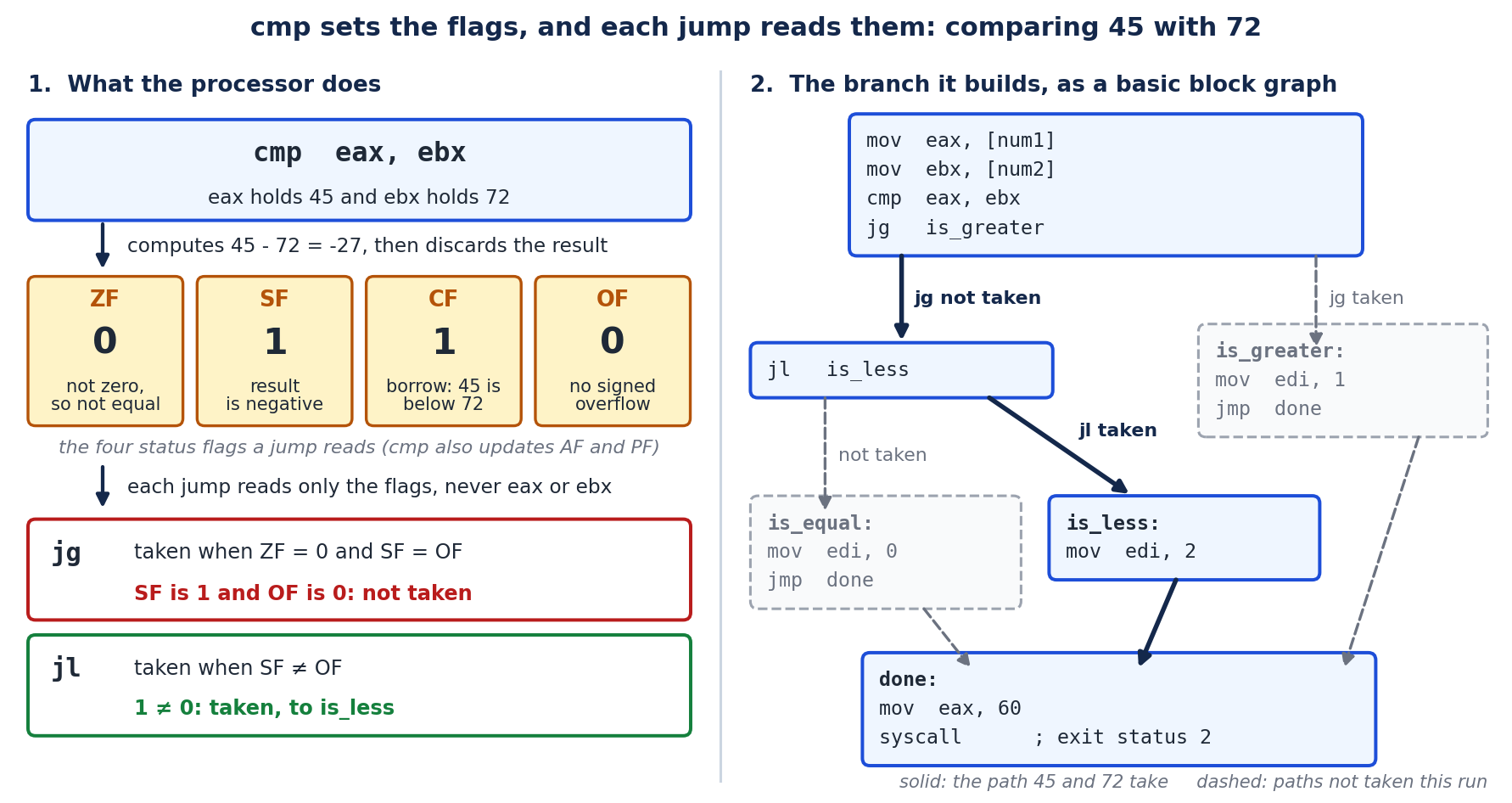
Two details of the program are worth carrying into your own reading. There are three outcomes but
only two conditional jumps, because once jg and jl have both failed, equal is the only case left,
so the equal block needs no je of its own; compilers reason the same way, and a chain of jumps that
seems to be missing a case usually handles it on the fall-through path. And every block except the
last ends in an unconditional jmp to done, which keeps one outcome from running into the next; in
a disassembler’s graph those jmp instructions are what make the three paths meet again.
Exercises#
What assembly pattern marks an
ifstatement, and which instruction actually performs the branch?Given
mov rdi, raxthenlea rsi, [rip+0x2f10]thencall SomeApi, what are the first two arguments to the call on a Linux target?How does the addressing form
[rax+rcx*4]correspond to a source-level construct?Why should an analyst be able to read raw disassembly even when a decompiler is available?
In the worked example of this section, swap the values so that
num1is 72 andnum2is 45. Which of ZF, SF, CF and OF are set after thecmp, which jump is taken, and what exit status does the program return?A listing shows
cmp DWORD PTR [rbp-0x4], 0x9followed byjle .skip, and the local is a signedint. What condition guards the code that follows thejle, and why can the listing not tell you whether the programmer wrote the test with 9 or with 10?Why do the signed conditional jumps compare SF with OF instead of reading SF alone? Use a
cmpof 0x7FFFFFFF with -1 to illustrate.
Answer Key#
A
cmp(ortest) that sets flags, followed by a conditional jump (jccsuch asje,jne,jg); thejccperforms the branch.rax(moved intordi) is the first argument, and the string constant at[rip+0x2f10](loaded intorsi) is the second argument.It is indexed array access: base
raxplus indexrcxscaled by 4, that is, elementrcxof an array of 4-byte elements.Decompilers infer and can be deliberately misled by anti-analysis tricks; dropping to the disassembly lets the analyst confirm the actual behavior of the bytes and avoid being deceived.
None of the four. 72 minus 45 is 27, which is not zero, not negative, needs no borrow and fits, so ZF, SF, CF and OF are all 0.
jgneeds ZF = 0 and SF = OF, both hold, so it jumps tois_greaterand the program exits with status 1.The code after the
jleruns only when the jump is not taken, that is, whenx > 9. For integersx > 9andx >= 10are the same test, and GCC compiles both to this pair of instructions, so the source could have used either constant.When the subtraction overflows, the stored difference has the wrong sign. 0x7FFFFFFF minus -1 is 2,147,483,648, which does not fit in 32 signed bits, so the stored result is 0x80000000 with SF = 1, which on its own suggests the first operand is the smaller. OF = 1 records the overflow, and since SF equals OF,
jgis taken andjlis not. That is correct, because 2,147,483,647 is greater than -1; a test on SF alone would have taken the less-than branch.
15.23 Windows Internals for Malware Analysts#
Most malware targets Windows, so analysis requires a working model of the operating system it abuses. This section gives the minimum internals needed to read the behavior of a Windows sample and connect it to the detection artifacts of Chapter 12 and the forensics of Chapter 13.
Processes, threads, and virtual memory. A process is a container: a private virtual address space, a handle table, and one or more threads that actually execute code. Malware frequently creates a benign process and then injects code into it (Section 15.6), so the process you see running is not always the code that is running. Each process has a Process Environment Block (PEB) describing its loaded modules; shellcode and reflective loaders walk the PEB to find libraries without calling the loader, which is why the PEB is both an attacker tool and an analyst landmark (Section 9.25).
Thread states. The thread, not the process, is the unit the Windows scheduler runs, and each thread moves through a small, documented set of states. A thread is Initialized while it is being created, Ready once it can run and is only waiting for a free processor, and Standby when the dispatcher has chosen it as the next thread for a particular processor, which at most one thread per processor can be at a time. It is Running while it executes on a core, and Waiting when it has blocked on a wait call, a lock, an event, or an input/output operation. Two states exist for memory-management reasons: a thread is in Transition when it would be ready except that its kernel stack has been paged out and must be brought back, and Deferred Ready when it has been queued for a processor but not yet scheduled, a state the kernel uses to cut contention on the scheduler lock. A finished thread is Terminated. Microsoft’s diagnostics and event-tracing documentation lists these values, and Windows Internals sets out the full state machine and the transitions between states.
A common misconception is worth clearing up: Suspended is not one of these scheduler states. A thread created
with CREATE_SUSPENDED, or halted later with SuspendThread, is simply not among the ready threads the
dispatcher will schedule, as Microsoft’s scheduling documentation notes, and it receives no processor time
until it is resumed. Suspension still matters to the analyst, because a process whose only thread is created
suspended is a hallmark of the process-hollowing technique described earlier (Section 15.10), so it is worth a
second look.
Handles and objects. Files, registry keys, mutexes, events, and processes are kernel objects accessed
through numeric handles. Two behaviors matter for analysis: malware often creates a named mutex to avoid
infecting a machine twice, and that mutex name is a high-quality host indicator; and handles to other processes
(OpenProcess) followed by memory writes (WriteProcessMemory) and remote thread creation
(CreateRemoteThread) are the classic injection signature.
The registry. The Windows registry is a hierarchical configuration database and a primary persistence and configuration surface for malware:
Registry area |
Why malware uses it |
|---|---|
|
Auto-start a payload at login (persistence) |
|
Install a malicious service or driver |
|
Hijack the logon path |
|
Hijack a legitimate program’s launch (debugger key) |
App-specific keys |
Store configuration, encryption keys, or campaign IDs |
These are the same keys the forensic analyst examines in Section 13.28, so learning them once serves both offense-analysis and defense.
Services and drivers. A Windows service runs in the background, often as SYSTEM, and can start at boot, which
makes it attractive for persistence and for loading kernel drivers (the mechanism behind the rootkits of Section
15.14). Service creation (sc create, event ID 7045) is a heavily monitored detection point (Section 12.10).
The loader and APIs. When a program starts, the Windows loader maps the executable and its imported DLLs and fills the Import Address Table (Section 15.4). Malware that wants to hide its intentions resolves APIs at runtime by hashing export names (Section 9.25) so the import table looks empty, an evasion the analyst counters by watching the actual calls at run time (Section 15.25). Holding this model in mind, an analyst can look at a sequence of API calls and reconstruct the sample’s plan: allocate memory, write code, start a thread, contact a server, install a Run key, encrypt files. That reconstruction is the point of the whole exercise.
Exercises#
Why is the process you see running not necessarily the code that is running?
Give two reasons malware creates a named mutex, and why the name is useful to a defender.
Name three registry locations malware uses for persistence and what each achieves.
How does resolving APIs by hashing export names help malware, and how does an analyst defeat it?
Answer Key#
Because code injection (Section 15.6) places malicious code into the address space of a separate, often legitimate, process, so the executing code and the host process differ.
To avoid reinfecting a machine (a single-instance check) and to coordinate components; the specific mutex name is a stable host-based indicator of compromise a defender can hunt for.
Any three of:
CurrentVersion\Run/RunOnce(auto-start at login),Services(install a service or driver),Winlogon\Shell/Userinit(hijack the logon path), and Image File Execution Options (hijack a program’s launch).It leaves the import table empty so static analysis cannot see which APIs are used; the analyst runs the sample under a debugger or monitor (Section 15.25) and observes the calls as they happen.
15.24 Obfuscation and Deobfuscation, Worked#
Section 15.10 listed obfuscation techniques; here we work through the common ones and how an analyst reverses them, because deobfuscation is where static analysis is won or lost.
String encryption. Rather than store "http://evil.example/c2" in plaintext (which the strings tool would
reveal, Section 15.3), malware stores it encrypted and decrypts it at use. In disassembly this appears as a
small routine, a loop that XORs or otherwise transforms a blob just before the string is used:
lea  rsi, [rip+0x3a20]      ; pointer to the encrypted blob
xor  ecx, ecx              ; i = 0
.decrypt_loop:
mov  al, BYTE PTR [rsi+rcx]
xor  al, 0x5a              ; single-byte XOR key 0x5a
mov  BYTE PTR [rsi+rcx], al
inc  ecx
cmp  ecx, 0x18             ; length 24
jl   .decrypt_loop
The analyst recovers the string either statically, by extracting the blob and the key and reproducing the XOR, or dynamically, by setting a breakpoint after the loop and reading the now-decrypted buffer (Section 15.25). A short script does the static route:
blob = bytes.fromhex("2a3e2b2e7e...")   # the 24 bytes from the binary
print(bytes(b ^ 0x5a for b in blob).decode())   # apply the recovered key
API hashing. Instead of naming an API, malware stores a hash and, at runtime, walks each DLL’s export table hashing names until one matches (Section 9.25). To deobfuscate, the analyst identifies the hash algorithm in the resolver, then precomputes the hash of every known export name to build a lookup table that maps each stored hash back to its function, revealing the malware’s true imports.
Control-flow flattening and opaque predicates. Advanced obfuscators dismantle the natural block structure of a function into a dispatcher-plus-state-machine (flattening), or insert branches whose outcome is always the same but not obviously so (opaque predicates), to confuse decompilers. The countermeasures are increasingly automated: symbolic-execution and deobfuscation frameworks (angr, Miasm, and Triton) reason about the possible values a variable can take and simplify away the dead branches, reconstructing the original control flow.
Packing. The most common obfuscation is packing (Section 15.5): the real code is compressed or encrypted and a stub unpacks it into memory at run time. The general unpacking strategy is dynamic: let the stub run under a debugger until it transfers control to the newly written region (the original entry point), then dump that region from memory. Section 15.25 walks that process. The theme across all four is the same: obfuscation raises the cost of static analysis, and the analyst answers either by reproducing the transformation statically or by letting the malware deobfuscate itself and catching the result at run time.
Exercises#
Why do malware authors encrypt strings, and what does the decryption routine typically look like in disassembly?
Describe the two general strategies for recovering an encrypted string.
How does an analyst reverse API hashing to recover a sample’s true imports?
What is control-flow flattening, and what class of tool helps undo it?
Answer Key#
To defeat the
stringstool and static signature matching; it appears as a short transform loop (often an XOR) that runs over a data blob immediately before the string is used.Statically, extract the blob and key from the binary and reproduce the transform in a script; dynamically, breakpoint just after the decryption loop and read the plaintext from memory.
Identify the hashing algorithm in the resolver, then hash every known export name to build a table mapping each stored hash back to the function it selects.
It rewrites a function’s natural blocks into a dispatcher-driven state machine to confuse decompilers; symbolic-execution and deobfuscation frameworks (angr, Miasm, Triton) help reconstruct the original flow.
15.25 A Dynamic Analysis Session#
Sections 15.11 and 15.21 set up the lab; this section walks the dynamic analysis of a packed Windows sample so the pieces connect into a repeatable procedure. Dynamic analysis is the counter to every static evasion in Section 15.24: whatever the malware hides on disk, it must reveal at run time to actually run.
The workflow, executed inside the isolated, snapshotted VM of Section 15.21:
1. Triage statically first (Sections 15.3-15.4):
   - hashes, file type, packer detection (Detect It Easy / DIE)
   - high section entropy suggests packing (Section 15.20 YARA)
   - near-empty import table suggests API hashing
2. Detonate under a monitor to capture behavior:
   - Process Monitor (Procmon): file, registry, process, network events
   - a fake-internet service (INetSim / FakeNet-NG) answers C2 lookups
   - note dropped files, created Run keys, mutexes, contacted domains
3. Unpack under a debugger (x64dbg) to reach the real code:
   - set a breakpoint on VirtualAlloc / VirtualProtect (the stub allocates
     RWX memory for the unpacked payload)
   - run until the stub jumps into the freshly written region: that target
     is the Original Entry Point (OEP)
   - dump the process memory at the OEP (Scylla plug-in) and rebuild the
     import table to get an analyzable, unpacked binary
4. Break on interesting APIs to observe intent directly:
   - CreateFileW / CryptEncrypt  -> ransomware file encryption
   - InternetConnect / WinHttpSendRequest -> C2 traffic
   - RegSetValueEx on a Run key   -> persistence
   - decryption-loop exit (Section 15.24) -> read recovered strings
5. Extract indicators (Section 15.12): domains, IPs, mutex names, file
   paths, registry keys, and a YARA rule (Section 15.20) for the family.
The reason this order works is that each step defeats a specific defense: static triage flags packing and API hashing so you know what to expect; behavioral monitoring reveals actions even when the code is unreadable; debugging to the OEP defeats the packer; and API breakpoints defeat string encryption and hashing by catching the values after the malware itself has decrypted them. The output, a set of indicators and a detection rule, is what turns one analyzed sample into protection for an entire organization, closing the loop with the detection engineering of Chapter 12 and the incident response of Chapter 14.
Exercises#
Why is dynamic analysis the natural counter to static-analysis evasions such as packing and string encryption?
On which API would you breakpoint to catch a packer allocating memory for its unpacked payload, and what are you looking for next?
What is the Original Entry Point, and why is dumping memory at that moment useful?
Give two API breakpoints and the malware behavior each would reveal.
Answer Key#
Because to execute, the malware must unpack and decrypt itself in memory; running it under monitoring and a debugger lets the analyst observe the revealed code, strings, and actions that static analysis cannot see.
VirtualAllocorVirtualProtect(the stub allocates or marks executable memory); next you run until the stub transfers control into that newly written region, which is the Original Entry Point.The OEP is the entry of the real, unpacked payload; dumping process memory there yields an unpacked image that (after rebuilding imports) can be analyzed statically like an unpacked binary.
Any two, for example:
CryptEncrypt/CreateFileWrevealing ransomware file encryption;WinHttpSendRequest/InternetConnectrevealing C2 network activity;RegSetValueExon a Run key revealing persistence.
15.26 Analyzing Script and .NET Malware#
The disassembly and Windows-internals sections assumed a compiled native binary, but a large and growing share of real malware is not native at all: it is PowerShell, JavaScript, VBScript, or a .NET assembly. These require different tools and are, helpfully, often easier to analyze because they carry more of their original structure. A reverse-engineering course must cover them because they dominate the initial-access stage (Section 15.16).
Script malware (PowerShell, JScript, VBScript). The commodity infection chain is a document macro or a script file that downloads and runs a payload. Scripts are text, so the whole battle is deobfuscation, because attackers wrap the logic in layers of encoding to defeat signatures:
Common PowerShell obfuscation and how to peel it:
  -EncodedCommand <base64>   -> base64-decode to get the real script
  [Convert]::FromBase64String / -join / -replace  -> string reassembly
  IEX (Invoke-Expression)    -> the sink that runs the decoded string
Deobfuscation strategy: do NOT run it. Replace the final IEX / eval with a
print/write so the script reveals its decoded next stage instead of
executing it, or decode the layers manually. Tools: CyberChef for the
encoding layers, and script-block logging (event ID 4104, Section 12.10)
which records PowerShell as it actually executes, defeating obfuscation.
The key insight is that script malware must eventually pass a decoded string to an execution sink (IEX,
eval, WScript.Shell.Run); intercepting the value at that sink, statically by editing it to print, or
dynamically via logging, reveals the true payload no matter how many encoding layers wrap it. This mirrors the
API-breakpoint idea of Section 15.25.
.NET malware. A great deal of modern malware (many commodity stealers and loaders) is written in C# and
compiled to .NET Common Intermediate Language (CIL), not native code. CIL retains method names, class
structure, and often readable logic, so .NET samples decompile back to near-source. The tools are dnSpy and
ILSpy, which reconstruct C# from the assembly and, in dnSpy’s case, let the analyst set breakpoints and debug the
sample as if they had the source. Obfuscators (such as ConfuserEx) rename symbols and encrypt strings to fight
this, and de-obfuscators (de4dot) reverse many of them. The practical workflow: identify a sample as .NET (the
PE imports mscoree.dll and Detect It Easy flags it), open it in dnSpy, run de4dot if it is obfuscated, then
read the decompiled C# directly, which is far faster than native reversing.
The broader lesson is to identify the technology first. Native, .NET, PowerShell, and JavaScript malware each demand a different toolchain, and pointing native disassembly tools at a .NET binary yields noise. Recognizing the sample’s type (from its headers, imports, and strings, Sections 15.3 and 15.4) is the first decision in any analysis and often the difference between an hour and a week of work.
Exercises#
Why is deobfuscation the central task when analyzing PowerShell or JavaScript malware, and what is the general trick for recovering the payload without running it?
What is the execution sink in script malware, and why is it the ideal place to capture the true payload?
Why does .NET malware decompile back to near-source, and which tools perform this?
Why is identifying the sample’s technology the first step of analysis?
Answer Key#
Because script malware is plaintext wrapped in encoding layers to defeat signatures; the general trick is to replace the final execution call (
IEX/eval) with a print/write so the decoded next stage is revealed instead of executed, or to decode the layers manually.The sink is the call that runs a decoded string (
IEX,eval,WScript.Shell.Run); capturing the value passed to it reveals the real payload regardless of how many encoding layers preceded it..NET compiles to CIL, which retains method names, class structure, and logic, so decompilers (dnSpy, ILSpy) reconstruct readable C#; de4dot reverses common obfuscation first.
Native, .NET, and script malware require different toolchains; using native tools on a .NET or script sample produces noise, so recognizing the type from headers, imports, and strings determines the whole approach.
15.27 Linux and ELF Malware Analysis#
Most of this chapter has centered on Windows because most commodity malware targets it, but Linux is the operating system of servers, cloud workloads, containers, and the Internet of Things, and Linux malware, cryptominers, DDoS botnets, and ransomware aimed at ESXi and cloud hosts, has grown sharply. Analysis transfers, but the format and toolchain differ, so a complete course covers them.
The ELF format. Where Windows uses PE (Section 15.4), Linux uses the Executable and Linkable Format (ELF).
The analyst’s landmarks are analogous: an ELF header, program headers (segments the loader maps), and section
headers (.text code, .data, .rodata strings, .dynsym/.dynamic for dynamic linking). The tooling maps
one-to-one onto the concepts of Sections 15.3 and 15.4:
Task |
Windows tool |
Linux/ELF tool |
|---|---|---|
Identify file, headers |
Detect It Easy, CFF Explorer |
|
Imported functions |
Dependency Walker, IAT view |
|
Strings |
strings.exe, FLOSS |
|
Disassembly/decompile |
IDA, Ghidra, x64dbg |
Ghidra, radare2/rizin, objdump -d, gdb |
Syscall/behavior trace |
Procmon, API Monitor |
|
Linux-specific behaviors. A Linux analyst watches for a recognizable repertoire: persistence via cron jobs,
systemd services, or ~/.bashrc and /etc/rc.local; privilege escalation via set-user-ID (SUID) binaries, sudo
misconfigurations, or writable /etc/passwd (Section 9.18); process and file hiding via LD_PRELOAD userland
rootkits or loadable kernel modules (Section 15.14); and, for IoT botnets such as the Mirai lineage, brute-forced
Telnet/SSH credentials and architecture-specific droppers (the same malware cross-compiled for ARM, MIPS, x86 to
match cheap devices). Behavioral tracing is especially productive on Linux because strace records every system
call a sample makes, so file, network, and process activity is visible directly, which is the Linux counterpart
to the API monitoring of Section 15.25.
Containers and the cloud. Modern Linux malware increasingly targets exposed container and orchestration APIs (a misconfigured Docker or Kubernetes endpoint) to deploy cryptominers at scale, and cloud ransomware targets hypervisor hosts. Analysis extends naturally: the payload is still an ELF binary or a script, examined with the tools above, but the delivery reasoning shifts to cloud identity and exposed services (Chapter 17). The unifying lesson is that the analysis method, static triage then behavioral tracing then targeted disassembly, is platform independent; only the file format and the specific tools change. An analyst who has internalized the method retools for a new platform in an afternoon.
Exercises#
What is the ELF equivalent of the Windows PE format, and name two ELF sections and what they hold.
Give the Linux tools you would use to (a) list a binary’s imported functions and (b) trace its runtime behavior.
Name three Linux-specific persistence mechanisms an analyst should check.
Why is
straceparticularly valuable for Linux malware analysis?
Answer Key#
ELF (Executable and Linkable Format). Any two sections, for example:
.text(code),.rodata(read-only strings/constants),.data(initialized data), or.dynsym/.dynamic(dynamic-linking information).(a)
readelf -d,nm -D, orobjdump -Tfor imported/dynamic symbols; (b)strace(system calls) orltrace(library calls), optionallysysdig/Falco.Any three of: cron jobs, systemd services,
~/.bashrc/profile scripts,/etc/rc.local, or LD_PRELOAD/kernel modules.It records every system call the sample makes, exposing file, network, and process activity directly, which is the Linux counterpart to Windows API monitoring and often reveals behavior without disassembly.
15.28 Extracting Malware Configuration at Scale#
A single analyzed sample (Section 15.25) yields indicators for one infection, but real threat intelligence comes from analyzing a family across thousands of samples, and the key to that is configuration extraction. Most modern malware families are built from a common code stub plus an embedded configuration block, the campaign- specific settings, so extracting that block turns each new sample into structured intelligence automatically.
What is in a config. A malware configuration typically holds the command-and-control servers (domains, IPs, URLs), the encryption keys or campaign identifier, the mutex name (Section 15.23), target lists, and behavior flags. Because the code is shared across a campaign, these fields are what actually distinguish one operation from another, which is why they are the intelligence prize.
How it is stored, and extracted. The config is rarely plaintext; it is encrypted or encoded exactly like the strings of Section 15.24. Extraction therefore reuses the same skills:
1. Locate the config: often a distinct high-entropy blob in a PE resource
   or a specific section, referenced by the decode routine.
2. Recover the decode logic: find the routine that transforms the blob
   (XOR, RC4, AES) and its key, by static reading (Section 15.22) or by
   breakpointing after decryption at run time (Section 15.25).
3. Reproduce it in a parser: write a script that, given any sample of the
   family, locates the blob, applies the decode, and emits the fields as
   structured data (JSON).
# Skeleton of a family config extractor (illustrative)
def extract_config(sample_bytes):
    blob = find_config_blob(sample_bytes)      # e.g., a known PE resource
    key  = derive_key(sample_bytes)            # static key or per-sample
    cfg  = rc4(blob, key)                       # reproduce the malware's decode
    return {
        "c2":       parse_c2_list(cfg),
        "campaign": parse_campaign_id(cfg),
        "mutex":    parse_mutex(cfg),
    }
# Run across a corpus to map a whole campaign's infrastructure over time.
Why scale changes the game. Running one extractor across a corpus of samples reveals the campaign’s entire infrastructure and how it evolves, feeds automated blocking (Chapter 12) and hunting, and lets defenders track an actor over months. This is how commercial and open threat-intelligence platforms (and projects such as the community configuration-extractor collections) convert a flood of samples into a map of adversary operations. The lesson that completes the chapter is that malware analysis is not only about understanding one program; its highest value is turning repeated structure into automation, so that human expertise is spent once on the family and then applied a thousand times by code.
Exercises#
Why is the configuration block, rather than the shared code, the intelligence prize in a malware family?
What fields does a malware configuration typically contain?
How does config extraction reuse the deobfuscation skills of Section 15.24?
What does running a config extractor across a large corpus of samples enable?
Answer Key#
Because the code is common across a campaign; the configuration holds the campaign-specific settings (C2, keys, campaign ID, targets) that actually distinguish and identify one operation from another.
Command-and-control servers (domains/IPs/URLs), encryption keys or a campaign identifier, the mutex name, target lists, and behavior flags.
The config is encrypted or encoded like the malware’s strings, so extraction locates the blob, recovers the decode routine and key (statically or by breakpointing after decryption), and reproduces the transform.
It maps the campaign’s full infrastructure and its evolution over time, feeding automated blocking and hunting and enabling long-term tracking of the actor, turning many samples into structured intelligence.
15.29 Case Study: The WannaCry Worm#
WannaCry, which struck in May 2017, is worth a detailed technical case study because it combined, in one documented event, several themes of this book: a leaked exploit, worm propagation, ransomware, and an accidental kill switch. The facts below are drawn from the extensive public analysis that followed the outbreak.
Propagation by exploit, not by user. Unlike the phishing-borne ransomware of Section 15.13, WannaCry spread as a worm (Section 15.17): it propagated automatically across networks with no user interaction by exploiting a vulnerability in Microsoft’s Server Message Block (SMB) version 1 protocol. The exploit, known as EternalBlue, targeted the flaw that Microsoft had patched in bulletin MS17-010 two months earlier, in March 2017. EternalBlue had been developed within a national intelligence agency and was released publicly by a group calling itself the Shadow Brokers, a textbook illustration of the n-day exploitation of Section 9.33: the patch existed, but unpatched systems were abundant, and a powerful exploit was now public.
The dual payload. On each machine it reached, WannaCry did two things: it encrypted the victim’s files with hybrid cryptography (Section 15.13) and displayed a ransom demand in Bitcoin, and it used the same SMB exploit to scan for and infect further reachable machines, both on the local network and across the internet. The worm component is what turned a single infection into a global event affecting an estimated hundreds of thousands of computers across many countries within days, including systems in the United Kingdom’s National Health Service, where it disrupted hospital operations.
The accidental kill switch. WannaCry contained a curious check: before running, it tried to contact a specific, then-unregistered domain, and if that request succeeded, it stopped. A security researcher analyzing the sample registered that domain, which caused the malware’s own check to halt the majority of the spread. The mechanism is debated (a possible anti-sandbox check, since some sandboxes answer every domain, as discussed in Section 15.24), but the effect is not: registering the domain functioned as a global off switch, a vivid lesson in how much dynamic analysis of a live sample can matter.
What it teaches. WannaCry ties the course together. Patch management (Chapters 5 and 19) would have prevented it, since the fix predated the outbreak. Network segmentation and disabling the obsolete SMBv1 (Chapter 11) would have contained it. Backups (Section 15.13) were the only reliable recovery, since paying rarely restored files. Detection of the exploit and the propagation (Chapter 12) and a rehearsed incident response (Chapter 14) were what separated organizations that recovered quickly from those that did not. One incident, correctly understood, motivates nearly every defensive discipline in this book, which is why it remains the canonical worked example of a modern worm.
Exercises#
How did WannaCry propagate, and why did that make it so much more damaging than phishing-delivered ransomware?
Explain how WannaCry is an example of n-day exploitation (Section 9.33).
What was the kill switch, and how did a researcher use it to halt the spread?
Name three defensive controls from other chapters that would have prevented or contained WannaCry.
Answer Key#
It spread as a worm using the EternalBlue SMBv1 exploit, infecting reachable machines automatically with no user interaction, so it propagated across and between networks far faster than malware requiring a user to click.
Microsoft had already patched the SMB vulnerability (MS17-010) two months before the outbreak, so WannaCry exploited a known, patched (n-day) flaw on systems that had not yet applied the update, not a zero-day.
The malware checked whether a specific hardcoded domain was reachable and stopped if it was; a researcher registered that previously unregistered domain, so the check began succeeding and the malware halted itself on most systems.
Any three of: timely patching (MS17-010), disabling SMBv1 and network segmentation, offline backups for recovery, exploit/propagation detection, and a rehearsed incident-response plan.
15.30 A Catalog of Anti-Analysis Techniques#
Malware fights back against the analyst, and Section 15.10 introduced this at a high level. Because recognizing and defeating anti-analysis is a large part of real reverse-engineering work, this section consolidates the techniques into a reference catalog organized by what each one attacks: the debugger, the virtual machine, the disassembler, or the analyst’s time.
Anti-debugging (defeat dynamic analysis under a debugger, Section 15.25):
Technique |
How it works |
Countermeasure |
|---|---|---|
|
Reads the Windows flag set when a debugger is attached |
Patch the flag or the check to return false |
Timing checks ( |
Debugging slows execution; large time deltas reveal it |
Patch out the check; keep the delta small |
INT 3 / breakpoint scanning |
Scans its own code for |
Use hardware breakpoints instead of software ones |
|
Asks the kernel about debug status directly |
Hook or patch the returned value |
Anti-VM and anti-sandbox (behave benignly when watched, so analysis sees nothing malicious):
Technique |
How it works |
Countermeasure |
|---|---|---|
Artifact checks |
Looks for VM drivers, MAC prefixes, registry keys |
Harden the VM to remove telltale artifacts |
Resource checks |
Real machines have many cores, large disks, uptime |
Provision a realistic-looking analysis VM |
Human-interaction checks |
Waits for mouse movement or a reboot |
Simulate user activity; use interaction-aware sandboxes |
Sleep/stalling |
Delays execution past the sandbox’s time budget |
Patch the sleep, or fast-forward time in the sandbox |
Anti-disassembly (defeat static analysis, Section 15.22):
Technique |
How it works |
Countermeasure |
|---|---|---|
Junk bytes / overlapping instructions |
Confuse the linear disassembler’s byte alignment |
Use recursive-descent disassembly; correct manually |
Opaque predicates |
Branches that are always taken but look conditional |
Symbolic simplification (angr/Miasm), manual analysis |
Control-flow flattening |
Real flow hidden behind a dispatcher (Section 15.24) |
Deobfuscation frameworks reconstruct the graph |
Self-modifying / packed code |
Real code appears only at run time |
Dynamic unpacking to the OEP (Section 15.25) |
The unifying insight, and the reason this catalog matters more than any single entry, is that anti-analysis is an arms race with a structural asymmetry in the analyst’s favor: to run, the malware must eventually execute its real behavior on a real target, so a sufficiently realistic dynamic environment always wins in the end (Section 15.25). Static anti-analysis raises the cost of reading the code, and dynamic anti-analysis raises the cost of running it safely, but neither can make the malware both undetectable and functional. The practical workflow is therefore to expect these techniques, identify which are present during static triage (Section 15.3), and choose the analysis approach, harden the VM, patch the check, or move to bare metal, that neutralizes them. Fluency with this catalog is what turns a sample that “does nothing when I run it” into a solved case.
Exercises#
Organize the four categories of anti-analysis by what each one attacks.
How does a timing check detect a debugger, and how is it defeated?
Why do anti-VM checks often take the form of looking for artifacts and limited resources?
Explain the structural asymmetry that favors the analyst in the anti-analysis arms race.
Answer Key#
Anti-debugging attacks dynamic analysis under a debugger; anti-VM/anti-sandbox attacks the analysis environment; anti-disassembly attacks static reading of the code; and stalling/sleep attacks the analyst’s (or sandbox’s) time budget.
Debugging slows execution, so the malware measures elapsed time (via
rdtscorGetTickCount) across a region and infers a debugger from an abnormally large delta; it is defeated by patching out the check or keeping the measured interval small.Sandboxes and analysis VMs leave telltale artifacts (specific drivers, MAC prefixes, registry keys) and are often under-provisioned (few cores, small disk, no real user), so checking for these cheaply distinguishes an analysis environment from a real victim.
To accomplish anything, the malware must eventually execute its real behavior on a real-looking target, so a sufficiently realistic dynamic environment will observe it; the malware cannot be simultaneously fully evasive and functional.
15.31 Writing the Malware Analysis Report#
Analysis that is not communicated is wasted, so the analyst’s actual deliverable is a report, just as the incident responder’s is (Section 14.27). A malware analysis report translates hours of reversing into decisions other people can act on, and its structure is standardized so that readers, incident responders, threat-intel teams, and detection engineers, can find what they need quickly.
1. Summary (non-technical). What the sample is (family, type), what it
   does, how dangerous it is, and the one or two actions the reader should
   take. Written for a manager or responder who will read nothing else.

2. Sample identification. File names, sizes, and hashes (MD5, SHA-256,
   Section 15.3); file type; and any family/attribution assessment with a
   stated confidence level.

3. Capabilities and behavior. What the malware does: persistence
   mechanism (Section 15.23), privilege use, network/C2 behavior, payload
   (encryption, theft, propagation), and anti-analysis observed
   (Section 15.30). Mapped to MITRE ATT&CK techniques.

4. Indicators of compromise. The actionable list (Section 15.12): file
   hashes, dropped file paths, registry keys, mutex names, domains, IPs,
   and URLs -- formatted so a defender can ingest them directly.

5. Detection. YARA rules for the family (Section 15.20), network
   signatures, and behavioral detections (Chapter 12), so the analysis
   becomes protection.

6. Recommendations. Containment, eradication, and hardening guidance
   feeding incident response (Chapter 14).
Two disciplines make the report trustworthy. First, separate observation from inference: “the sample writes to the Run key” is an observation, “the sample is designed for long-term persistence” is an inference, and stating confidence (“assessed with moderate confidence”) keeps the reader correctly calibrated, the same standard as the forensic reporting of Section 13.19. Second, lead with the actionable: the indicators and detections in sections 4 and 5 are what a defender uses within the hour, so they are formatted for direct ingestion rather than buried in prose. The report closes the loop that the whole chapter has traced: a sample is triaged, analyzed statically and dynamically, its configuration and indicators extracted, and finally its findings written up so that one analyst’s work protects an entire organization. That transfer, from a single binary to durable, shared defense, is the reason malware analysis is a discipline rather than a curiosity.
Exercises#
Who are the readers of a malware analysis report, and why does that shape its structure?
Why must the report separate observation from inference, and what does stating a confidence level achieve?
Which two sections are the most time-critical for a defender, and how should they be formatted?
How does the report complete the malware-analysis workflow of this chapter?
Answer Key#
Managers/responders (who need the summary and actions), incident responders and detection engineers (who need indicators and detections), and threat-intel teams (who need capabilities and attribution); the report is layered so each audience finds its part quickly.
Because conflating what was seen with what it implies misleads readers; separating them, and stating confidence, keeps the reader correctly calibrated about what is established fact versus assessment.
The indicators of compromise and the detection content; they should be formatted for direct machine ingestion (clean lists of hashes, domains, rules) so defenders can deploy them immediately.
It transfers the analyst’s findings into a form others can act on, turning the triage, static and dynamic analysis, and indicator/config extraction of one sample into durable, shared protection for the organization.
15.32 Recognizing C++ in Disassembly#
Sections 15.22 and 15.23 covered reading C constructs in assembly; a growing share of malware is written in C++, which introduces its own recognizable patterns. Because object orientation changes how code looks at the machine level, an analyst who cannot recognize C++ constructs will misread a modern sample. This section covers the four signatures that matter.
Name mangling. C++ supports function overloading, namespaces, and classes, so the compiler encodes a
function’s full signature into its symbol name, a process called name mangling. A method Foo::bar(int)
appears in the binary under an encoded name rather than a plain bar, and the encoding differs by compiler:
Microsoft Visual C++ produces names beginning with ? (for example ?bar@Foo@@...), while the Itanium ABI used
by GCC and Clang produces names beginning with _Z (for example _ZN3Foo3barEi). Modern disassemblers such as
IDA Pro and Ghidra demangle these automatically, and the presence of mangled names is itself the first clue
that a binary is C++ rather than C.
The this pointer and thiscall. A C++ method receives a hidden first argument: a pointer to the object it
operates on, the this pointer. Under the Microsoft x86 thiscall convention, this is passed in the ecx
register rather than on the stack, so a function that reads ecx as a base pointer for member accesses (for
example mov eax, [ecx+8]) is almost certainly a C++ method accessing a field at offset 8 of its object. On
x86-64 the object pointer is simply the first argument in rcx (Windows) or rdi (System V), consistent with
the calling conventions of Section 9.27.
Virtual function tables. The signature that most distinguishes C++ is the virtual function table (vtable).
When a class has virtual functions, each object carries a hidden pointer (the vptr) to a table of function
pointers; a virtual call is resolved at run time by loading the vptr, indexing into the table, and calling
through it. In disassembly this appears as a double indirection, mov eax, [ecx] (load the vtable) followed by
call [eax+offset] (call the function at a fixed slot), rather than a direct call to a fixed address. Spotting
this indirect-call-through-a-table pattern is how an analyst recognizes polymorphism and maps out a class’s
methods.
Objects, constructors, and RTTI. Object creation typically appears as an allocation (new, which calls an
allocator) immediately followed by a call that initializes the memory and sets the vptr, that call is the
constructor. A matching destructor runs on cleanup. Where the compiler emits run-time type information
(RTTI), the analyst gets a gift: RTTI structures often contain the actual class names as strings, directly
revealing the program’s class hierarchy. Putting these together, the analyst reconstructs objects, their fields,
their methods, and their inheritance relationships, turning an opaque C++ binary back into an understandable
design. The practical takeaway is that C++ is not harder to reverse than C, it is differently shaped, and the
four signatures, mangled names, the ecx/this pattern, vtable indirection, and constructor-plus-RTTI, are the
lenses that bring that shape into focus.
Exercises#
What is name mangling, and why does its presence immediately tell you a binary was compiled from C++?
Under the Microsoft x86
thiscallconvention, how is thethispointer passed, and what assembly pattern reveals a member-variable access?Describe the disassembly signature of a C++ virtual function call and why it differs from a normal call.
Why is run-time type information (RTTI), when present, valuable to an analyst?
Answer Key#
Name mangling encodes a function’s full signature (class, namespace, parameter types) into its symbol name to support overloading; the compiler-specific mangled forms (
?...for MSVC,_Z...for the Itanium ABI) are a direct indicator that the source language was C++.In
ecx; a function usingecxas a base register for offset accesses such asmov eax, [ecx+8]is a C++ method reading a field of its object.A virtual call loads the object’s vtable pointer and then calls through a fixed slot in that table (for example
mov eax,[ecx]thencall [eax+offset]), an indirect double-dereference, rather than a direct call to a fixed address, because the target is resolved at run time by object type.RTTI structures frequently embed the real class names as strings and encode the inheritance hierarchy, so they directly reveal the program’s object design that would otherwise have to be reconstructed by hand.
15.33 Covert and Stealthy Launching#
Section 15.6 and Section 15.23 introduced code injection; because covert launching is a distinct analysis topic (and one that malware relies on to hide), this section consolidates the family of techniques by which malware runs its code inside another, trusted process so that the malicious activity does not appear as its own suspicious program. Recognizing these is central to reading a modern Windows sample.
A launcher (or loader) is malware whose job is to set up and covertly execute another piece of malware, often by extracting an embedded or downloaded payload and running it stealthily. The main covert-launching techniques, and how each appears to an analyst, are:
Technique |
Mechanism |
Analyst-visible signature |
|---|---|---|
DLL injection |
Force a remote process to load a malicious DLL ( |
|
Direct injection |
Write code straight into a remote process and run it, without a DLL on disk |
Same API sequence, but injecting shellcode rather than a library path |
Process replacement (hollowing) |
Start a legitimate process suspended, unmap its memory, overwrite it with malicious code, and resume |
|
Hook injection |
Insert a malicious hook into another process via Windows hooks ( |
|
APC injection |
Queue an asynchronous procedure call to run code in a target thread ( |
|
The unifying idea is disguise through a trusted host: after any of these, the malicious code runs under the
identity of a normal process (for example svchost.exe or explorer.exe), so it inherits that process’s trust,
evades naive process-name allowlists, and separates the observed activity from the file that launched it. Process
replacement (hollowing) is the most deceptive of the set, because the target appears in the process list as a
legitimate program from the correct path while its memory has been entirely replaced. The defensive response
follows directly from the signatures above: endpoint detection (Section 12.10) watches for the tell-tale API
sequences (a suspended CreateProcess followed by remote memory writes, or CreateRemoteThread into an
unrelated process), and memory forensics (Section 13.13) finds injected code that has no backing file on disk.
Reading these techniques is therefore both an analysis skill and the basis for detecting them.
Exercises#
What is a launcher (loader), and why is covert launching valuable to malware?
Describe process replacement (process hollowing) and why it is especially deceptive.
Give the characteristic Windows API sequence that suggests remote DLL injection.
How do the analyst-visible signatures of covert launching become the basis for detection?
Answer Key#
A launcher is malware that sets up and stealthily executes another payload (often extracted or downloaded); covert launching lets the payload run inside a trusted process, inheriting its identity and separating the malicious activity from the file that started it.
The malware starts a legitimate process suspended, unmaps its original memory, writes malicious code in its place, fixes the thread context, and resumes it; it is deceptive because the process appears in the task list as the legitimate program from its correct path while actually running attacker code.
OpenProcess, thenVirtualAllocExandWriteProcessMemoryto place the DLL path or code, thenCreateRemoteThread(often invokingLoadLibrary) in the target process.The same API call sequences and memory patterns that identify each technique are what endpoint telemetry and memory forensics monitor for (for example a suspended
CreateProcessplus remote writes, or injected code with no file on disk), turning analysis signatures into detections.
15.34 Malware-Focused Network Signatures#
Section 15.12 covered extracting indicators of compromise, and Chapter 12 covered detection engineering broadly; this section addresses the specific reverse-engineering skill of producing robust network signatures from malware analysis, the point where offense-analysis and defense meet. The goal is a signature that reliably catches a malware family’s traffic while resisting the attacker’s attempts to change it.
The key insight is that analysis-driven signatures beat surface-derived ones. A defender who only captures a sample’s traffic and writes a signature on whatever strings appear (the snort-the-obvious approach) produces a brittle rule that the attacker defeats by changing a user-agent or a URL path. An analyst who has reverse engineered the malware understands which parts of the traffic are essential to the malware’s operation (a fixed protocol structure, a specific encoding, a hardcoded key, an authentication token the server checks) and targets those, producing a signature that survives cosmetic changes. This is why deep analysis produces better detection than traffic capture alone.
Several principles guide the work. First, prefer the stable over the incidental: key on the parts of the protocol the malware cannot easily change without breaking its own command-and-control, not on a banner it can edit freely. Second, understand the attacker’s perspective: the adversary can see published signatures and will test malware against antivirus and public rules (Section 15.30), so a signature that reveals too much of what the defender knows can be studied and evaded, a real tension in signature sharing. Third, capture safely: traffic must be generated in the isolated lab of Section 15.21 with a fake-internet service, never by letting the sample reach real command-and-control. Fourth, balance specificity against generality: too specific and it misses variants, too broad and it floods the analyst with false positives (Section 12.16). The output, typically a Snort or Suricata rule (Section 12.7) plus host indicators, is then validated against both malicious and benign traffic before deployment. The unifying lesson is that the best network detection is a product of analysis, not a substitute for it: understanding how the malware actually communicates is what lets the defender write a rule the attacker cannot cheaply evade.
Exercises#
Why does a network signature derived from deep analysis outperform one written from captured traffic alone?
What kinds of traffic features should a robust signature key on, and which should it avoid?
Why is the attacker’s ability to see published signatures a consideration when designing and sharing them?
How must malware traffic be generated for signature development, and why?
Answer Key#
Because analysis reveals which parts of the traffic are essential to the malware’s operation (protocol structure, encoding, keys, tokens); keying on those produces a signature that survives cosmetic changes, whereas a rule built on incidental strings is defeated by trivial edits.
It should key on stable, operationally required features (fixed protocol format, specific encoding, hardcoded authentication values) and avoid easily changed incidentals such as user-agent strings or URL paths.
Adversaries test their malware against public antivirus and detection rules, so a widely shared signature can be studied and evaded; this creates tension between the value of sharing detection and the risk of teaching the attacker exactly what to change.
In an isolated analysis lab using a fake-internet service that answers the malware’s requests, never by allowing the sample to contact real command-and-control, so behavior can be observed without aiding the attacker or spreading the malware.
15.35 Debuggers, Disassemblers, and Kernel Debugging#
The syllabus of a reverse-engineering course is organized around specific tools, and an analyst must know which tool fits which task. Sections 15.3, 15.4, and 15.22 used these tools in passing; this section consolidates the toolchain and adds the one capability not yet covered, kernel debugging, which rootkit analysis (Section 15.14) requires. Section 15.44 develops the launch-versus-attach distinction, and the operating-system permission checks behind it, that underlie every debugger session named here.
Disassemblers and decompilers. The disassembler is the analyst’s map of a binary’s code. IDA Pro, from Hex-Rays, has long been the commercial standard and is now at version 9, with a free edition (IDA Free) for learning; its interactive navigation and Hex-Rays decompiler set the bar. Ghidra, released free and open source by the NSA, provides comparable disassembly and a decompiler and has become the common teaching tool (Section 15.22). Both perform static analysis: they show the code without running it.
User-mode debuggers. A debugger runs the binary and lets the analyst pause at breakpoints, step one instruction at a time, inspect and modify registers and memory, and watch behavior unfold, the dynamic counterpart to the disassembler (Section 15.25). On Windows, OllyDbg was the classic user-mode debugger, but it is 32-bit only and long unmaintained (its site has not been updated since 2014), so modern practice uses x64dbg, an open-source debugger that is the spiritual successor to OllyDbg and supports 64-bit targets. IDA Pro also includes a debugger, and GDB fills the role on Linux (Section 9.28). Debuggers are what defeat packing and string encryption, because the analyst can let the malware decrypt itself and then read the result from memory (Sections 15.24 and 15.25).
Kernel debugging. User-mode debuggers cannot see into the operating-system kernel, so analyzing a rootkit or a malicious driver (which run in kernel space, Section 15.14) requires a kernel debugger. WinDbg, Microsoft’s debugger, is the standard tool: it attaches to the Windows kernel, typically from a second machine or across a virtual-machine connection, and lets the analyst inspect kernel structures, set breakpoints in driver code, and observe the low-level hooks by which rootkits hide processes and files. Kernel debugging is more involved than user-mode work, since a mistake can halt the whole system, which is why it is done against a disposable virtual machine (Section 15.21). The organizing principle across the toolchain is the static-versus-dynamic pairing: disassemblers (IDA Pro, Ghidra) show the code at rest, user-mode debuggers (x64dbg, IDA, GDB) show it running in an application, and a kernel debugger (WinDbg) shows it running in the operating system itself. Choosing the right one for the question at hand is much of the craft.
Exercises#
Distinguish the role of a disassembler from that of a debugger in reverse engineering.
Why has x64dbg replaced OllyDbg as the standard Windows user-mode debugger for malware analysis?
Why does analyzing a rootkit require a kernel debugger rather than a user-mode debugger?
Why is kernel debugging performed against a disposable virtual machine?
Answer Key#
A disassembler (IDA Pro, Ghidra) statically shows the program’s code without running it; a debugger runs the program and lets the analyst pause, step, and inspect or modify registers and memory dynamically as it executes.
OllyDbg is 32-bit only and has been unmaintained since 2014, so it cannot handle modern 64-bit malware; x64dbg is an actively maintained open-source successor that supports 64-bit targets.
Rootkits and malicious drivers run in kernel space, which user-mode debuggers cannot inspect; a kernel debugger such as WinDbg attaches to the kernel itself to observe driver code and the low-level hooks rootkits use to hide.
Because a mistake during kernel debugging can crash or halt the entire system, and the malware runs with kernel privileges, so a disposable virtual machine contains the risk and can be reverted.
15.36 AI-Assisted Reverse Engineering#
Every tool in Sections 15.10 through 15.32 shares an assumption: a human reads the code. Since 2023 a second reader has arrived. Large language models can now consume decompiler output and return prose that describes what a function does, propose names for variables, and answer questions about a binary in ordinary English. This section explains what that capability actually is, where it helps, where it fails, and the discipline that keeps it from corrupting an analysis.
The central claim of this section is one sentence, and it should be read twice: a language model is a fast hypothesis generator over decompiled code, and a poor authority about it. Everything else follows from that. The generated text is fluent whether or not it is correct, and fluency is not evidence. The skill that matters, and the skill that is graded in any serious course, is not prompting. It is verification.
How the tools attach to the toolchain. Three integration shapes have emerged, and all three are adapters that marshal decompiler output into a request and render the response back to the analyst. In-tool plugins put the model inside the disassembler: GhidrAssist is an MIT-licensed Ghidra extension offering function and instruction explanation, multi-turn chat, a semantic knowledge graph that answers some queries without calling a model at all, and an agentic mode that explores a binary using structured reasoning. It speaks to any OpenAI v1-compatible endpoint, which includes locally hosted servers such as Ollama and LM Studio as well as hosted APIs. Protocol servers invert the direction: GhidraMCP exposes Ghidra through the Model Context Protocol so that an external client drives the disassembler as a set of tools rather than the disassembler calling out to a model. Bridges sit between the two, as OGhidra from Lawrence Livermore National Laboratory does in connecting Ollama-hosted models to Ghidra for natural-language binary analysis. On the IDA side, Gepetto queries language models to explain decompiled functions and rename variables. The differences are real but secondary; what matters for an analyst is that the model sees only what the adapter chooses to send it.
The research picture. The academic work is younger than the tooling. LLM4Decompile, presented at EMNLP 2024, trained models specifically to recover compilable C from assembly and established the evaluation framing most later work uses, namely re-executability rather than textual similarity. That distinction matters: a decompilation that reads beautifully and does not reproduce the original behavior is a failure, and measuring only how much the output looks like source rewards exactly the wrong thing. At the systems level, the DARPA AI Cyber Challenge, whose final results were announced in August 2025, demonstrated that automated systems combining program analysis with language models could find and patch vulnerabilities in real open-source code at competition scale, and the winning cyber reasoning systems were released as open source. The honest summary of the field as of this writing is that these systems are genuinely useful accelerators and are not autonomous analysts.
How the tools fail. Four failure modes recur, and each is confident, fluent, and wrong.
Hallucinated semantics is the model inventing behavior the code does not have, most often by pattern
matching a function to a common idiom it resembles superficially. Confident wrong naming is subtler and
more dangerous: a model labels a routine decrypt_payload when the arithmetic is a checksum, and because
the name is plausible it propagates into every later note, diagram, and report until nobody remembers it
was a guess. Missing context is structural rather than accidental: the model sees the text of one
function, not the runtime, not the call graph, and not the other functions, so it cannot know what a
caller actually passes. Prompt injection is the failure mode unique to this domain and the one most
often overlooked. A sample is attacker-controlled input, and strings inside it are attacker-controlled
text. When those strings are fed to a model along with the decompiled code, an adversary who anticipates
LLM-assisted analysis can plant text designed to steer the assistant, for instance a string that reads as
an instruction to describe the binary as benign. The analyst’s tooling becomes part of the attack surface.
The mitigation is architectural rather than clever prompting: treat sample-derived content as untrusted
data, keep the human in the decision loop, and never let a model’s output take an action.
Confidentiality. A hosted API is a third party. Sending a non-public sample, a client’s binary, or material under a non-disclosure agreement to a hosted model may breach an obligation, and the decompiled text of a proprietary program is still the proprietary program. The rule follows directly: where a sample cannot leave the machine, the model must not either, which is what locally hosted inference through Ollama or LM Studio exists to provide. Accepting somewhat lower capability in exchange for keeping the material local is usually the correct trade, and it is a judgment an analyst should be able to defend.
The verification discipline. Because the failure modes above are not detectable from the output’s tone, a claim must be checked against primary evidence before it becomes a finding. Five gates make this routine. Restate the claim in one falsifiable sentence, which alone eliminates vague assertions. Locate the specific addresses or instructions that would support it. Confirm by reading the disassembly or observing the behavior under a debugger. Record the evidence alongside the claim, so a reader can check the work. Disclose which tool and model produced the suggestion. An unverified machine-generated claim in a report is an unsupported assertion whether or not it happens to be true, and it should be treated as one.
What to delegate. The division of labor follows from where errors are cheap and checkable. A model is well suited to first-pass summaries that orient you in an unfamiliar binary, candidate names you will confirm, explanations of an instruction or an API you have not met, and boilerplate scripting. It is not suited to final capability claims, indicator extraction, attribution, or any conclusion that enters a report, because those are precisely the places where a plausible error is expensive and hard to detect. Used this way, the technology shortens the orientation phase of an analysis, which is real value, and it leaves the judgment where it belongs.
Exercises#
State in one sentence the relationship an analyst should have to a language model’s description of a function, and justify it.
Name the four failure modes of AI assistance on binaries and give one detection strategy for each.
Explain why prompt injection is a threat to the analyst rather than only to the model, and describe the architectural mitigation.
A model labels a routine
decrypt_payload. What is the minimum evidence required before that name may appear in a report?Why must a non-public sample be analyzed with a locally hosted model rather than a hosted API?
LLM4Decompile evaluates re-executability rather than textual similarity to the original source. Why is that the right measure?
Answer Key#
A model’s description is a hypothesis to be tested, not a finding to be reported. The output is equally fluent whether it is right or wrong, so fluency carries no evidential weight and only verification against the disassembly, decompiler, or debugger can establish the claim.
Hallucinated semantics, detected by asking what evidence in the listing would have to be true and checking whether it is; confident wrong naming, detected by asking which specific operations support the name; missing context, detected by noticing that the answer depends on information outside the function such as what a caller passes; and prompt injection, detected by treating sample-derived strings as attacker-controlled and checking whether the model’s claim tracks the code or the strings.
The sample is attacker-controlled input, so strings inside it are attacker-controlled text. An adversary who anticipates LLM-assisted analysis can plant text that steers the assistant’s conclusion, making the analyst’s own tooling part of the attack surface. The mitigation is architectural: treat sample-derived content as untrusted data, keep the human in the decision loop, and never let model output trigger an action directly.
The specific addresses or instructions that implement the operation, read in the disassembly or observed in a debugger, showing that a key and a reversible transformation are actually present. If the arithmetic is a one-way reduction over the input, the correct name is a checksum or hash, not decryption, regardless of what the model proposed.
A hosted API is a third party, and the decompiled text of a non-public program is still that program. Sending it may breach a non-disclosure obligation or a client agreement, so where the sample cannot leave the machine the model must not either, which is the purpose of locally hosted inference.
Because the goal of decompilation is to recover behavior, not prose. Output that closely resembles the original source but does not reproduce its behavior is a failure, and scoring textual similarity rewards plausible-looking reconstructions over correct ones.
15.37 A Linux-Only Reverse Engineering Workflow#
Much of the literature on malware analysis assumes a Windows analysis machine, because most commodity malware targets Windows. That assumption is a practical obstacle for learners: a Windows analysis virtual machine means a license, a lengthy build, and a fragile toolchain. It is also, for a large part of the work, unnecessary. This section sets out a complete reverse engineering workflow that runs entirely on a single Linux virtual machine, and is explicit about the one thing it cannot do.
The dividing line. Static analysis is portable; live execution is not. A Portable Executable is just a file, and a disassembler does not need to run it to read it. Ghidra loads PE binaries as readily as ELF, so the entire static side of Windows malware analysis, the headers, the imports, the resources, the control flow, and the code itself, is available on Linux. What genuinely requires Windows is detonation: observing the sample execute against a real Windows kernel and API surface. So the honest statement of the boundary is not that Linux cannot analyze Windows malware. It is that Linux can analyze Windows malware statically and cannot run it.
Reading PE files on Linux with pev. The tool that makes this practical is pev, a PE32 and PE32+
toolkit packaged for Linux. It provides a family of small programs, each answering one question.
readpe prints the headers, the section table, and the data directories, which is where the analyst
begins: an entry point outside any named section, a section marked writable and executable, or a virtual
size wildly larger than the raw size are all packing indicators (Section 15.25). peldd lists the
imported DLLs, and readpe will enumerate the imported functions within them, which is the single richest
static signal about a sample’s capabilities: an import of VirtualAllocEx alongside WriteProcessMemory
and CreateRemoteThread describes process injection (Section 15.24) as clearly as a comment would.
pescan reports anomalies and packing heuristics, pepack matches known packer signatures, pestr
extracts strings with awareness of PE structure, peres dumps embedded resources where droppers commonly
hide a second stage, pesec reports which mitigations such as ASLR and DEP are enabled, and pehash
computes the hashes used for correlation. Together these answer most of the questions a Windows-only
triage tool would answer, from a Linux prompt, without running anything.
Debugging on Linux. Dynamic analysis of Linux binaries is fully native. gdb is the reference
debugger, and the workflow transfers directly from any other debugger: break sets a breakpoint by
symbol or address, run starts execution, stepi and nexti advance one instruction, info registers
shows the register file, x/ examines memory in a chosen format, and finish runs to the end of the
current function and prints the return value. That last command deserves emphasis, because reading a
computed value out of a function is one of the most common tasks in cracking a check, and on x86-64 an
integer return arrives in rax. Extensions such as GEF and pwndbg add context displays that make the
stack and registers legible at a glance. For analysts who prefer a graphical debugger, edb-debugger is
the closest free Linux analogue to x64dbg. The concepts are identical across all of them; only the key
bindings differ, which is why learning the model in gdb transfers to Windows tooling later.
Anti-debugging on Linux: the ptrace self-trace. Section 15.30 catalogued anti-analysis techniques
generally. The canonical Linux instance is worth spelling out because it is simple, common, and
instructive. The ptrace system call attaches one process to another for debugging, and a process may
request tracing of itself with ptrace(PTRACE_TRACEME, 0, 0, 0). A process can be traced by only one
tracer at a time, so if a debugger is already attached this call fails and returns -1. Malware exploits
that asymmetry: it calls PTRACE_TRACEME early and exits if the call fails, which means the program
refuses to run under a debugger. Three bypasses illustrate three different levels of intervention. The
static approach never runs the program under a debugger at all, recovering the needed value by reading
the disassembly. The debugger-side approach intercepts the call and lies about its result, for instance
by catching the syscall in gdb and setting the return value to 0. The preload approach substitutes the
library function entirely: because the program calls ptrace through libc, a shared object that defines
its own ptrace returning 0 and is loaded first via LD_PRELOAD satisfies the check without any
patching. A fourth approach, patching the conditional branch that acts on the result, generalizes to
almost every anti-analysis check and is discussed below.
Patching a decision. Many protections reduce to a single conditional branch: a check runs, sets a
flag, and a jump decides between success and failure. Redirecting that jump defeats the protection
regardless of how sophisticated the check was, which is why patching is such a durable technique. The
procedure is mechanical. Disassemble and find the compare and the conditional jump immediately after the
check, for instance a test eax, eax followed by a je. Translate the virtual address to a file offset
using the section headers, since the address in the listing is where the byte will live in memory and not
where it sits in the file. Then change the instruction: inverting the condition, je (opcode 0x74) to
jne (0x75), flips the decision, while overwriting the two-byte jump with nop instructions removes it
so control simply falls through. Always patch a copy and keep the original for comparison.
Unpacking. Packing is not encryption; it is compression plus a stub that restores the original at run
time (Section 15.25). The common case is fully mechanical: upx -l identifies a UPX-packed file and
upx -d restores it, after which the strings and imports that were invisible in the packed file appear
normally. The instructive step is the comparison. Running strings on the packed file and again on the
unpacked file demonstrates concretely why a strings-only triage of a packed sample is nearly worthless,
and why entropy and a near-empty string table are themselves indicators. Where a custom packer resists
automated unpacking, the manual route is to run to the original entry point and dump memory, which is
where the Linux-only workflow reaches its limits for Windows samples and the technique is studied rather
than performed.
Practising on crackmes. A crackme is a small program written to be reverse engineered legally: it guards a check, and the exercise is to recover the input that satisfies it or to modify the program so that any input does. Crackmes are the standard way to build the skill because they are unambiguous about success and carry no legal or safety risk, unlike practising on commercial software or live malware. Public archives such as crackmes.one host large collections filterable by platform and difficulty, and guided platforms such as pwn.college provide auto-graded reverse engineering tracks. The methodology is the same each time and is worth internalizing: identify the file, look at the strings, find the check, decide whether it is cheaper to recover the expected input or to patch the decision, and then write down the evidence. The last step is the one beginners skip and the one that distinguishes an analysis from a lucky guess.
Exercises#
State precisely what a Linux-only workflow can and cannot do with a Windows malware sample, and why.
Which
pevtools would you use to decide quickly whether a PE file is packed, and what would each show?An import table contains
VirtualAllocEx,WriteProcessMemory, andCreateRemoteThread. What capability does that combination describe, and why is the import table such a strong static signal?Explain why
ptrace(PTRACE_TRACEME, 0, 0, 0)detects a debugger, and give three distinct bypasses at three different levels of intervention.A conditional jump at virtual address 0x401253 decides between success and failure. Describe the full procedure for patching it, including the step most often gotten wrong.
Why does comparing
stringsoutput before and after unpacking teach more than simply unpacking?
Answer Key#
It can perform the entire static side: headers, sections, imports, resources, control flow, and the code itself, because a PE file is just a file and Ghidra reads PE as readily as ELF. It cannot detonate the sample, because observing execution requires a real Windows kernel and API surface. The boundary is between reading a program and running it, not between operating systems.
readpefor the headers and section table, where an entry point outside a named section, a writable-and-executable section, or a virtual size far exceeding the raw size all indicate packing;pescanfor anomaly and packing heuristics;pepackfor known packer signatures; andpestr, where a near-empty string table is itself an indicator.Process injection: allocate memory in a remote process, write code or a path into it, then create a thread there to execute it. The import table is a strong signal because a program must declare the system functions it calls, so its declared capabilities are visible without executing it, which is why packing exists to hide exactly this.
A process can be traced by only one tracer at a time, so if a debugger is already attached the self-trace request fails and returns -1, which the program treats as detection. Bypasses: statically recover the needed value and never attach a debugger; catch the syscall in the debugger and set its return value to 0; or define a replacement
ptracethat returns 0 in a shared object loaded first withLD_PRELOAD.Disassemble and locate the compare and the conditional jump after the check; translate the virtual address to a file offset using the section headers, which is the step most often gotten wrong because the listing address is the memory location and not the file position; then either invert the condition, changing
je(0x74) tojne(0x75), or overwrite the two-byte jump withnops so control falls through. Patch a copy and keep the original.Because the comparison demonstrates the reason packing works. The packed file yields almost nothing useful, and the unpacked file yields the real strings and imports, which shows concretely that a strings-only triage of a packed sample is close to worthless and that a near-empty string table is itself evidence worth acting on.
15.38 From Source Code to Binary: Toolchains, Artifacts, and What Separates Malware from Software#
Every technique in this chapter is a way of undoing something a build system did. That makes the build system worth understanding first. This section sets out what software is, how source code becomes a file that a processor or a virtual machine can execute, what each stage of that translation discards, and why malware is not a different kind of program but the same kind of program used without authorization.
Software, programs, and processes. Software is a set of instructions and the data they operate on, written by a person in a language a person can read and then translated into a form a machine can execute. Source code is written for people: it carries identifiers, types, comments, and structure that exist only to help a human reason about the program, none of which the processor needs. The binary is written for the machine: a file of bytes that a loader maps into memory and a processor decodes. The distinction that matters most for analysis is between a program and a process. The program is the file on disk. The process is what exists after the loader has mapped that file, applied relocations, resolved its imports, and started a thread. Static analysis (Section 15.3) examines the first; dynamic analysis (Section 15.4) examines the second. Almost every confusion a new analyst has about packing, about imports resolved at run time, and about self-modifying code comes from forgetting which of the two is being described.
The build pipeline. For a compiled language the translation runs in four stages. The preprocessor
expands includes and macros, so the compiler never sees the header files as they were written. The
compiler emits assembly for one translation unit at a time, applying optimizations that inline, reorder,
unroll, and delete code, subject only to preserving observable behavior. The assembler turns that assembly
text into an object file: machine code plus a relocation table and a symbol table. The linker resolves
symbols across object files and libraries, attaches the runtime startup code that no developer wrote, and
writes the final executable. Each stage is lossy, and the losses are cumulative. Comments and formatting
are gone at the preprocessor and can never be recovered by any tool. Local variable names and most type
information are gone at compile time unless the build carried debug information; a local becomes an offset
from a frame pointer or simply a register. The shape of the control flow is rearranged, so the structure a
decompiler presents is a reconstruction rather than a record. Function boundaries survive in the symbol
table until someone runs strip, after which a function is only an address that something calls.
What survives, and why it matters. Six things reach the shipped file because the program cannot run
without them, and those six are the whole basis of static triage. String literals must be stored somewhere
the program can read, so URLs, registry paths, file names, and error messages usually arrive intact.
Imported function names must be present because the loader resolves imports by name, which turns the
import table into a capability list obtained for free. The section table must describe sizes, offsets, and
permissions because the loader uses it to map the file. The entry point must be recorded because the
loader needs somewhere to begin. Build fingerprints such as the Rich header on Microsoft toolchain output,
the .comment section on GCC output, and embedded compiler version strings often identify the toolchain
and occasionally the developer’s environment. Finally, debug information is present more often than one
would expect, and a leftover program database (PDB) path or symbol table hands over function names and line numbers.
This is also the reason the anti-analysis chapter exists. Packing (Section 15.5), string encoding
(Section 15.24), and import resolution at run time through LoadLibrary and GetProcAddress
(Section 15.33) are countermeasures aimed precisely at the six survivors. An author who wants to raise the
cost of analysis attacks the list above, item by item.
Five toolchains, five different problems. Not every build produces native machine code, and the artifact decides the tooling.
Toolchain |
Artifact on disk |
What the analyst reads |
Typical tools |
|---|---|---|---|
C and C++ with GCC or Clang |
ELF executable |
Native x86-64 machine code |
|
C and C++ with MSVC or MinGW |
PE executable for Windows |
Native x86 or x86-64 machine code |
|
Java with |
A |
JVM bytecode for a stack machine |
|
C# on .NET |
A PE file carrying a Common Language Infrastructure (CLI) header |
CIL bytecode with rich metadata |
|
Python with CPython |
A |
CPython bytecode, or a native launcher wrapping it |
|
Native code is the hardest case and the default assumption in malware work, because nothing above the instruction level survives. Java and .NET keep names, types, and method signatures in the file by design, so decompilation is close to lossless and obfuscation rather than compilation is what defends the code (Section 15.26). Python keeps almost everything, which is why a frozen bundle is unpacked rather than reverse engineered. A common and expensive beginner error is to open a .NET assembly in a native disassembler and study the small x86 stub while the actual logic sits in CIL a few hundred bytes away.
Execution model matters as much as language. Ahead-of-time compiled code ships the bytes the processor runs. Bytecode on a virtual machine ships an intermediate form that the runtime interprets or compiles just in time. Interpreted code ships source text or a cached bytecode file, and the interpreter reads the program as data. Frozen bundles and packed native executables are the two container cases: in both, a native launcher carries something else inside it, and the first task is to get past the wrapper rather than to reverse the wrapper itself.
Malware is software. Nothing in the preceding pages distinguishes benign software from malicious software, because nothing does. Malware is built with the same compilers, links the same runtimes, and calls the same operating system interfaces. File encryption is a feature of backup products and of ransomware. Persistence through a startup key is how an updater survives a reboot and how a backdoor survives a reboot. Screen capture is a support tool and a spyware capability. Process injection is a debugging technique and an evasion technique. Malware is therefore defined by context rather than by code: software that performs actions on a system without the informed authorization of that system’s owner, to the benefit of an outside party and usually to the owner’s detriment.
Four tests make that definition operational, and an analyst should be able to state the answer to each one next to any capability reported.
Authorization. Did the owner of the system agree to this action?
Disclosure. Is the behavior documented, or is it actively concealed?
Effect. Does the action serve the owner, or an outside operator?
Scope. Does the behavior stay inside what was actually agreed to?
The consequence for practice is that a report must separate observation from inference. The observation is
technical and reproducible: this binary imports CreateFileW, FindFirstFileW, and CryptEncrypt, so it
can enumerate files, open them, and encrypt their contents. The verdict, that the sample is ransomware, is
a judgment that rests on the four tests and on context the binary alone does not contain. Dual-use tooling
makes this concrete. PsExec is a signed Microsoft utility for remote execution; used by an administrator
on their own fleet it is a tool, and used by an intruder after credential theft it is the lateral movement
stage of an intrusion. The bytes never changed. The categories in Section 15.1 describe behavior, not
construction, which is why one sample commonly earns several of them at once: a loader that drops a
credential stealer and also mines cryptocurrency is three categories in one file.
What makes malware harder than ordinary software. The difference the analyst feels is adversarial intent rather than instruction set. Ordinary release builds frequently ship symbols; malware is stripped. Ordinary programs store their strings in the clear; malware stacks them byte by byte or decrypts them at run time. Ordinary programs declare their imports; malware resolves them dynamically so the import table says nothing. Ordinary programs are what they appear to be; packed malware ships a stub and a compressed payload, so the disassembly on screen is not the program that runs. Ordinary programs do not check whether they are being watched; malware checks for debuggers, for timing anomalies, and for virtual machine artifacts, and changes behavior when it finds them. And ordinary programs have documentation, while a sample has none: the binary and its observed behavior are the only sources of truth.
Exercises#
Compile a single trivial program with GCC twice, once with
-gand once with-gfollowed bystrip. Compare the output ofnm,readelf --sections, andstringsacross the two files. List precisely which of the six survivors changed and which did not.Build the same source as a Windows PE using the MinGW cross compiler on Linux. Run
file,readpe -h optional, andpelddon the result. Identify the entry point, the subsystem, and every imported DLL.Take a small Python script, import it so that CPython writes a
.pyc, and disassemble it withpython3 -m dis. Explain in two sentences why the recovered form is so much closer to the source than the GCC output in Exercise 1.Given a file whose
fileoutput ends with the words Mono/.Net assembly, state which disassembly view would mislead you and why, and name the artifact inside the PE that tells the loader this is managed code.A binary imports only
LoadLibraryAandGetProcAddress. Give one benign explanation and one malicious explanation, and state the single piece of evidence that would separate them.Apply the four tests to a program that captures the screen every thirty seconds and uploads the images to a remote server. Describe one deployment in which it is legitimate and one in which it is malware, changing nothing about the program itself.
Answer Key#
The stripped build loses the symbol table, so
nmreports no symbols and function names disappear from disassembly. The section table, the entry point, the imported function names, the string literals, and the build fingerprints are all unchanged, because the loader still needs them. The debug sections are removed bystrip, so the sixth survivor is the one that actually went away.filereports PE32+ executable for MS Windows.readpe -h optionalprintsAddressOfEntryPoint, which is an RVA rather than a file offset, and the subsystem field, which reads console for a console build.pelddlists the imported DLLs, typicallyKERNEL32.dllandmsvcrt.dllfor a minimal MinGW build. The point of the exercise is that all of this was obtained on Linux without running anything.CPython bytecode retains names, constants, and a line number table, because the interpreter needs them at run time for attribute lookup and for tracebacks. GCC discards names because the processor addresses memory by offset, not by identifier, so nothing in the native artifact requires them to be present.
The native x86 view would mislead you, because it shows only the small startup stub the operating system loader executes before the common language runtime takes over. The artifact that identifies managed code is the CLI header, reached through the COM descriptor entry in the optional header data directories.
Benign: a plugin host, or a program that must degrade gracefully when an optional operating system feature is absent, both of which resolve functions by name at run time. Malicious: deliberate hiding of the capability list, which is also what a packer stub looks like. The separating evidence is which names are actually resolved at run time, observed in a debugger or in a trace, since the resolved set is the real import list.
Legitimate: an endpoint monitoring agent installed by an employer, disclosed in an acceptable use policy that the user acknowledged, with the images going to that employer’s own console. Malware: the identical agent installed by an intruder after credential theft, undisclosed, with the images going to infrastructure the owner does not control. Authorization, disclosure, and effect all flip while the code stays byte for byte the same.
Two more distinctions that shape what you read. The same C or C++ source compiles to an ELF file on Linux and a PE file on Windows; the machine code can be byte-for-byte identical while the container, its headers, its loader contract and its metadata are entirely different. That is why file identification precedes every other step, and why a tool that reads one format tells you nothing about the other. Underneath the container sits the instruction set, and here the useful distinction is RISC (reduced instruction set computer) against CISC (complex instruction set computer). The durable difference is encoding and addressing, not speed: RISC designs such as ARM and RISC-V use fixed-length instructions and a load-and-store model in which arithmetic operates only on registers, while CISC designs such as x86 use variable-length instructions that may operate on memory directly. The textbook claim that RISC means one instruction per clock cycle stopped describing real hardware decades ago, and modern x86 processors decode complex instructions into internal micro-operations, which softens the architectural distinction considerably. What survives for a reverse engineer is practical: fixed-length encoding makes ARM and RISC-V disassembly unambiguous, while x86’s variable-length encoding is what makes the anti-disassembly tricks of Chapter 15 possible at all. Other platforms you will meet, notably real-time operating systems and mainframes, differ from a desktop primarily in scheduling guarantees and in instruction set rather than in any of this.
15.39 Reverse Engineering as a Discipline: Software, Hardware, AI, Law, and Careers#
Section 15.38 followed a program down from source code to a shipped binary. This section widens the frame: what reverse engineering is as a discipline, why organizations pay for it, how the same method applies to a machined part as to a malware sample, where the work sits inside a security team and inside a career, and what the law actually permits. It is the orientation a reader needs before the technical chapters make sense as a whole rather than as a sequence of tricks.
Software engineering, and where reverse engineering sits inside it. Software engineering is the systematic application of engineering to the specification, design, construction, verification, operation and maintenance of software. The phase that consumes most of the money and most of the calendar is the last one. Maintenance is where a team inherits a system whose designers have left, whose documentation is stale, and whose source may be gone entirely, and reverse engineering is the established method for recovering enough understanding to change such a system safely. Forward engineering descends the abstraction ladder, from an idea about behavior to source code to machine code, and every step of that descent is automated and repeatable. Re-engineering is the round trip: recover a design from an existing system, improve it, then build forward again. Reverse engineering is the first half of that loop, and it is a process of examination rather than modification. Changing the subject is a separate decision that consumes the output.
The abstraction ladder. Five rungs are worth naming, because almost every confusion a newcomer has is a confusion about which rung they are standing on.
Rung |
What lives there |
Who reads it |
|---|---|---|
Requirements and design |
What the product is meant to do |
People, in documents that often do not exist |
Source code |
Names, types, comments, structure |
Developers |
Assembly |
Registers, instructions, addresses |
Disassemblers, and analysts |
Machine code in a file |
ELF, PE or Mach-O bytes on disk |
The operating system loader, and static analysis |
A running process |
Memory, threads, system calls |
The processor, and dynamic analysis |
Going down is mechanical and deterministic. Going up is inference: from bytes you propose a meaning, and you must test that proposal against evidence. The gap between adjacent rungs is exactly where the information went, and it is where the work is. A decompiler operates between the third rung and the second, and what it emits is a C-like rendering of the compiler’s output rather than a recovery of the program anyone wrote. Nothing in this book produces original source code. It produces defensible reconstructions, which is a different and more honest claim.
What a binary is. A binary is a file of bytes laid out in a format the loader understands: a header
identifying the format, a section or segment table saying what to map where and with which
permissions, machine code, data, and a list of imports that must be resolved before anything runs.
ELF dominates Linux, PE dominates Windows, and Mach-O covers Apple platforms. Machine code is
architecture specific, so the same C program built for x86-64 and for ARM64 yields two unrelated byte
sequences and identifying the architecture is step one of every analysis. Not every executable is
machine code at all: a Java class file holds JVM bytecode, a .NET assembly holds CIL inside a PE
container, and a .pyc holds CPython bytecode. The decisive property for an analyst is that a binary
is structured and self-describing, because the loader has to read it. That single fact is why static
triage works.
Software and malware. Malware is built with the same compilers, links the same runtimes and calls the same operating system interfaces as everything else on the machine. File encryption is a backup product feature and a ransomware feature; persistence through a startup key is how an updater survives a reboot and how a backdoor survives a reboot. What separates them is context, tested four ways: authorization, whether the system owner agreed; disclosure, whether the behavior is documented or concealed; effect, whether it serves the owner or an outside operator; and scope, whether it stays inside what was agreed. None of the four can be answered by reading code. The consequence for practice is that a report must separate an observation, which is technical and reproducible, from a verdict, which is a judgment that must be defended.
What Reverse Engineering Is, and Why It Is Done#
Reverse engineering is the deconstruction of a finished product, system or artifact in order to recover its structure, behavior and design intent, working backward from what shipped with little or no access to original blueprints, source code or documentation. The software literature defines it as analyzing a system to understand its design, requirements and functionality by examining its code; the metrology literature defines it, for a physical object, as identifying the object’s properties through a comprehensive analysis of its structure, functions and operations. These are the same idea in two materials.
Six reasons account for nearly all demand, and only two of the six involve an adversary.
Understanding a system nobody understands any more. Recovering the architecture and dependencies of something too complex for any individual to hold.
Recovering lost information. The design documents were never written, the author left, the vendor is gone, or the source was lost. The binary becomes the only surviving specification.
Finding security flaws and analyzing malware. Two directions of one skill: find the vulnerability before an attacker does, and understand the payload after they used one.
Maintaining and debugging legacy systems. Patching what cannot be rebuilt, which is routine in industrial control, medical devices, avionics and government systems.
Integration, reuse and interoperability. Making an independently written program work with a closed one. This is the purpose the law protects most clearly, and Section 15.39’s legal discussion below explains why that matters.
Optimization and competitive analysis. Understanding why something is fast, or taking apart a competitor’s product to learn what it costs to build. Legal in outline and hazardous in detail.
The method, in four steps. Published treatments run to seven phases on the software side and seven stages on the metrology side. Compressed, they agree:
Step |
Software |
Hardware |
|---|---|---|
1. Extract |
Isolate the executable, dump memory, capture traffic |
3D scan the surface, probe with a coordinate measuring machine (CMM), dump the flash |
2. Analyze |
Trace code paths, read the disassembly, watch it run |
Fit geometry, measure the material, decode the bus |
3. Document |
Call graph, data structures, indicators, a written report |
A computer-aided design (CAD) model, a schematic, a pinout, a tolerance sheet |
4. Rebuild |
Detection rules, a patch, an interoperable client |
Remanufacture, repair, or redesign the part |
Step three is the one beginners skip and the one professionals are paid for. An undocumented finding is a memory rather than a result.
Why it is hard, stated precisely. Compilation is lossy and has no inverse. What survives into the shipped file is what the loader needs: string literals, imported function names, the section table, the entry point, and build fingerprints. Static triage is built entirely on those survivors, which is also why the adversarial case attacks them one by one, through stripping, string encoding, dynamic import resolution and packing. Scale is the second problem, since a modern application is millions of instructions and choosing what not to read is itself a skill. And there is nobody to ask: no documentation, no support channel, no build system. Reverse engineering is therefore not decompilation. Decompilation is one tool for one rung, and it is the least reliable evidence an analyst handles.
Is It Reverse Engineering? Four Questions and Twelve Cases#
Students who can recite the definition still misclassify about half of the cases below, and the wrong answers are not random. They come from three specific confusions: believing that reverse engineering requires a disassembler, believing that reading published source counts because the technique looks similar, and believing that whatever is unlawful must be reverse engineering and whatever is lawful must not be. Four questions separate all of it.
Is there an artifact? Something finished must exist: a file, a device, a protocol, a machined part. Without an artifact there is nothing to deconstruct.
Is the design hidden from you? If the source, schematic or specification was published, you are reading it rather than recovering it.
Are you inferring it? You must be working backward from observed behavior or measured structure. Copying a specification that was handed to you is not inference.
May you do it here? Copyright, anti-circumvention, contract and trade secret law.
The first three questions classify the activity. Three yes answers make it reverse engineering. The fourth question governs the activity and settles none of the first three, which is why it is asked separately, and before any tool is opened.
Case |
Situation |
Reverse engineering? |
Notes |
|---|---|---|---|
A |
A 3D scanner sweeps a broken gear and the point cloud becomes a CAD model |
Yes |
The textbook physical case. Its formal three phases are scanning, point processing, and application-specific geometric model development. |
B |
Reading a library’s published source on a public repository |
No |
Question two fails. The design is not hidden. This is the most common false positive. |
C |
Running strings and Ghidra on an unknown executable to find the server it contacts |
Yes |
The canonical software case, and the work of Sections 15.3 through 15.24. |
D |
Rebuilding your own project from your own source with a new compiler flag |
No |
Question three fails. This is forward engineering, descending the ladder rather than climbing it. |
E |
Changing one property, diffing the saved structure, and learning which field encodes it |
Yes |
Differential analysis of an undocumented format. No disassembler is involved and it still counts. |
F |
Copying a competitor’s published specification sheet into a report |
No |
Questions one and three fail. Nothing was deconstructed and nothing was inferred. |
G |
Capturing a smart plug’s traffic in order to write an open-source driver |
Yes |
Protocol reverse engineering from observed behavior, and the purpose the law protects most clearly. |
H |
Decapsulating a chip and photographing the die |
Yes |
Hardware reverse engineering in its destructive form. Try the universal asynchronous receiver/transmitter (UART) console, the Joint Test Action Group (JTAG) port and a flash dump first. |
I |
Downloading a leaked source archive and reading it |
No |
Nothing is inferred and nothing is deconstructed. It is a legal problem that is not reverse engineering at all. |
J |
Removing a game’s licence check with a decompiler and uploading the result |
The analysis is; the upload is not |
The examination is reverse engineering. Distributing a modified copy is infringement, and defeating the check is circumvention outside any exemption. |
K |
Asking a model to explain a decompiled function and accepting the answer unchecked |
Yes, as part of a workflow |
Permitted and incomplete. An unverified model claim is a hypothesis, not a finding. See Section 15.36. |
L |
Recovering a 1998 medical device driver whose vendor no longer exists |
Yes |
Legacy maintenance, the fourth of the six reasons, and a class covered by the current triennial exemptions. |
Case E deserves the extra attention, because it is the one that expands the definition correctly. Most undocumented file formats and control interfaces are recovered not by disassembly but by changing one thing at a time and diffing the result. A published worked example makes the point: the author of an open-source presentation tool needed to drive an embedded slide deck and play it without a network connection, probed the embed parameters, dispatched synthetic keyboard events for navigation, then retrieved the document’s undocumented JSON structure and created decks that differed by exactly one property so that diffing them revealed which array index encoded the animation step, the transition type and its timing. No binary was disassembled at any point, and the work is reverse engineering by every part of the test.
Six published method models. The four-step method given above is a compression. It is worth seeing what it compresses, because the sources agree on the shape and disagree only on how finely to slice the middle.
Model |
Steps |
|---|---|
Four steps, generic |
Extract, analyze, document, rebuild |
Four steps, workshop |
Observe, disassemble, reason, build |
Seven stages, software |
Collect information; examine it; extract structure; record functionality; record data-flow; record control-flow; review and document |
Three phases, physical |
Scanning; point processing; application-specific geometric model development |
Six steps, shop floor |
Acquire and disassemble; analyze and measure; document; create CAD; replicate and test; refine |
Seven stages, metrology |
Determine objectives; select measurement technology; prepare and scan; process the data; create the 3D model; prototype and validate; manufacture |
Two observations are worth making. The software model spends four of its seven stages on recording things, which is the same claim as step three of the four-step method, stated four times. And the physical models begin with a step the software models leave implicit: deciding whether you want the artifact as it was built, with its wear and its manufacturing tolerances, or as it was meant to be. The software equivalent of that choice is whether you are documenting what the program does or what its author intended, and the two diverge exactly where the interesting bugs live.
System level and code level. A further distinction, due to Eilam, organizes the software side. System-level reversing observes an executable from the outside, tracking its inputs, its outputs and its effect on the machine, using tools that do not require reading a single instruction. Code-level reversing extracts design concepts and algorithms from the instructions themselves. The split maps exactly onto the dynamic and static halves of a malware analysis workflow, and the practical rule is to start at the system level always, because it is cheaper, it is safer, and it tells you where to look before you commit to reading code.
Three shorter distinctions complete the vocabulary. Reverse engineering produces understanding; patching, cloning and redistributing consume that understanding and are separate decisions with separate consequences, which is the line that case J crosses. Reverse engineering starts from a lawfully obtained finished artifact, which is why case I is neither an artifact you deconstructed nor lawfully obtained. And recovering a design is only the first half of a loop: improving it and building forward again is re-engineering, and only the recovery half is reverse engineering.
Three Domains#
Software |
Hardware |
AI-assisted |
|
|---|---|---|---|
Start with |
A file, or a process in memory |
A physical object, sometimes a datasheet |
Output from a disassembler or decompiler |
Extract by |
Copying the file, dumping memory, capturing traffic |
3D scanning, CMM probing, serial peripheral interface (SPI) flash dumping, JTAG or UART, decapping |
Feeding a function, its callers and its strings to a model |
Analysis means |
Disassembly, decompilation, tracing, debugging |
Geometry fitting, material analysis, bus decoding, imaging |
The model proposes a summary, a name, or an algorithm |
Fails at |
Packing, obfuscation, anti-analysis, scale |
Destructive steps, tolerance error, one-of-a-kind hardware |
Confident wrong naming, invented semantics, prompt injection from strings inside the sample |
Must verify |
Every claim against the instructions or a run |
Every dimension against the physical part |
Every claim against the disassembly, before it enters a report |
The bottom row is one rule stated three ways: nothing becomes a finding until it has been checked against the artifact itself.
Hardware reverse engineering divides into mechanical and electronic work. Mechanically, an analyst captures surface geometry with a portable 3D scanner or a coordinate measuring machine, cleans the point cloud, fits it to a CAD model, then prototypes and validates; the first decision is whether the goal is the part as built, defects included, or an idealized version of it. Electronically and non-destructively, the analyst traces the board, identifies components and finds the debug interfaces: UART for a console, JTAG or serial wire debug (SWD) for the processor, and SPI or embedded MultiMediaCard (eMMC) for the flash holding the firmware. Destructively, the package is delayered or decapped and the die imaged, which is expensive and one-shot. The moment the firmware image is in hand the problem becomes software again, and Sections 15.3 through 15.5 apply unchanged.
AI-assisted reverse engineering is a tool inside the software workflow rather than a fourth discipline. Section 15.36 covers the tools and the five verification gates. The honest summary of what changed is narrow: proposing names, summarizing decompiled functions and guessing at an algorithm’s purpose all became much faster, and verification did not become faster at all. A model’s output is a hypothesis; confirming it against the disassembly costs what it always did. In a report, only the confirmed half counts.
Reverse Engineering in Cybersecurity#
Within a security team the work has five recognizable jobs: malware analysis, which establishes a sample’s behavior, origin and impact; vulnerability discovery, often in closed-source products or firmware where source review is impossible; detection signature development, turning findings into hashes, YARA rules, Sigma rules and network signatures; deobfuscation, recovering functionality that was hidden precisely to defeat the first three; and threat intelligence support, supplying indicators and attribution-relevant detail. The underlying skills are x86 and x64 assembly and increasingly ARM, operating system internals on both Linux and Windows, obfuscation and unpacking, and both static and dynamic analysis.
The output is never the analysis itself. It is a rule, a report, a scoping decision or a patch, and it usually has a deadline measured in hours. That is why depth is chosen rather than maximized: triage costs minutes, basic analysis costs hours, targeted reverse engineering costs days, and full reverse engineering costs weeks, each roughly an order of magnitude more than the last. The first question of any engagement is who is waiting and what decision they must make.
Reverse engineer is rarely a job title. It is the skill behind the malware analyst, the detection engineer, the incident responder, the vulnerability researcher and the product security engineer, and it is equally the skill behind interoperability and driver work, legacy system rescue, digital forensics and hardware repair.
Law and Ethics#
Four legal questions apply, and answering one settles none of the others.
Copyright. Does reading the code infringe? Analysis, and the intermediate copying it requires, has been treated as fair use where the purpose is legitimate. Copying the expression into your own product is not.
Anti-circumvention. May you defeat a technological lock? In the United States this is 17 U.S.C. 1201, a separate prohibition with its own narrow exceptions.
Contract. Did you promise not to? An end user license agreement can forbid reverse engineering even where copyright law would permit it, and it is often the binding constraint.
Trade secret. Was the knowledge taken improperly? Reverse engineering a lawfully obtained product is a recognized proper means of acquisition, which does not override a contract.
17 U.S.C. 1201(f) permits a person who has lawfully obtained the right to use a copy of a computer program to circumvent an access control “for the sole purpose of identifying and analyzing those elements of the program that are necessary to achieve interoperability of an independently created computer program with other programs, and that have not previously been readily available,” provided the identification and analysis are not themselves infringing. Information obtained may be shared only to enable interoperability. Subsection (g) covers encryption research and requires lawful acquisition and a good-faith attempt to seek authorization; subsection (j) covers security testing and requires authorization from the owner or operator of the system. None of these touches the Computer Fraud and Abuse Act, which is a separate statute.
Temporary exemptions are granted every three years. The ninth triennial rulemaking produced a final rule published in the Federal Register on 28 October 2024, effective the same day and running three years. Its good-faith security research class permits accessing a computer program solely for good-faith testing, investigation or correction of a security flaw or vulnerability, carried out in an environment designed to avoid harm to individuals or the public, where the information derived is used primarily to promote security or safety. The same rule adopted repair-related classes for motorized land vehicles, marine vessels and agricultural vehicles; vehicle operational and telematics data; devices primarily designed for use by consumers; retail-level commercial food preparation equipment; and medical devices and systems, along with software preservation classes for libraries, archives and museums. Taken together those are the largest expansion of repair-related circumvention permissions so far, and they are directly relevant to hardware reverse engineering.
In the European Union, Directive 2009/24/EC Article 5(3) permits a lawful user to “observe, study or test the functioning of the program in order to determine the ideas and principles which underlie any element of the program” during acts the user is entitled to perform, and Article 6 permits decompilation where it is “indispensable to obtain the information necessary to achieve the interoperability of an independently created computer program with other programs,” subject to conditions limiting who may do it, how much may be examined and what the result may be used for. The shape matches 1201(f): interoperability is the protected purpose and everything else is out of scope.
None of this is legal advice. In professional practice the legal question is asked before the disassembler is opened.
A Case Worth Knowing#
The Asahi Linux project began work on Apple Silicon in December 2020 with no documentation for the M1 GPU. The method was ordinary reverse engineering at unusual scale: an m1n1 hypervisor tracer watching what the macOS driver did, enough of the macOS driver interface recovered to allocate memory and submit work, then a Python prototype driver sharing structure definitions with the tracer, tested against a nested stack. The shader instruction set was analyzed far enough to draw a triangle within weeks. Rust kernel driver work began on 18 August 2022 and rendered its first cube on 24 September 2022. Graphics acceleration shipped in December 2022, OpenGL ES 3.1 conformance followed in 2023, full OpenGL 4.6 conformance arrived in January 2024, and Vulkan 1.3 conformance came within weeks of the Vulkan work starting. Alyssa Rosenzweig stepped away from the project and joined Intel in August 2025.
Three lessons follow. The purpose was interoperability, which is the purpose the law protects most clearly. The method was the four-step loop, executed at scale. And the timeline is the honest counterweight to the claim that AI has made reverse engineering fast: roughly four years, almost none of it spent on tasks a model shortens.
Learning It, and Being Paid For It#
Formal courses converge on the same five modules: environment and the build process; low-level architecture and assembly; static analysis; dynamic analysis and debugging; and anti-analysis with memory corruption. Johns Hopkins 695.744 is vulnerability-led and uses The Art of Software Security Assessment; Carnegie Mellon 14-819 is malware-led and includes firmware; Georgia Tech ECE 4117 and CS 4854 is malware-led with ten team labs weighted at half the grade; Texas A&M CSCE 451 is fundamentals-led and covers ARM firmware and bootloaders; and SANS FOR610 runs six sections ending in a capture-the-flag tournament, which is itself evidence that competitive practice is professional practice.
On certification, the credential of record for this discipline is GIAC’s GREM, Reverse Engineering Malware: 66 questions, three hours, a 73 percent passing score, one proctored examination, and fifteen exam objectives spanning static and behavioral analysis, Windows assembly, malicious documents, .NET malware, obfuscation and packing, and anti-analysis. GIAC is an accredited ISO/IEC 17024 personnel certification body through ANAB, and renewal requires 36 continuing education credits over four years. OffSec’s OSED, from the EXP-301 course, addresses the exploit development side of the same skill. Most working reverse engineers hold neither. What the field actually rewards is a portfolio: public write-ups that show a method and the evidence behind each claim, tool contributions, published vulnerabilities, and conference talks.
Exercises#
Place reverse engineering in the software lifecycle and justify the placement in two sentences. Then explain the difference between reverse engineering and re-engineering.
Write out the five rungs of the abstraction ladder. State which two rungs a decompiler works between, and describe precisely what its output is and is not.
A colleague says a binary is “just a bunch of bytes.” Give three structural elements a loader must be able to read in an executable, and explain why their presence is what makes static triage possible.
Two binaries are byte-identical. One is running on a machine whose owner installed it deliberately; the other was installed by an intruder after credential theft. Apply the four tests and state which one is malware, then explain why no amount of disassembly could have answered the question.
Apply the four-step method to a physical part and to a compiled binary, naming one concrete technique for each step in each column.
For each of the three domains in the comparison table, name the failure mode and the verification step. Explain in one sentence why the three verification steps are the same rule.
An engineer lawfully buys a proprietary application, circumvents its licence check, writes an independent program that reads its file format, and publishes only the format description. Which of the four legal questions does 17 U.S.C. 1201(f) address, and which question remains open?
Name three exemption classes adopted in the ninth triennial rulemaking, give the date the rule took effect, and state when they lapse if not renewed.
Someone claims reverse engineering used to take years and now takes minutes. Identify the part of the claim that is defensible and the part that is not, and cite a concrete counterexample with dates.
Four scenarios, none illustrated. For each one give the classification, name the failing question where the answer is no, and answer the permission question separately. (a) A researcher runs a published open-source firmware image through a disassembler to learn how its scheduler works, because the code is easier to read as assembly than as C. (b) A team measures the response times of a closed web API under varying loads and publishes a model of its rate limiter, without ever seeing the code. © A student photographs every page of a textbook and reads it. (d) A vendor’s technician opens their own product, replaces a failed board, and writes down the part numbers so the shop can stock spares.
State the difference between system-level and code-level reversing, name one tool or technique for each, say which one a malware analyst should run first, and give the reason.
Answer Key#
It sits in maintenance. Implementation has both the source and the authors available, while maintenance is where the design has been lost and must be recovered before the system can be changed safely. Reverse engineering recovers understanding and does not modify the subject; re-engineering is the full round trip of recovering a design, improving it, and building forward again, so reverse engineering is its first half.
Requirements and design; source code; assembly; machine code in a file; a running process. A decompiler works between assembly and source code. Its output is a C-like rendering of the compiler’s output, reconstructed from the instructions; it is not the source anyone wrote, and it omits comments, original names and often the original control-flow shape.
Any three of: the header identifying format and architecture; the section or segment table giving what to map where and with which permissions; the entry point; the import table naming functions to resolve. Static triage is possible precisely because the loader must be able to read all of this without executing the program, so an analyst can read it too.
Neither is malware by virtue of its bytes; the second deployment is malware. Authorization, disclosure, effect and scope all differ between the two deployments while the code is identical, and all four are properties of the context rather than of the program, so disassembly cannot reach them.
Software: extract by copying the executable and dumping memory; analyze by reading the disassembly in Ghidra and tracing with
ltrace; document with a call graph, a structure layout and an indicator list; rebuild as a YARA rule. Hardware: extract by 3D scanning the surface; analyze by fitting the point cloud to primitives and measuring material; document as a CAD model with tolerances; rebuild by machining a replacement.Software fails at packing, obfuscation, anti-analysis and scale, and is verified against the instructions or against a run. Hardware fails at destructive steps, tolerance error and one-of-a-kind parts, and is verified against the physical part. AI-assisted fails at confident wrong naming, invented semantics and prompt injection from strings inside the sample, and is verified against the disassembly. All three are the same rule: nothing becomes a finding until it has been checked against the artifact itself.
Subsection (f) addresses the anti-circumvention question, and it fits: the engineer lawfully obtained the right to use the copy, the sole purpose was interoperability of an independently created program, and only the format description was published. It also speaks to the copyright question insofar as the analysis is non-infringing. The contract question remains entirely open: if the licence forbids reverse engineering, 1201(f) says nothing about that promise.
Any three of: good-faith security research; repair of motorized land vehicles, marine vessels and agricultural vehicles; vehicle operational data; devices primarily designed for use by consumers; retail-level commercial food preparation equipment; medical devices and systems; software preservation. The final rule was published and took effect on 28 October 2024, and the exemptions run three years, lapsing in October 2027 unless renewed in the tenth proceeding.
Defensible: the first draft got much faster, because proposing function names, summarizing decompiled code and hypothesizing an algorithm’s purpose are exactly the tasks language models do well. Not defensible: verification did not get faster, and verification is what converts a hypothesis into a finding. Counterexample: the Asahi Linux M1 GPU work ran from December 2020 to full OpenGL 4.6 conformance in January 2024, and almost none of that time went on tasks a model shortens.
(a) Not reverse engineering. Question two fails, because the design is published, even though the technique is identical to case C. Permitted, and the licence governs what may be done with what is learned. (b) Reverse engineering. An artifact exists, the design is hidden, and the model was inferred from observed behavior; no disassembly is required for it to count. Permission turns on the terms of service rather than on copyright. © Neither reverse engineering nor permitted. Nothing is inferred, so questions one and three fail, and it is a copyright problem. (d) Reverse engineering in the weakest sense at most, and normally just maintenance: question two fails, because the design is not hidden from the vendor’s own technician. Plainly permitted.
System-level reversing observes the executable from outside, tracking inputs, outputs and effects on the machine, using tools such as a sandbox report, a network capture or a system-call trace. Code-level reversing extracts design concepts and algorithms from the instructions themselves, using a disassembler or a decompiler. Run system level first, because it is cheaper and safer and because it tells you which few functions out of thousands are worth reading.
15.40 The Disassembler Landscape: Ghidra, radare2, Cutter, IDA, and Binary Ninja#
Every section above has assumed a disassembler without saying much about which one. In practice four platforms dominate, and the choice matters less than beginners expect: they read the same bytes and mostly disagree at the margins. What actually differs is licensing, scriptability, and how much the decompiler is willing to guess.
Ghidra is the National Security Agency’s open-source suite, and it is the reason a course like this can be taught for free. It loads PE and ELF alike, carries its own decompiler, and scripts in Java and Python. Because it is free and cross-platform, it is the reference tool in this book.
radare2 is a command-line framework: fast, scriptable, and comfortable once the terse command grammar stops
feeling hostile. Two details are worth knowing before you rely on it. First, radare2 ships no decompiler of its
own; decompilation comes from plugins, either r2ghidra, which embeds Ghidra’s decompiler, or r2dec, reached
through the pdd command. Second, Cutter, the graphical front end usually named alongside it, is no longer
built on radare2 at all. Cutter is built on Rizin, a fork of radare2 with a redesigned API. On Kali this has a
practical consequence that costs students an afternoon if nobody warns them: the package is rizin-cutter, and
apt install cutter simply fails.
IDA, from Hex-Rays, is the long-standing commercial standard, and the tool most reverse engineering job postings still name. IDA Free costs nothing and now includes x86 and x86-64 cloud decompilation, but it ships no development kit, so there is no IDAPython and no plugins. IDA Classroom is offered free of charge to education providers and does include IDAPython and the C++ software development kit (SDK), which makes it the practical choice for a student project that needs IDA scripting. One correction for anyone working from older material: the decompiler is no longer sold as a separate add-on bolted onto IDA Pro. Current tiers bundle decompilers and differ in how many architectures they cover.
Binary Ninja, from Vector 35, is the newest of the four and the most opinionated about intermediate representations. Its analysis lifts machine code through a tower of intermediate languages (ILs), and what its decompiler emits is High Level IL, rendered as Pseudo C. The vendor is explicit that this rendering is not guaranteed to compile, which is the right way to think about all decompiler output: it is an analyst’s view of the code, not recovered source. Binary Ninja Free runs locally and Binary Ninja Cloud runs in a browser, but neither free option exposes the API or the plugin ecosystem, so automation requires a paid license. The Python API bindings are MIT licensed even though the product itself is proprietary.
Tool |
License |
Decompiler |
Free tier |
In Kali |
|---|---|---|---|---|
Ghidra |
Open source (Apache 2.0) |
Built in |
Entire tool is free |
Yes, |
radare2 |
Open source (Lesser General Public License, LGPL-3.0) |
No, via |
Entire tool is free |
Yes, |
Cutter |
Open source (General Public License, GPL-3.0) |
Via Rizin plugins |
Entire tool is free |
Yes, but the package is |
IDA |
Proprietary |
Bundled by tier |
IDA Free, and IDA Classroom for education |
No |
Binary Ninja |
Proprietary (API bindings MIT) |
High Level IL, shown as Pseudo C |
Free and Cloud, no API or plugins |
No |
How to choose. Learn one deeply before sampling the others, because the skill that transfers is reading control flow and calling conventions, not memorizing a keybinding. Use Ghidra as the default. Reach for radare2 when you want to script a question across hundreds of binaries. Open a second tool when the first one produces a result you do not believe, since disagreement between two disassemblers is itself evidence, usually of anti-disassembly (Section 15.30) or of a hand-written or packed region (Section 15.28).
Tool versions and licensing terms change. Every claim in this section was checked against vendor and project primary sources on 1 September 2026; confirm current terms before relying on them.
15.41 The User and Kernel Boundary, and What Crosses It#
A program cannot open a file, map memory, or send a packet on its own. The kernel owns the hardware, and the only way across is to ask. That request is a system call, and the boundary it crosses is the single most useful place an analyst can stand.
How the crossing works. On x86 the processor runs user code in the least privileged mode, Ring 3,
and kernel code in the most privileged, Ring 0. The transition is made by a dedicated instruction, and
the arguments travel in registers according to a per-architecture convention. The Linux man page
syscall(2) gives the table directly. On x86-64 the syscall number goes in eax and the arguments in
rdi, rsi, rdx, r10, r8 and r9, the syscall instruction executes, and the result comes
back in rax with a second value in rdx; a negative return is the error the C library converts into
errno. On 32-bit i386 the instruction is int 0x80 and the arguments go in ebx, ecx, edx,
esi, edi and ebp. On arm64 it is svc #0 with the number in w8, and on RISC-V it is ecall
with the number in a7. It is worth reading the table rather than memorizing one row, because the
differences are exactly what breaks a syscall-level detection when it is ported.
Why the boundary matters to analysis. A sample can hide its imports, encrypt its strings, unpack itself at run time and rewrite its own code, but it cannot avoid asking the kernel for the things it needs. Reading a file, writing a registry value, spawning a process and opening a socket all cross the same boundary in the same way, which is why behavioral evidence survives obfuscation when static evidence does not. This is the mechanism behind the detection shift described in Section 15.16.
Where you attach. On Linux, strace records the syscalls a process makes and ltrace records the
library calls that sit above them; the difference between the two views is often where a wrapper is
hiding something. On Windows the equivalent visibility comes from Process Monitor and from Event
Tracing for Windows, with API-level hooking tools filling the gap between them. All of these observe
from inside the guest, and a sufficiently privileged sample can interfere with them, which is one
argument for corroborating host telemetry against a packet capture taken outside the guest.
Rings are not the hypervisor. Ring 0 is the kernel of one operating system. A hypervisor sits below the guest entirely, so a compromise of Ring 0 inside a guest is a privilege escalation, while escaping to the host is a different and much rarer class of bug. Section 15.21 treats the lab design consequences; the distinction matters here because it determines what an attacker actually gains.
15.41.1 Before the boundary exists: the initramfs and the boot chain#
Section 15.41 assumes a running kernel with a root filesystem under it. Getting to that state is itself a small bootstrap problem, and the mechanism that solves it is worth understanding, because it is trusted code that runs before any disk is unlocked.
The circular dependency. The kernel needs a driver to read the root filesystem, and on a modern system that driver may be a module living on the root filesystem. It may also need to assemble a RAID array, activate logical volume manager (LVM) volumes, bring up a network interface to reach a Network File System (NFS) root, or ask a human for a LUKS passphrase before there is a filesystem to read at all. Compiling every possible storage and filesystem driver into the kernel binary would solve the first problem and none of the others.
What an initramfs is. It is a gzipped cpio archive, not a filesystem image. The kernel
unpacks it into rootfs, a small always-present in-memory filesystem, and then looks for a file
named init in what it unpacked. If that file exists, the kernel executes it as process identifier (PID) 1 and hands the
rest of the boot to userspace. The kernel documentation is explicit about why this design was chosen
over the older initrd: locating and mounting the real root device is complex, root partitions can
span multiple devices, live on the network, or be encrypted, and that kind of complexity is policy,
which belongs in userspace rather than in the kernel. Because the format is cpio rather than a
filesystem image, the kernel’s extractor is tiny and can be discarded once boot finishes.
How it differs from initrd. The distinction still causes confusion because the filenames overlap.
The old initrd was a gzipped filesystem image that the kernel needed a filesystem driver to read, its
program was called /initrd, and that program did some setup and then returned to the kernel. An
initramfs is a cpio archive that needs no filesystem driver, its program is /init, and it is not
expected to return. When it is ready to hand off, it pivots the root onto the real device and execs
the real init, typically with pivot_root followed by umount2 with MNT_DETACH, or with the
switch_root utility that wraps the same sequence. That is why a failure at this stage leaves you at
a prompt inside the initramfs rather than inside your system, and why the kernel argument
rdinit=/bin/sh is the initramfs analogue of init=/bin/sh when you need a shell there deliberately.
Why a security course cares. Three reasons, in rough order of how often they matter.
The initramfs is part of the trusted boot path. It contains the code that prompts for and handles a full-disk-encryption passphrase, so an attacker who can modify it can capture that passphrase while the disk is still locked, which is the mechanism behind the classic evil-maid attack. Whether that modification is detectable depends entirely on whether the initramfs is signed or measured. Signing the kernel alone does not cover it, which is the gap that unified kernel images, where kernel, initramfs and command line are bundled and signed as one object, exist to close.
It is a persistence location that outlives the obvious remedies. Reinstalling or reimaging the root filesystem does not necessarily regenerate the initramfs, and a hook added to it runs as PID 1 on every subsequent boot, before any endpoint agent, any kernel module signature policy applied at runtime, and any of the host telemetry of Section 15.41. This places it alongside the bootkit and firmware persistence discussed in Section 15.14 rather than alongside ordinary userspace persistence.
It is also a normal and legitimate part of the system, which is what makes it awkward. Distributions regenerate the initramfs routinely on kernel updates, so a changed hash is not by itself evidence of anything. The useful question in an investigation is not whether it changed but whether its contents match what the distribution’s generator would have produced, which means unpacking it, listing the hooks and modules it carries, and comparing them against a rebuild on a known-good system.
15.42 Tool Hygiene: Where the Data Goes, and Whether the Project Is Alive#
Two questions decide whether a tool belongs in an analysis workflow, and neither is about features.
Where does the data go? Public multi-scanner services are the clearest case. VirusTotal’s own documentation states that a submitted sample is immediately shared with its partners, that the contents may also be shared with premium customers who are given tools to search for and download samples for study, and that anyone who does not want to share a file publicly should not submit it. That is not a caveat buried in a policy; it is the design. Submission is therefore disclosure, with three consequences. An adversary who monitors the service learns that their sample reached a defender. A file that was not yours to publish, a client’s document or a memory image, may leave your control irreversibly. And the first submission timestamp itself becomes public metadata. Searching by hash costs none of this, tells you whether the sample is already known, and is almost always the right first move. Where a submission is genuinely required, the paid private-scanning path exists precisely because the default is sharing.
Contrast that with CyberChef, the data manipulation tool built by Government Communications Headquarters (GCHQ) released under Apache 2.0. The project states plainly that no recipe and no input, text or file, is ever sent to its web server: everything runs in the browser. It can also be downloaded in full and run offline, or pulled as a container image, which is the form that belongs inside an isolated guest. For unwrapping the layered Base64, XOR, compression and encoding that appear in extracted strings, it removes the need to write a throwaway script, and it does so without moving the data anywhere.
Is the project still alive? Capability is not currency. API Monitor is a genuinely strong Windows tool, with more than thirteen thousand API definitions, over a thousand COM interfaces, breakpoints before and after a call, and a process memory editor. It is also still labeled version 2 Alpha, its published requirements stop at Windows 8 and Server 2008, and its site’s copyright line ends in 2012. A capable tool that stopped moving is a liability on a modern system, and the check costs one minute: find the last release, read what the project claims to support, and see whether anyone has answered an issue this year. Apply the same test to every tool named in this chapter before you depend on it.
Secrets belong to neither question, but to the same discipline. An analysis machine should hold no credential you would mind losing. SSH key pairs authenticate you to hosts, OpenPGP keys sign and encrypt messages and bind a message to a signer, personal access tokens stand in for a password at a service such as a Git host, and API keys identify a program to a service. All four are bearer credentials in practice: whoever holds one is you, for as long as it is valid. A token improves on a password only by being scoped and expirable, which is worth a great deal operationally and nothing at all if it is sitting on a machine where a sample just ran. The four properties these mechanisms serve are worth naming precisely, and are treated in Chapter 2: authentication establishes who a party is, authorization decides what that party may do, accountability records what was done, and non-repudiation makes a denial untenable afterwards, which only a signature provides. The lab rule follows directly. No saved credentials, no personal browser profile, no cloud sync client, no account that exists anywhere except inside the guest. And when a secret does leak, typically into a commit, rotate it rather than rewriting history, because it was public the moment it was pushed.
15.43 Number Representation for the Analyst#
Section 15.22 taught you to read a comparison and the jump that follows it. It did not say what the compared bits actually mean, and that is the gap this section closes. The same thirty-two bits are 4294967295 to one instruction and -1 to another. Nothing in the bits records which reading is intended. Only the instruction that reads them decides, so an analyst who cannot do this conversion cannot tell which branch a program takes.
Two’s complement#
Wind a three-digit odometer back one click from 000 and it shows 999. Nobody built a minus sign into the mechanism, and yet 999 behaves exactly like minus one, because adding one to it returns you to zero, which is what minus one is for. Two’s complement is that convention in binary. The bits carry no mark saying they are signed, and the instruction that reads them decides, which is why the same eight bits are 251 to one instruction and minus five to another. An odometer has ten digits per position and a byte has two, and the odometer rolls at 1000 while a byte rolls at 256. The counts differ and the behavior does not, which is the part worth carrying across.
To negate a value, invert every bit and add one. The rule is the same at every width.
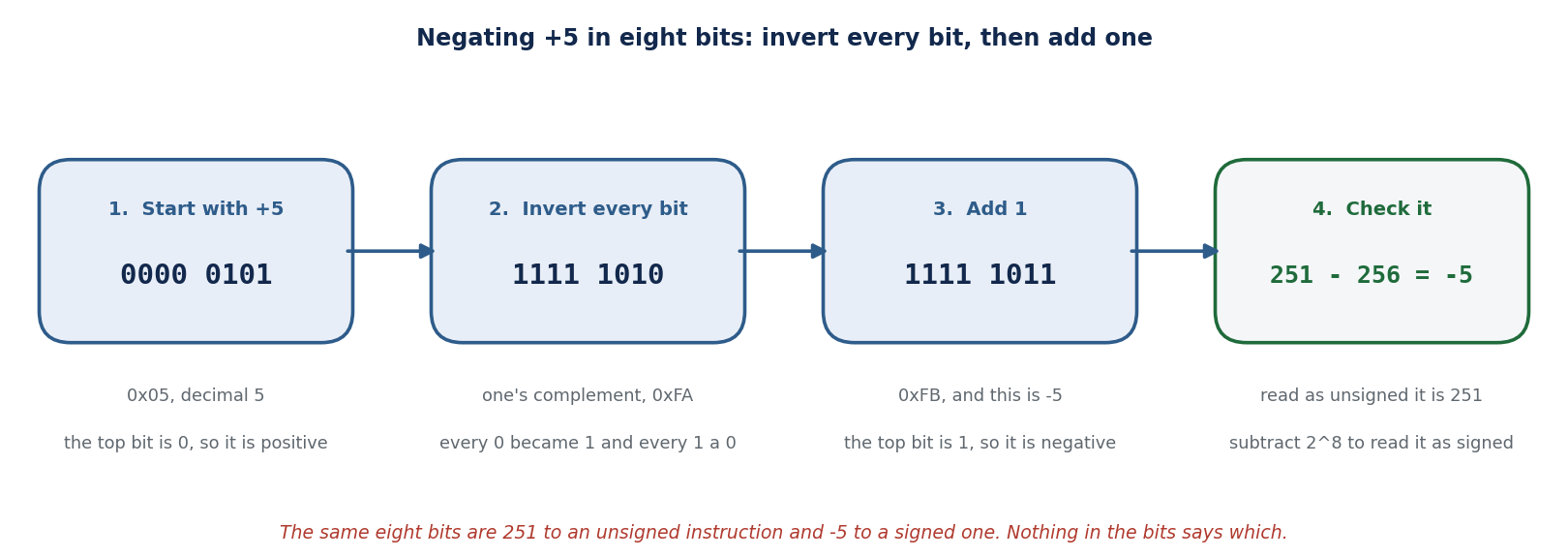
Reading in the other direction: when the top bit is set, subtract two to the power N from the unsigned reading. For 0xFB that is 251 minus 256, which is -5. A free check on any negation is to add the result to the original; you should get zero, with the carry falling off the end.
Worked examples, all eight bits unless stated:
Negate 12. 00001100 inverts to 11110011, plus one is 11110100, which is 0xF4. As unsigned that is 244, and 244 minus 256 is -12.
Minus one is all ones at every width: 0xFF, 0xFFFF, 0xFFFFFFFF. This is why a function that returns -1 shows up in a listing as a register full of F characters.
0x80 is the one value with no positive twin. It is -128. Invert it to 0111 1111, add one, and you are back at 1000 0000. Negating the most negative value returns it unchanged, and the overflow flag is how the hardware reports that.
Sign extension preserves the value, zero extension does not. The byte 0xF4 is -12. Widened by
movsxit becomes 0xFFFFFFF4, still -12. Widened bymovzxit becomes 0x000000F4, which is 244. Choosing the wrong one changes the number.
The ranges worth knowing on sight: eight bits signed run -128 to 127 and unsigned 0 to 255; thirty-two bits signed run -2147483648 to 2147483647 and unsigned 0 to 4294967295. The count is lopsided because zero occupies one of the non-negative slots, which is the whole reason 0x80 has no twin.
Endianness#
The same date is written 09/19/2026 in one country and 19/09/2026 in another, and a reader who does not know which convention is in use will misread it confidently. Byte order is that problem inside a machine. A four-byte value stored little-endian puts its least significant byte at the lowest address, so the bytes appear in a hex dump in the reverse of the order you would speak them. The habit worth building is simple: four bytes that form an address get reversed before you believe the number. Date formats are a human convention that varies by country, while byte order is a property of the hardware rather than a convention anyone chooses. There is also no equivalent of a single byte in the date picture, and single bytes are unaffected by order, which is the exception that trips people first.
x86 and x86-64 are little-endian: the least significant byte is stored at the lowest address. This is a property of the processor, not of your hex editor, and no setting changes it.
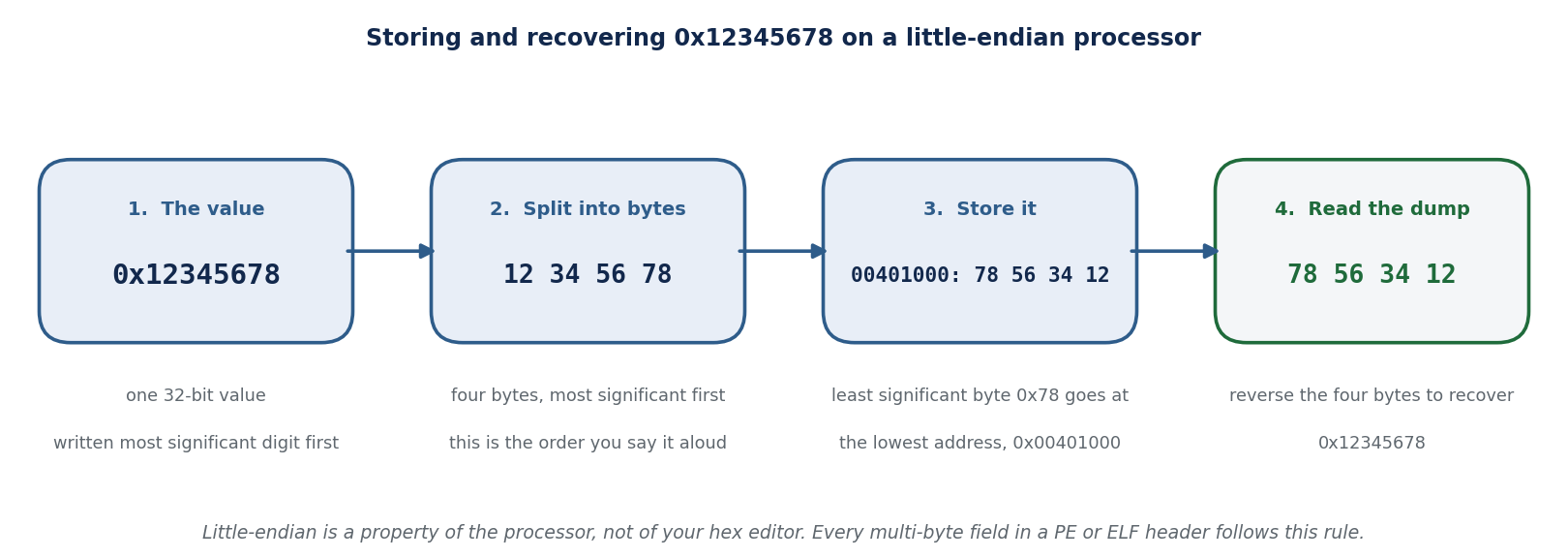
Said aloud, 0x12345678 is the byte sequence 12 34 56 78. In memory and in a hex dump it appears as 78 56 34 12. The habit that prevents a wrong address is to reverse a run of bytes before believing it as a number. A run of independent single bytes is not reversed; only a multi-byte value is.
Reading a memory operand#
Every x86 memory operand computes one address from up to four parts, written
[base + index * scale + displacement]. Any part may be omitted, which is why the operands look so
different from one instruction to the next.
![Four steps computing [ebx+ecx*4+8] with EBX 0x00404000 and ECX 3. Index times scale is 12. Adding the base gives 0x0040400C. Adding the displacement of 8 gives the effective address 0x00404014.](../../_images/ch15_effective_address.png)
The scale is the element size, and that makes it free type information: scale 1 says a byte buffer, 2 a short or wide character, 4 an int or a pointer, 8 a double or a 64-bit value. One hard rule: ESP can be a base register but can never be the index. If you think you have read an index of ESP, you have mis-decoded the operand.
Exercises#
Write -12 as an eight-bit value in hexadecimal.
The byte 0xA5 appears in a dump. What is it read as signed, and as unsigned?
A thirty-two-bit local holds 0xFFFFFF9C. What decimal value is that?
cmp eax, ebxruns with EAX holding 0xFFFFFFFF and EBX holding 1. Which ofjaandjgis taken?Which eight-bit value other than zero is unchanged by negation?
movsx eax, byte ptr [ebp-1]loads the byte 0xF4. What is in EAX?
Answer Key#
0xF4. Invert 00001100 to 11110011, then add one to reach 11110100.
10100101 is 165 unsigned and -91 signed, because 165 minus 256 is -91.
-100. The top bit is set, so subtract two to the thirty-second from 4294967196.
jais taken andjgis not. Unsigned, 4294967295 is above 1. Signed, -1 is less than 1. This is the question that costs analysts real time, and it is the reason this section exists.0x80, which is -128. It is the only one, and it is the reason signed overflow exists.
0xFFFFFFF4, which is -12. Had the instruction been
movzx, EAX would hold 0x000000F4.
15.44 Launching Versus Attaching: How a Debugger Takes Control#
Every dynamic analysis session (Section 15.25) and every exploit-development session (Section 9.28) begins with the same decision, and it is a decision that shapes what the analyst can see. A debugger can take control of a program in one of two ways. It can launch the program itself, becoming the program’s parent and watching from the first instruction, or it can attach to a process that is already running, joining it partway through its life. Section 15.35 named the debuggers; this section explains the two control paths themselves, the operating-system machinery that makes each one work, the permission checks that decide who is allowed to use them, and why the choice matters as much for the malware analyst reading a live infection as for the defender who must keep debug interfaces from becoming an attacker’s foothold.
15.44.1 The two control paths#
Launching (also called starting, or spawning under the debugger). The debugger creates the target as a child process with debugging enabled from the outset, so it is present before the program’s own code runs. In an integrated development environment (IDE) this is Start Debugging, bound to F5 in Visual Studio and Visual Studio Code and, as Debug, to Shift+F9 in IntelliJ IDEA on Windows and Linux; on the command line it is gdb ./program then run, or windbg program.exe. An IDE may build the project first, usually as a separate step that runs before the debug session starts (in Visual Studio Code, an optional preLaunchTask), though some debuggers build the program themselves: the Go debugger Delve, for example, compiles the program with optimizations disabled and then starts it. Either way, what the debugger launches is a built executable. Because the debugger is the parent and holds the target from birth, it catches faults that happen during startup, and stopping the debugger normally ends the program with it. This is the mode for local development and for controlled analysis of a sample you are willing to detonate from its first instruction.
Attaching. The target is already running, started by the operating system, a service manager, a script, or another user. The debugger locates it by its process identifier (PID) or name and latches on to it in motion. A PID is unique only among the processes running at that moment: Linux, for example, wraps PID numbers around at the value in /proc/sys/kernel/pid_max and then reuses them, so a PID copied from an old log may now name a different process. On the command line this is gdb -p <pid>, windbg -p <pid>, or lldb with process attach; in an IDE it is Attach to Process. Attaching cannot show what already happened before you connected, but it lets you inspect a long-lived process without restarting it, and, crucially, it lets you walk away afterward and leave that process running. This is the mode for a production service that has begun to misbehave, a process running inside a container or on a remote host, a frozen third-party application, and any software you did not start yourself.
Once connected, the two modes give the analyst the same core tools: breakpoints, single-stepping, and inspection of registers, memory, and variables, apart from deliberately limited modes such as the noninvasive attach of Section 15.44.3. What differs is when control begins, how much of the program’s past the debugger can see, what happens when the session ends, and the conditions the program runs under. A launched program is the debugger’s child and inherits its permissions, so a sample detonated from an elevated debugger runs elevated. An attached debugger meets code that was prepared before it arrived: in .NET, for example, a module built with optimizations that loaded before the attach stays optimized even if the debugger is set to suppress just-in-time (JIT) optimization, and in optimized code debuggers are frequently unable to show the values of local variables, while stepping and breakpoints may not behave as expected.
The table below states the practical differences, with the qualifications that the rest of the section establishes.
Property |
Launching (Launch) |
Attaching (Attach) |
|---|---|---|
Process lifecycle |
The debugger starts the process and is its parent; it owns startup and teardown. |
The process exists independently; the debugger joins it and can later leave it. |
Startup coverage |
Full. Faults and behavior from the first instruction are visible. |
None by default. Anything before you attach is already gone, though attach-at-start options (Section 15.44.5) narrow the gap. |
On disconnect |
Stopping the session normally ends the process. |
An explicit detach leaves the process running everywhere. If you simply quit, GDB, Visual Studio, and the JetBrains IDEs detach for you, but on Windows a debugger that exits without detaching kills the process by default, so there you must detach deliberately (Section 15.44.3). |
While connected |
Breakpoints pause the program; in development this costs only time. |
GDB, |
Typical setting |
Local development; detonating a sample from instruction one; remote targets started through a debug server (Section 15.44.6). |
Production, services, containers, remote hosts, hung or third-party software. |
Gate on use |
At default settings, being able to run the program is enough; hardened Linux hosts can refuse even this (Yama |
An operating-system permission check decides whether you may attach at all (Sections 15.44.2 to 15.44.4). |
Attaching is not free while it lasts. GDB stops a process as it attaches (Section 15.44.2), and in its default all-stop mode, whenever the program stops for any reason, all threads of execution stop, not just the current one. A single breakpoint in a live service therefore halts the whole service, and a pause that outlasts a client timeout or a health check makes the service look failed to everything that depends on it. On a production host, keep pauses brief, prefer a snapshot such as a core dump for anything that needs long study, and end every session with a detach.
15.44.2 Linux: ptrace and the one-tracer rule#
On Linux both paths run through a single system call, ptrace(2). Launching corresponds to the child calling PTRACE_TRACEME and then execve, which is how a launched program marks itself as traced before its real code runs. Attaching corresponds to the debugger calling PTRACE_ATTACH, which sends the target a SIGSTOP, or, since Linux 3.4, PTRACE_SEIZE, which attaches without stopping. This is why attaching with GDB freezes the target the moment it connects: the manual states that the first thing GDB does after arranging to debug the process is to stop it. A live lab run confirms the effect. Reading /proc/<pid>/status for an attached process shows State: t (tracing stop) and a nonzero TracerPid; after detach, the same fields read State: S (sleeping) and TracerPid: 0, and the process runs on.
Three properties of ptrace decide who may attach and what disconnecting does:
One tracer per thread. Tracing is per-thread, and each thread can have at most one tracer at a time. A single-threaded program can exploit this by tracing itself: if it calls
PTRACE_TRACEMEat startup and the call fails, a debugger is already attached, and if it succeeds, it has filled its own tracer slot so that no real debugger can attach later. Both outcomes are used as anti-debugging checks (Section 15.44.7).Detaching continues the target; the tracer’s death frees it too. GDB’s
detachcontinues the process, and exiting GDB while attached simply detaches. At the kernel level, if the tracer dies, all tracees are automatically detached and restarted. Note the one launch-mode trap the GDB manual calls out: theruncommand while attached kills the process you attached to, becauserunstarts a fresh child.Permission is enforced twice. First an access-mode check requires that the debugger share the target’s credentials or hold the
CAP_SYS_PTRACEcapability. Then the Yama security module applies/proc/sys/kernel/yama/ptrace_scope: value 0 is classic behavior (any process may attach to another of the same user identifier), 1 (the common default) restricts attaching to a child or a debugger the target named withPR_SET_PTRACER, 2 requiresCAP_SYS_PTRACE, and 3 forbids attaching entirely and cannot be re-enabled without a reboot. The documented rationale is direct: if one application is compromised, unrestrictedptracewould let the attacker attach to other running processes, such as an SSH session or a GNU Privacy Guard (GPG) agent, and extract their secrets.
A minimal Linux comparison, run in an authorized lab against a deliberately simple service, makes the two paths concrete.
# LAUNCH: the debugger is the parent and holds the target from instruction one
$ gdb -q ./service
(gdb) break handle_request
(gdb) run
Breakpoint 1, handle_request (n=1) at service.c:6   # caught the very first request
(gdb) kill                                          # ends the program with the session

# ATTACH: join a process the OS already started, then leave it running
$ ./service &                 # started independently; PID printed
$ gdb -q -p "$(pgrep -n service)"
0x00007f... in __GI___clock_nanosleep ...           # frozen wherever it happened to be
(gdb) backtrace
(gdb) detach                                         # process continues; TracerPid returns to 0
15.44.3 Windows: DebugActiveProcess, kill on exit, and privilege#
On Windows the attach path is the DebugActiveProcess function, and the launch path is CreateProcess with a debug flag. Two Windows-specific facts change the picture the table paints.
First, the default is to kill the target when the debugger exits. DebugActiveProcess grants access as though the debugger had created the target, and the documentation states plainly that exiting the debugger also exits the process unless the debugger first calls DebugSetProcessKillOnExit. That function’s kill-on-exit parameter defaults to TRUE. So the reassuring rule that disconnecting leaves the application running is not a property of attaching in general; it is a behavior that Windows debuggers must deliberately opt into. They do, in different ways. In Visual Studio, Stop Debugging ends a process that was launched but detaches from a process that was attached, and the Debug menu offers Terminate All and Detach All to force one outcome or the other; the Attach to Process dialog is Ctrl+Alt+P. In WinDbg the distinction is explicit in the quit commands: q ends the session and closes the target application, while qd (quit and detach) and .detach end the session and leave the target running.
Second, attaching to system processes needs privilege. WinDbg attaches with windbg -p <pid> or windbg -pn <name>, adds -pv for a noninvasive attach that inspects the target without taking control of it, and uses -o to follow child processes. But a debugger that holds the SeDebugPrivilege (the Debug Programs right, granted to administrators) can attach to any process, including one owned by another user or by the system, which is exactly why that privilege is a prize in post-exploitation (Chapter 9). Separately, an analyst running as an ordinary, non-elevated user cannot even see the processes in Session 0, where Windows services and the Internet Information Services (IIS) worker w3wp.exe live, so Visual Studio must be run as an administrator, or from the server console, to attach to them.
15.44.4 macOS: task ports, entitlements, and System Integrity Protection#
On macOS the mediating abstraction is the Mach task port. To attach, a debugger must obtain the target’s task port, and the system guards that tightly. A debugging tool carries Apple’s com.apple.security.cs.debugger entitlement, described by Apple as a value indicating that the app is a debugger and may attach to other processes or get task ports, or it runs as root. Debug builds produced by Xcode carry the companion get-task-allow entitlement, which is what makes them attachable; release builds omit it. System Integrity Protection (SIP) goes further and prevents attaching to Apple’s own signed system processes even as root. The lesson is the same as on Linux and Windows: attaching is not a free action, it is a privileged operation the operating system decides to permit.
15.44.5 IDEs and language runtimes: the cooperative attach#
For compiled native code, attaching needs only permission. For managed and interpreted runtimes, attaching needs the target’s cooperation: the program must be running a debug agent that listens for a client. This is the sense in which an IDE speaks of a process that is already running in debug mode.
Java exposes the Java Debug Wire Protocol (JDWP) through a JVM agent. Started with
-agentlib:jdwp=transport=dt_socket,server=y,suspend=y,address=5005, the Java virtual machine (JVM) printsListening for transport dt_socket at address: 5005and, withsuspend=y, does not run the program’smainmethod until a debugger connects, which is Java’s form of attach-at-start;suspend=nruns immediately and lets a debugger join later. A lab run on a current JVM confirms thataddress=5005binds only to localhost, while theaddress=*:5006form shown in vendor documentation binds to every interface, a distinction that matters in Section 15.44.7.Node.js exposes an inspector agent with
--inspect, which binds to127.0.0.1:9229by default and prints aDebugger listening on ws://127.0.0.1:9229/...URL, or--inspect-brk, which breaks before user code runs.Python uses debugpy, which either listens with
--listen(and--wait-for-clientto block until a client connects, so you can debug from the first line) or attaches to an already-running interpreter by PID with--pid.
The keyboard shortcut for Attach to Process is not uniform across IDEs. In Visual Studio it is Ctrl+Alt+P. In IntelliJ IDEA it is Ctrl+Alt+F5 in the default Windows keymap, Ctrl+Alt+5 in the Linux keymaps, and Option+Shift+F5 on macOS; Rider’s documentation gives Ctrl+Alt+F5, and Rider adds Reattach to Process, Ctrl+Alt+Shift+F5. Visual Studio Code makes the choice a configuration field rather than a shortcut: a launch configuration whose request is launch starts the application and attaches the debugger to the new process, while request set to attach connects to a process that is already running in debug mode. In IntelliJ IDEA and Rider, detaching from an attached process leaves it running, which their documentation states explicitly: unlike local sessions, the target process continues to run after the debugger detaches.
15.44.6 Remote hosts and containers#
Remote hosts. Both paths extend across a network by splitting the debugger in two: a small debug server runs beside the target, and the full debugger runs on the analyst’s machine. GDB’s gdbserver can launch a program on the remote machine (gdbserver host:2345 ./program) or attach to one already running there (gdbserver --attach host:2345 <pid>), and Visual Studio does the same with its remote tools, whose remote debugger, msvsmon.exe, runs on the remote computer. Launching is therefore not confined to local development; what separates the two modes is who starts the process, not where it runs. The GDB manual is blunt about the risk: gdbserver has no built-in security, and a connection to it provides access to the target system with the same privileges as the user running gdbserver, so the server belongs on a trusted network, never on a public one. Naming a local address does not confine it: the manual notes that the host part of host:2345 is currently ignored, and a lab run of gdbserver 127.0.0.1:2345 showed it listening on every interface. Firewall the port, or use the manual’s standard input and output route over SSH, target remote | ssh -T hostname gdbserver - ./program, which opens no network port at all (Section 15.44.7).
Containers. A containerized process is an ordinary process in its own namespaces, so attaching still runs through ptrace (Section 15.44.2), with the container’s restrictions on top. Docker’s documentation for its default seccomp profile notes that tracing arbitrary processes is already blocked by dropping the CAP_SYS_PTRACE capability, because it could leak information about the host, and the Visual Studio Code dev container documentation tells users of ptrace-based debuggers, such as those for C++, Go, and Rust, to add the SYS_PTRACE capability and an unconfined seccomp profile to the container. Both settings loosen the container’s isolation, so they belong in development containers and never in production. Kubernetes offers a more contained route: kubectl debug adds an ephemeral debug container to a running pod, and its --target option places that container in the process namespace of the application container, so the debugger can see the target’s processes, provided the container runtime supports the option. Seeing is not yet tracing: attaching usually also needs the SYS_PTRACE capability in the debug container, which kubectl’s general debugging profile grants to that ephemeral container alone, and which a namespace enforcing the baseline Pod Security Standard does not allow.
15.44.7 Why the distinction matters for analysis and security#
The startup gap is where malware hides its most important behavior. A packed sample decrypts its real payload in the first moments of execution (Section 15.24), and anti-analysis checks (Section 15.30) run at startup precisely so that an analyst who attaches late sees only the unpacked, already-decided program. Launching, or one of the attach-at-start mechanisms above (a JDWP suspend=y, node --inspect-brk, debugpy --wait-for-client, or lldb process attach --waitfor), is what closes that gap. A lab measurement is instructive: lldb’s wait-for-launch feature attached to a fresh process but still landed after its first printf and first unit of work had run, so wait-for narrows the startup window without fully eliminating it. When the earliest instructions are the whole question, only true launch-mode control answers it.
Detach safety is what makes live analysis possible. Because attaching and then detaching leaves the target running, an incident responder can inspect a suspicious long-lived process on a production host, capture what they need, and disconnect without taking the service down (Chapter 14). This is the operational reason attach exists, and the Windows kill-on-exit default (Section 15.44.3) is the reason a responder must confirm the tool detaches rather than terminates before using it on anything that must stay up.
Attach is what anti-debugging tries to defeat. MITRE ATT&CK catalogs this as technique T1622, Debugger Evasion. The common checks all test for the machinery this section described: the one-tracer rule via a self PTRACE_TRACEME and the TracerPid field of /proc/self/status on Linux, and the BeingDebugged byte of the Process Environment Block (PEB), the IsDebuggerPresent and NtQueryInformationProcess functions, and structured exception handling timing on Windows. A lab check confirms the self-trace behavior: a program that calls PTRACE_TRACEME at startup reports a debugger when launched under GDB, and once it is running normally it occupies its own tracer slot so that even a root user attaching later is refused with the process is already traced. Recognizing these checks, and knowing they follow from the operating system’s own attach mechanism rather than from magic, is what lets an analyst neutralize them.
A debugger interface is itself an attack surface. The same cooperative agents that make attach convenient are a remote-code-execution path when they are exposed, because a debugger, by design, runs arbitrary code in the target. JDWP implements no authentication or access control, so an exposed JDWP port grants an attacker full control of the Java process; security researchers observed exploitation of a deliberately exposed JDWP server within hours, which is why the localhost-versus-all-interfaces binding noted in Section 15.44.5 is not a detail. Node.js states the risk in its own documentation: a debugger bound to a public address lets any client that can reach it run arbitrary code, and it recommends binding to localhost and using an SSH tunnel for remote debugging. The defensive measures follow directly from the mechanisms in this section: keep debug agents bound to the loopback interface, never ship a production build with a debug port open, treat SeDebugPrivilege as a sensitive grant, and harden Linux hosts by raising ptrace_scope so a compromised process cannot attach to its neighbors.
Exercises#
An analyst needs to observe a packed sample decrypt its payload. Explain why attaching to the sample after it is already running will usually fail to capture this, and name two mechanisms that would let the analyst be present when the decryption happens.
On Linux, distinguish
PTRACE_TRACEMEfromPTRACE_ATTACH, and explain how a program can use the one-tracer-per-thread rule as an anti-debugging check.A responder attaches a debugger to a critical production service on Windows, finishes the inspection, and closes the debugger. Under the default behavior, what happens to the service, and what must the responder do to avoid it?
Reading
/proc/<pid>/statusfor a process showsState: t (tracing stop)and a nonzeroTracerPid. What do these two values together tell you?Why can an ordinary, non-administrator user on Windows fail to see a running service such as
w3wp.exein the Attach to Process list, and what changes that?A team runs a Java service in production with
-agentlib:jdwp=...,server=y,suspend=n,address=*:8000. Identify the security problem with this configuration and state a safer alternative.Correct the following claim and explain the error: To attach a debugger to a running process, press Ctrl+Alt+P; this shortcut is the same in Visual Studio and in the JetBrains IDEs.
Explain why a debug interface such as JDWP or the Node.js inspector, when reachable over the network, is equivalent to a remote-code-execution vulnerability rather than merely an information leak.
Debugging guides for C++, Go, and Rust inside containers add the
SYS_PTRACEcapability to the container. Explain why the debugger needs it, why the setting should stay out of production, and what Kubernetes offers instead.
Answer Key#
Attaching cannot show anything that happened before the debugger connected, and a packer decrypts its payload in the program’s first moments, so a late attach sees only the already-unpacked code. To be present at decryption, launch the sample under the debugger (the debugger becomes the parent and holds it from the first instruction), or use an attach-at-start mechanism such as a suspended runtime agent (JDWP
suspend=y),node --inspect-brk, debugpy--wait-for-client, orlldb process attach --waitfor, though wait-for still lands slightly after the very first instructions.PTRACE_TRACEMEis called by a process on itself to mark itself as traced by its parent, the mechanism behind launch mode;PTRACE_ATTACHis called by a debugger on another process to join it, sending it aSIGSTOP. Because each thread may have only one tracer, a single-threaded program can callPTRACE_TRACEMEon itself at startup: if the call fails a debugger is already attached, and if it succeeds it has taken its own tracer slot so no real debugger can attach afterward.Under the Windows default (kill-on-exit set to TRUE, per
DebugSetProcessKillOnExit), exiting the debugger also exits the target, so closing the debugger would terminate the production service. The responder must detach rather than terminate: in Visual Studio use Detach All (Stop Debugging already detaches an attached process), and in WinDbg useqdor.detachrather thanq.State: t (tracing stop)means the process is stopped under a tracer, and a nonzeroTracerPidnames the process tracing it. Together they show that a debugger is currently attached, and which process it is.Services run in Session 0, and a limited (non-administrator) account cannot see Session 0 processes in the Attach to Process list. Running Visual Studio as an administrator, or from the server console, makes them visible; more generally, attaching to another user’s or the system’s processes requires the
SeDebugPrivilege.suspend=nwithaddress=*:8000runs an unauthenticated JDWP agent bound to every network interface in production. JDWP has no authentication, so anyone who can reach port 8000 can execute arbitrary code in the Java process. A safer configuration does not run a debug agent in production at all; if remote debugging is truly required, bind the agent to localhost and reach it through an SSH tunnel, and remove it once finished.Ctrl+Alt+P is the Attach to Process shortcut in Visual Studio only. The JetBrains IDEs use Ctrl+Alt+F5 in their default Windows keymap (IntelliJ IDEA’s Linux keymaps use Ctrl+Alt+5, and its macOS keymap Option+Shift+F5), and Rider adds Ctrl+Alt+Shift+F5 to reattach. The claim wrongly assumes one shortcut across both families, and even within one family the key depends on the keymap.
A debugger, by definition, can read and write the target’s memory and direct its execution, which is arbitrary code execution inside that process. A debug interface exposes exactly that capability to whoever can connect. When it is reachable over the network and, as with JDWP, requires no authentication, any remote party gains full control of the process, so it is a remote-code-execution exposure, not a mere disclosure of information.
These debuggers are
ptrace-based, and Docker’s default configuration drops theCAP_SYS_PTRACEcapability, which its documentation notes already blocks tracing arbitrary processes; adding the capability (together, in the Visual Studio Code guidance, with an unconfined seccomp profile) lets the debugger attach. Those settings loosen the container’s isolation, so they belong in development containers only. In Kubernetes,kubectl debugcan instead add an ephemeral debug container to the running pod only when it is needed, using--targetto share the application container’s process namespace; with thegeneralprofile, kubectl grantsSYS_PTRACEto that debug container alone, so the application container never carries it, although a namespace enforcing the baseline Pod Security Standard refuses even this.
15.45 Pointers and Process Memory for the Analyst#
Reading disassembly, following an exploit, and recognizing injection all come down to one idea: a pointer, a value that is the address of something else in memory rather than the thing itself. An analyst spends much of the day reasoning about where data and code live and which register or variable is holding an address, so it is worth stating the model plainly.
In C and C++ a pointer is a variable whose value is a memory address. The following declares an integer and a pointer to it:
int data = 10;      /* an ordinary integer */
int *ptr = &data;   /* a pointer holding the address of data */
Here &data is the address of data, and *ptr reads back through that address to the value 10. The same
idea, at the level a disassembler shows, is a memory operand such as mov eax, [rbx], which reads from the
address held in rbx (Section 15.43).
What a pointer can point at. Pointers divide by what they reference. Data pointers hold the address of
data: a local variable on the stack, a block returned by malloc or new on the heap, or a global or
static variable in the image’s static-data sections (.data and .bss). Function pointers, also called
code pointers, hold the address of executable code in the .text section; a program uses them to call a
routine chosen at runtime, which is how virtual method tables, callbacks, and plugin interfaces work, and also
why overwriting a code pointer is a favorite exploitation goal (Chapter 9).
Process memory versus thread memory. A process is a single virtual address space shared by all of its threads, so the heap, the static data, and the code are common ground: a pointer one thread computes into the heap is equally valid to another thread that holds the same address. The exception is the stack. Each thread has its own stack for its call frames and local variables, and although a pointer into another thread’s stack is numerically valid in the shared address space, using it is a classic defect, because that frame vanishes the moment the other thread returns or exits. This is exactly why the thread model of Section 15.23 matters to analysis: the shared regions are where resident code and shared state live, while the per-thread stack holds a thread’s own control flow, including the return addresses that a memory-corruption bug targets.
The processor’s own pointers. At the hardware level two registers are pointers in the strict sense. The
instruction pointer (RIP on x86-64, EIP on 32-bit x86) holds the address of the next instruction to
execute, and the stack pointer (RSP, or ESP) holds the address of the top of the current thread’s stack.
Every branch rewrites RIP, every call and push adjusts RSP, and a debugger that single-steps a sample
is watching precisely these two values (Section 15.44). Control-flow hijacking, in the end, is just getting an
attacker-chosen address into RIP, which is why so much of both offense and defense comes down to who controls
the pointers.
Exercises#
In the instruction
mov rax, [rbp-0x8], is the value being read necessarily a pointer, or could it be either a pointer or ordinary data? What in the surrounding code would settle it?After a
callinstruction executes, what has changed aboutRSP, and what value now sits at the addressRSPpoints to?Why is a pointer into another thread’s stack dangerous even though it is a valid address in the same process?
Answer Key#
Either.
[rbp-0x8]is just a stack slot, and its contents are a pointer only if the code later dereferences the loaded value as an address, for example a followingmov rcx, [rax]. The type is not visible in the bytes, only in how the value is used.The
callpushes the return address, the address of the instruction right after thecall, onto the stack. SoRSPhas decreased by the pointer size, eight bytes on x86-64, and the memory at[RSP]now holds that return address.The address is valid only while that frame exists. When the other thread returns from the function or exits, the memory is reused, so the pointer is left dangling and dereferencing it reads or corrupts whatever now occupies that space.
Chapter Summary#
This chapter is a practical guide to understanding malicious software. It set out a malware taxonomy and the safe analysis environment, then developed static and dynamic analysis and the anti-analysis and evasion techniques that malware uses to resist both. It described how to structure a malware analysis report, surveyed antivirus and antimalware defenses, and provided a field guide to malware types before a deep dive into the malware lifecycle and modern ransomware. The central message is that careful, isolated analysis turns an opaque sample into actionable indicators and that defenders must account for code that actively fights inspection. The chapter also supplies the systems background an analyst leans on: the Windows thread state machine, the layout of process memory, the pointers and registers that address it, and the difference between a shell, a shell script, and shellcode.
Why This Matters#
Malware analysis transforms an unknown threat into a known one. Every IOC extracted, every behavior documented, and every YARA rule written benefits every organization using that intelligence. Analysis also drives detection engineering: a malware family’s unique import combinations, mutex names, or C2 patterns become Snort signatures, YARA rules, and SIEM correlation rules that detect the next infection before it spreads.
News in Focus: WannaCry and the Worm That Used a Leaked Exploit (2017)#
WannaCry, in May 2017, is the case that fused worm, ransomware, and a leaked nation-state exploit into a global incident. It spread automatically using EternalBlue, an exploit of a Server Message Block (SMBv1) vulnerability (CVE-2017-0144) that had been developed by a national intelligence agency and then leaked, and for which Microsoft had issued a patch (MS17-010) two months earlier. Unpatched Windows systems worldwide, including the UK’s National Health Service, were encrypted within hours; the spread was slowed when a researcher registered a “kill-switch” domain hard-coded in the malware. The episode distilled several of this book’s lessons at once: the danger of unpatched systems and legacy protocols, the dual-use and leakage risk of offensive tooling (Chapter 18), the destructive power of worm-like propagation, and the fact that the patch existed but had not been applied, exactly the patch-management gap the GreyNoise edge data in Chapter 8 quantified. (Figures and attributions are per public reporting on the incident.)
Knowledge Check
What property distinguishes a worm from a virus and a Trojan?
In a modern ransomware intrusion, why does the attacker exfiltrate data and disable backups before encrypting?
Why is fileless malware hard for traditional antivirus to catch, and which two techniques help?
Answers: (1) A worm self-propagates across networks with no user action; a virus needs a host file to be opened, and a Trojan needs the user to run disguised software. (2) Exfiltration enables double extortion (threatening to leak data even if files are restored), and disabling backups removes the victim’s ability to recover without paying. (3) It runs in memory and abuses legitimate built-in tools, leaving few on-disk signatures; memory forensics (Chapter 13) and behavior-based detection/EDR (Chapter 12) help.
News in Focus: Fileless and Living-off-the-Land Attacks#
The discovery of sophisticated ransomware variants using legitimate management tools (PSExec, WMI, RDP) rather than traditional malware executables challenged organizations that relied on antivirus detection. These campaigns were classified as fileless or living-off-the-land because the malicious activity was performed by binaries already present on every Windows system. Detection required behavioral analysis rather than signature matching, driving the market shift from antivirus to endpoint detection and response (EDR).
# Chapter 15 -- Static analysis simulation: PE imports, strings, entropy, YARA

import math, re
from collections import Counter

def shannon_entropy(data: bytes) -> float:
    if not data:
        return 0
    counts = Counter(data)
    total = len(data)
    return -sum((c/total)*math.log2(c/total) for c in counts.values())

# Simulated PE import analysis
suspicious_imports = {
    "CreateRemoteThread":   "Process injection (T1055)",
    "VirtualAllocEx":       "Allocate memory in remote process",
    "WriteProcessMemory":   "Write to remote process memory",
    "RegSetValueEx":        "Registry persistence (T1547)",
    "WinExec":              "Execute commands",
    "CryptEncrypt":         "Encryption -- possible ransomware",
    "FindFirstFile":        "File enumeration -- possible ransomware",
    "InternetOpenUrl":      "Network C2 communication",
    "IsDebuggerPresent":    "Anti-debugging check (T1622)",
}

benign_imports = ["GetLastError", "HeapAlloc", "CreateFile", "CloseHandle",
                  "GetModuleHandleA", "LoadLibraryA", "GetProcAddress"]

print("=== Simulated PE Import Analysis ===")
sample_imports = list(suspicious_imports.keys())[:6] + benign_imports[:4]

print(f"\n  Total imports found: {len(sample_imports)}")
print(f"  {'Import':<28} {'Suspicion'}")
print("  " + "-"*70)
for imp in sample_imports:
    note = suspicious_imports.get(imp, "Benign")
    flag = " <-- SUSPICIOUS" if imp in suspicious_imports else ""
    print(f"  {imp:<28} {note}{flag}")

# Entropy analysis
import random
random.seed(42)
packed_data   = bytes([random.randint(0,255) for _ in range(4096)])  # high entropy
unpacked_data = (b"This is a normal text string with low entropy. " * 100)[:4096]
code_section  = bytes([random.randint(0,127) for _ in range(4096)])  # medium entropy

print(f"\n=== Entropy Analysis ===")
print(f"  Packed/encrypted section : {shannon_entropy(packed_data):.2f} bits/byte  (>7.5 = packed)")
print(f"  Code section             : {shannon_entropy(code_section):.2f} bits/byte  (typical)")
print(f"  Data/strings section     : {shannon_entropy(unpacked_data):.2f} bits/byte  (normal)")

# YARA-like rule simulation
print("\n=== YARA Rule Match Simulation ===")

class YaraRule:
    def __init__(self, name, strings, condition_count):
        self.name = name
        self.strings = strings
        self.condition_count = condition_count

    def match(self, content: str) -> bool:
        matched = sum(1 for s in self.strings if s.lower() in content.lower())
        return matched >= self.condition_count

rules = [
    YaraRule("RansomwareStrings",
             ["your files have been encrypted", ".onion", "bitcoin", "decryption key"],
             condition_count=2),
    YaraRule("RemoteAccessTrojan",
             ["CreateRemoteThread", "VirtualAllocEx", "WriteProcessMemory"],
             condition_count=2),
    YaraRule("AntiAnalysis",
             ["IsDebuggerPresent", "CheckRemoteDebuggerPresent", "NtQueryInformationProcess"],
             condition_count=1),
]

samples = {
    "sample_a.exe": "CreateRemoteThread VirtualAllocEx WriteProcessMemory IsDebuggerPresent",
    "sample_b.exe": "Your files have been encrypted. Send bitcoin to .onion address for decryption key.",
    "sample_c.exe": "GetLastError HeapAlloc CreateFile CloseHandle",
}

for fname, content in samples.items():
    hits = [r.name for r in rules if r.match(content)]
    result = ", ".join(hits) if hits else "No match"
    print(f"  {fname}: {result}")
=== Simulated PE Import Analysis ===

  Total imports found: 10
  Import                       Suspicion
  ----------------------------------------------------------------------
  CreateRemoteThread           Process injection (T1055) <-- SUSPICIOUS
  VirtualAllocEx               Allocate memory in remote process <-- SUSPICIOUS
  WriteProcessMemory           Write to remote process memory <-- SUSPICIOUS
  RegSetValueEx                Registry persistence (T1547) <-- SUSPICIOUS
  WinExec                      Execute commands <-- SUSPICIOUS
  CryptEncrypt                 Encryption -- possible ransomware <-- SUSPICIOUS
  GetLastError                 Benign
  HeapAlloc                    Benign
  CreateFile                   Benign
  CloseHandle                  Benign

=== Entropy Analysis ===
  Packed/encrypted section : 7.96 bits/byte  (>7.5 = packed)
  Code section             : 6.98 bits/byte  (typical)
  Data/strings section     : 3.91 bits/byte  (normal)

=== YARA Rule Match Simulation ===
  sample_a.exe: RemoteAccessTrojan, AntiAnalysis
  sample_b.exe: RansomwareStrings
  sample_c.exe: No match
Review Questions (MCQ)#
Q1. A worm differs from a virus primarily in that a worm: A. Is harder to detect B. Does not require a host file and propagates autonomously C. Only targets Windows D. Always encrypts files
Q2. Double extortion ransomware combines encryption with: A. Phishing B. Exfiltration of data as a second ransom leverage C. DDoS D. Rootkit installation
Q3. High entropy (close to 8 bits/byte) in a PE section suggests: A. A legitimate executable B. The section is encrypted or packed C. The file is a PDF D. The file has no imports
Q4. The Windows API function pair most indicative of process injection is: A. RegSetValueEx + CreateFile B. VirtualAllocEx + CreateRemoteThread + WriteProcessMemory C. CryptEncrypt + FindFirstFile D. WinExec + GetProcAddress
Q5. YARA rules are used to: A. Decrypt malware B. Match file patterns to classify malware families C. Block network traffic D. Analyze network captures
Q6. A rootkit at the kernel level is best detected by: A. Running antivirus from within the compromised OS B. Inspection from a known-good external context (live boot, memory forensics) C. Checking the registry for Run keys D. Examining browser history
Q7. Domain Generation Algorithms (DGA) in C2 make blocking difficult because: A. They use HTTPS B. They generate thousands of potential C2 domains, making blocklists impractical C. They encrypt DNS traffic D. They run on port 443
Q8. Fileless malware evades detection by: A. Using encrypted executables B. Executing only in memory via legitimate system binaries (LOLBins) C. Disabling antivirus on startup D. Using rootkit techniques
Q9. INetSim in a malware analysis lab is used to: A. Capture network traffic B. Simulate internet services so malware can behave normally without reaching the real internet C. Unpack malware D. Write YARA rules
Q10. The ransomware attack chain step that precedes encryption is: A. Initial access B. Privilege escalation C. Disabling backups and shadow copies D. Exfiltration
Answers: Q1 B, Q2 B, Q3 B, Q4 B, Q5 B, Q6 B, Q7 B, Q8 B, Q9 B, Q10 C.
Lab Assignment#
Part A – Static analysis: Download a benign PE file (e.g., a portable app from a trusted source). Use strings (Linux) or CFF Explorer (Windows) to extract strings. Identify: any URLs, registry keys, or suspicious API imports. Compute its SHA-256 and query VirusTotal.
Part B – Sandbox submission: Submit a known benign file (or a purposely benign script you write) to any.run or Hybrid Analysis. Document the behavioral report: file activity, registry activity, network connections, and any detection verdicts. Explain what each reported behavior means.
Part C – YARA rule writing: Write three YARA rules: one for a hypothetical ransomware sample (based on the string patterns in the chapter), one for a RAT (based on import combinations), and one for an anti-debugging sample. Test each rule using the simulator above with sample strings you compose.
Part D – MITRE ATT&CK mapping: For a ransomware incident with the following behaviors (spear phishing initial access, PowerShell execution, LSASS dump, lateral movement via PsExec, Shadow Copy deletion, file encryption), map each behavior to its ATT&CK technique ID and tactic.
References#
NIST Computer Security Resource Center (CSRC) glossary: definition of malware.
Practical Computer Security (Course 3): lecture on Antivirus and Antimalware (history, detection generations, identification behaviors).
Email authentication standards SPF, DKIM, and DMARC; rootkit-detection tools (GMER, chkrootkit, rkhunter).
Microsoft Security Bulletin MS17-010; CVE-2017-0144 (EternalBlue / SMBv1). Reporting on the WannaCry outbreak (May 2017).
Sikorski, M., and Honig, A. Practical Malware Analysis. No Starch Press.
No More Ransom project (Europol European Cybercrime Centre, Dutch National Police, and partners). Crypto Sheriff and free decryption tools. https://www.nomoreransom.org
Check Point Research (2023). Rorschach: A New Sophisticated and Fast Ransomware.
UK National Crime Agency (2024). Operation Cronos: disruption of the LockBit ransomware group.
Reverse-engineering tools: Ghidra (NSA), IDA Pro (Hex-Rays), Binary Ninja, JADX, and Cutter (rizin).
Tan, H., Luo, Q., Li, J., and Zhang, Y. (2024). LLM4Decompile: Decompiling Binary Code with Large Language Models. Proceedings of EMNLP 2024. https://aclanthology.org/2024.emnlp-main.203/
Defense Advanced Research Projects Agency (2025). AI Cyber Challenge (AIxCC) final results; winning cyber reasoning systems released as open source. https://www.darpa.mil/news/2025/aixcc-results
GhidrAssist: an LLM extension for Ghidra (MIT licensed). symgraph/GhidrAssist
GhidraMCP: a Model Context Protocol server for Ghidra. LaurieWired/GhidraMCP
OGhidra: bridging local models via Ollama with Ghidra, Lawrence Livermore National Laboratory. llnl/OGhidra
Gepetto: an IDA plugin that queries language models to explain decompiled functions. JusticeRage/Gepetto
pev: the PE32 and PE32+ analysis toolkit for Linux (readpe, pescan, peldd, pestr, pepack, peres, pesec).
crackmes.one, a public archive of legal reverse engineering challenges. https://crackmes.one/
GeeksforGeeks. Software Engineering: Reverse Engineering. https://www.geeksforgeeks.org/software-engineering/software-engineering-reverse-engineering/
Creaform. What Is Reverse Engineering. https://www.creaform3d.com/en/resources/blog/what-is-reverse-engineering
Astro Machine Works. What Is Reverse Engineering. https://astromachineworks.com/what-is-reverse-engineering/
Huntress. What Does a Reverse Engineer Do in Cybersecurity. https://www.huntress.com/cybersecurity-101/topic/what-does-a-reverse-engineer-do-cybersecurity
17 U.S.C. 1201, Circumvention of copyright protection systems, subsections (f), (g) and (j). https://www.law.cornell.edu/uscode/text/17/1201
United States Copyright Office. Ninth Triennial Section 1201 Proceeding, final rule, Federal Register, 28 October 2024. https://www.federalregister.gov/documents/2024/10/28/2024-24563/exemption-to-prohibition-on-circumvention-of-copyright-protection-systems-for-access-control
Directive 2009/24/EC of the European Parliament and of the Council on the legal protection of computer programs, Articles 5(3) and 6. https://eur-lex.europa.eu/legal-content/EN/TXT/HTML/?uri=CELEX:32009L0024
Rosenzweig, A. Dissecting the Apple M1 GPU. https://alyssarosenzweig.ca/blog/asahi-gpu-part-n.html ; Asahi Linux, Tales of the M1 GPU, November 2022. https://asahilinux.org/2022/11/tales-of-the-m1-gpu/
TheOpenPresenter. Reverse Engineering Google Slides. https://theopenpresenter.com/blog/reverse-engineering-google-slides/
Thomas, R. Reverse Engineering Intro workshop. romainthomas/reverse-engineering-workshop ; LIEF, a library to parse, modify and rebuild executable formats. https://lief.re/
Eilam, E. Reversing: Secrets of Reverse Engineering. Wiley. Source of the system-level versus code-level distinction.
SANS Institute. FOR610 Reverse-Engineering Malware, and GIAC. GREM certification. https://www.giac.org/certifications/reverse-engineering-malware-grem
radare2 project. radare2 reverse engineering framework, LGPL-3.0. https://rada.re/ ; releases: radareorg/radare2
RizinOrg. Rizin, a fork of radare2, and Cutter, its graphical front end (GPL-3.0). https://rizin.re/ and https://cutter.re/ ; on Kali the package is
rizin-cutter.Hex-Rays. IDA disassembler and decompiler, including IDA Free and the IDA Classroom program for education providers. https://hex-rays.com/
Vector 35. Binary Ninja, including Binary Ninja Free and Binary Ninja Cloud; High Level IL and Pseudo C output. https://binary.ninja/
LOLBAS Project. Living Off The Land Binaries, Scripts and Libraries, with the inclusion criteria and the origin of the phrase. https://lolbas-project.github.io and LOLBAS-Project/LOLBAS
GTFOBins. Unix-like executables that can be used to bypass local security restrictions on misconfigured systems. https://gtfobins.org
LOTS Project. Living Off Trusted Sites, legitimate domains used for phishing, command and control, download and exfiltration. https://lots-project.com ; companion projects https://malapi.io and https://filesec.io
Kerrisk, M., editor. syscall(2) and brk(2), Linux man-pages. Per-architecture system call conventions. https://man7.org/linux/man-pages/man2/syscall.2.html
GCHQ. CyberChef, the Cyber Swiss Army Knife. Apache 2.0, Crown Copyright, entirely client-side. gchq/CyberChef
VirusTotal. Documentation on how submissions are shared with partners and premium customers, and the private scanning alternative. https://docs.virustotal.com/
Landley, R. Ramfs, rootfs and initramfs, in the Linux kernel documentation. The cpio archive format, the init program run as PID 1, and how initramfs differs from initrd. https://docs.kernel.org/filesystems/ramfs-rootfs-initramfs.html
Intel Corporation. Intel 64 and IA-32 Architectures Software Developer’s Manual, document 767375: Volume 1, Appendix B, EFLAGS Condition Codes, and Volume 2, the instruction set reference entries for the compare instruction and the conditional jumps. Volumes at version 092 on Intel’s download page, updated August 19, 2026. https://www.intel.com/content/www/us/en/developer/articles/technical/intel-sdm.html
Kali Linux. nasm, the Netwide Assembler, in the kali-linux-default metapackage. https://www.kali.org/tools/nasm/
The NASM development team. NASM, the Netwide Assembler, documentation. https://www.nasm.us/docs.html
Free Software Foundation. Debugging with GDB, the section on Attach (attach stops the target, detach continues it, exiting GDB while attached detaches, and the run command kills an attached process) and the section on Killing. https://sourceware.org/gdb/current/onlinedocs/gdb.html/Attach.html
The Linux man-pages project (A. Colomar, maintainer). ptrace(2), Linux man-pages 6.19, 2026-06-05; HTML rendering by M. Kerrisk at man7.org. PTRACE_TRACEME, PTRACE_ATTACH and PTRACE_SEIZE, the one-tracer rule, automatic detach when the tracer dies, and the ptrace access-mode check. https://man7.org/linux/man-pages/man2/ptrace.2.html
The Linux kernel documentation. Yama, the ptrace_scope sysctl and its four values, with the rationale for restricting cross-process attach. https://docs.kernel.org/admin-guide/LSM/Yama.html
Microsoft. DebugActiveProcess and DebugSetProcessKillOnExit, Win32 debugging API. Exiting the debugger also exits the target unless kill-on-exit is cleared; the kill-on-exit default is TRUE. https://learn.microsoft.com/en-us/windows/win32/api/debugapi/nf-debugapi-debugactiveprocess
Microsoft. WinDbg command reference: q and qq (Quit), which close the target application, versus qd (Quit and Detach) and .detach, which leave it running; and the -p, -pn, -pv and -o command-line options. https://learn.microsoft.com/en-us/windows-hardware/drivers/debuggercmds/q–qq–quit-
Microsoft. Attach to running processes with the Visual Studio debugger (Ctrl+Alt+P), and Debug multiple processes: Stop Debugging ends launched processes and detaches attached ones; Detach All and Terminate All; Session 0 and running as administrator. https://learn.microsoft.com/en-us/visualstudio/debugger/attach-to-running-processes-with-the-visual-studio-debugger
Microsoft. Configure debugging in Visual Studio Code: the request attribute, launch versus attach, and the preLaunchTask setting. https://code.visualstudio.com/docs/debugtest/debugging-configuration
JetBrains. Attach to process, IntelliJ IDEA and Rider documentation (Ctrl+Alt+F5 in the default Windows keymap; the target process continues to run after the debugger detaches). https://www.jetbrains.com/help/idea/attach-to-process.html and https://www.jetbrains.com/help/rider/attach-to-process.html
Oracle. The Java Platform Debugger Architecture and the JDWP agent options (transport, server, suspend, address), in the Java Standard Edition documentation. Node.js, Debugging Node.js, the inspector and its localhost default and public-binding warning. https://docs.oracle.com/en/java/javase/21/docs/specs/jpda/conninv.html and https://nodejs.org/en/learn/getting-started/debugging
Microsoft. debugpy, the Python debugger: –listen, –wait-for-client, and attach by –pid. microsoft/debugpy
Apple. Debugging tool entitlement (com.apple.security.cs.debugger), which lets an app attach to other processes or get task ports. https://developer.apple.com/documentation/bundleresources/entitlements/com.apple.security.cs.debugger
The MITRE Corporation. ATT&CK technique T1622, Debugger Evasion, including the TracerPid, BeingDebugged and IsDebuggerPresent checks. https://attack.mitre.org/techniques/T1622/
Wiz Research (2 July 2025). Exposed JDWP Exploited in the Wild: JDWP implements no authentication, an exposed port grants full control of the Java process, and exposure drew exploitation within hours. https://www.wiz.io/blog/exposed-jdwp-exploited-in-the-wild
Free Software Foundation. Debugging with GDB: All-Stop Mode (whenever the program stops, all threads stop) and Using the gdbserver Program (starting a program remotely, or attaching with –attach; the host part of host:port is currently ignored; the stdio connection over ssh; and the warning that gdbserver has no built-in security). https://sourceware.org/gdb/current/onlinedocs/gdb.html/All_002dStop-Mode.html and https://sourceware.org/gdb/current/onlinedocs/gdb.html/Server.html
Microsoft. Remote debugging, Visual Studio (Windows) documentation: the remote tools and the msvsmon.exe remote debugger on the remote computer. https://learn.microsoft.com/en-us/visualstudio/debugger/remote-debugging
Docker. Seccomp security profiles for Docker: the default profile, including its entry for ptrace. https://docs.docker.com/engine/security/seccomp/
Microsoft. Create a Dev Container, Visual Studio Code documentation: the SYS_PTRACE capability and seccomp setting for ptrace-based debuggers. https://code.visualstudio.com/docs/devcontainers/create-dev-container
The Kubernetes Authors. Debug Running Pods: kubectl debug, ephemeral containers, and the –target option. https://kubernetes.io/docs/tasks/debug/debug-application/debug-running-pod/
The Linux man-pages project (A. Colomar, maintainer). proc_sys_kernel(5), Linux man-pages 6.19, 2026-02-08; HTML rendering by M. Kerrisk at man7.org: /proc/sys/kernel/pid_max, the value at which PIDs wrap around. https://man7.org/linux/man-pages/man5/proc_sys_kernel.5.html
Start Debugging shortcuts: Microsoft, Overview of the Visual Studio debugger (F5); Microsoft, Debug code with Visual Studio Code (F5); JetBrains, Start the debugger session, IntelliJ IDEA documentation (Debug, Shift+F9 on Windows and Linux). https://learn.microsoft.com/en-us/visualstudio/debugger/debugger-feature-tour and https://code.visualstudio.com/docs/debugtest/debugging and https://www.jetbrains.com/help/idea/starting-the-debugger-session.html
The Delve authors. dlv debug, Delve command-line documentation: compiles the program with optimizations disabled, then starts and attaches to it. go-delve/delve
Microsoft. JIT Optimization and Debugging, Visual Studio (Windows) documentation: suppressing JIT optimization has no effect on modules already loaded when the debugger attaches, and optimized code can hide the values of local variables. https://learn.microsoft.com/en-us/visualstudio/debugger/jit-optimization-and-debugging
The Kubernetes Authors. Pod Security Standards: the baseline policy’s list of capabilities that may be added, which excludes SYS_PTRACE, including for ephemeral containers. https://kubernetes.io/docs/concepts/security/pod-security-standards/
The Kubernetes Authors. kubectl debug profiles, source file pkg/cmd/debug/profiles.go: the general profile grants SYS_PTRACE to the debug container, and the baseline profile removes it. kubernetes/kubectl
Microsoft. Debugging a User-Mode Process Using WinDbg: attaching, noninvasive attach, and spawning a new process, which as the debugger’s child inherits the debugger’s permissions. https://learn.microsoft.com/en-us/windows-hardware/drivers/debugger/debugging-a-user-mode-process-using-windbg
JetBrains. IntelliJ Platform keymap definitions, intellij-community repository, platform/platform-resources/src/keymaps: XDebugger.AttachToProcess is Ctrl+Alt+F5 in the default keymap, Ctrl+Alt+5 in the Linux keymaps, and Option+Shift+F5 in the macOS keymap; Debug is Shift+F9. JetBrains/intellij-community
Microsoft. ThreadState enumeration (Microsoft.Windows.EventTracing.Cpu): the kernel thread-state list, Initialized through Deferred Ready. https://learn.microsoft.com/en-us/dotnet/api/microsoft.windows.eventtracing.cpu.threadstate
Microsoft. ThreadState enumeration (System.Diagnostics): the meaning of each thread execution state, including Transition. https://learn.microsoft.com/en-us/dotnet/api/system.diagnostics.threadstate
Microsoft. Context Switches, Win32 apps: ready threads, and why suspended or blocked threads are not scheduled. https://learn.microsoft.com/en-us/windows/win32/procthread/context-switches
Microsoft. SuspendThread function (processthreadsapi.h). https://learn.microsoft.com/en-us/windows/win32/api/processthreadsapi/nf-processthreadsapi-suspendthread
Yosifovich, P., Ionescu, A., Russinovich, M. E., and Solomon, D. A. (2017). Windows Internals, Part 1, 7th ed. Microsoft Press. The thread state machine and the dispatcher.