Chapter 11: Network Defense and Hardening#
“A firewall does not protect you from threats that originate inside it, threats that go around it, or threats that walk through its front door.” paraphrased from common security teaching
Learning Objectives#
After completing this chapter, you will be able to:
Describe the role of firewalls, their types, and how to write effective rules.
Explain network segmentation and the DMZ architecture.
Describe zero-trust architecture and its practical implementation.
Configure basic firewall rule sets and explain the implicit deny principle.
Explain VPN types and their security properties.
Describe DNS security controls including DNSSEC, DoH, and DNS sinkholing.
Explain network access control (NAC) and 802.1X authentication.
Describe DDoS categories and mitigation strategies.
Trace a packet through a first-match ruleset and identify shadowed and correlated rules.
Calculate the size, lifetime, and exhaustion rate of a connection state table.
State what network address translation does and does not provide as a security control.
Read an 802.1Q tag, explain VLAN hopping, and write the configuration that prevents it.
Weigh egress filtering and TLS interception against their operational and privacy costs.
Configure SMB file sharing on Windows and macOS with named accounts, signing, and encryption, and without guest or SMB 1 access.
Key Terms#
Firewall: a device or software that enforces access control between networks.
Stateful inspection: tracks connection state to validate return traffic.
NGFW: Next-Generation Firewall; adds deep packet inspection, application awareness, and IPS.
DMZ: Demilitarized Zone; a network segment between the internet and the internal network.
Implicit deny: any traffic not explicitly permitted is blocked.
ACL: Access Control List; ordered list of permit/deny rules.
Zero trust: security model requiring verification for every request regardless of network location.
NAC: Network Access Control; enforces endpoint compliance before granting network access.
802.1X: IEEE standard for port-based network access control.
Sinkhole: redirecting malicious domain resolutions to a controlled IP for analysis or blocking.
Anycast: routing technique that sends traffic to the nearest of multiple identical endpoints.
Physical vs virtual firewall: dedicated hardware appliance vs software/cloud-delivered filtering.
Stateless vs stateful filtering: judging each packet alone vs tracking connections and auto-allowing replies.
Proxy / Tor: relaying intermediary (forward/reverse) vs onion-routed anonymity network.
Kerberos / IAM / OAuth / OpenID Connect (OIDC) / FIDO2-WebAuthn: ticket auth, identity management, delegated authz, sign-in, passwordless.
False acceptance rate (FAR), false rejection rate (FRR), equal error rate (EER): the three biometric accuracy measures.
Rule shadowing: an earlier rule matches everything a later rule would, so the later rule never fires.
Connection (state) table: the firewall’s record of active flows, with a finite size and per-state timeouts.
NAPT: network address port translation; many internal hosts share one external address by rewriting ports.
802.1Q tag / native VLAN: the 4-byte VLAN tag, and the one VLAN whose frames cross a trunk untagged.
VLAN hopping: reaching another VLAN by switch spoofing or by double tagging.
Egress filtering / TLS interception: filtering outbound traffic, and decrypting it at a middlebox to inspect it.
SMB signing: a per-message integrity check on Server Message Block traffic that defeats relay and tampering; a connection is signed if either end requires it.
SMB over QUIC: Server Message Block carried inside a TLS 1.3 tunnel over UDP port 443, an alternative to exposing TCP port 445 for remote access.
11.1 Firewalls#
A firewall is a doorman with a guest list rather than a wall around the building, and it is one of the layers the bank of Section 1.5 relies on rather than the whole of the defense. Traffic arrives, the doorman checks it against the rules, and default deny is the instruction that anything not explicitly listed is turned away, which is the reason a short list beats a long one. The limit is in the picture too: a doorman checks who is arriving, not what they are carrying, and that is precisely the gap that deep packet inspection and application-layer controls exist to close. One more difference sets up the distinction below. A doorman sees each guest arrive individually, while a firewall sees packets, and a single conversation is thousands of them, which is the difference between a stateless firewall that checks every packet as a stranger and a stateful one that remembers this guest stepped out for a moment.
Firewall Types and Evolution#
Packet-Filter Firewalls#
Packet-filter firewalls evaluate each packet independently against a rule set based on header fields: source/destination IP, port, and protocol. They are fast and simple but cannot track connection state, making them vulnerable to IP spoofing and fragmentation attacks. They operate at layer 3-4.
Stateful Inspection Firewalls#
Stateful firewalls maintain a connection table that tracks TCP sessions and UDP pseudo-sessions. Return traffic is automatically permitted if it belongs to an established, allowed session. This prevents certain spoofing attacks and simplifies outbound rule writing. The state table itself is a resource that can be exhausted by SYN floods.
Next-Generation Firewalls#
NGFWs add layer-7 inspection: application identification (blocking BitTorrent regardless of port), user identity-based rules (allow finance team to access financial SaaS), URL filtering, TLS inspection (decrypt-inspect-re-encrypt), and integrated intrusion prevention. NGFWs are the standard for enterprise perimeter and internal segmentation today.
Writing Firewall Rules#
The Implicit Deny Principle#
All enterprise firewall rule sets should end with an explicit deny all rule (or rely on an
implicit deny that blocks everything not matched above). Traffic is permitted only by explicit
positive rules. This default-deny posture means new services are blocked until consciously allowed,
rather than exposed until someone notices.
Rule Ordering and Specificity#
Firewall rules are evaluated top to bottom; the first match wins. More specific rules must precede more general ones. A common misconfiguration is placing a broad permit rule before a more specific deny, inadvertently allowing everything that the deny was meant to block.
NetFlow / IPFIX / full packet capture: network flow metadata and full-byte capture for visibility and forensics.
Honeypot / honeynet / honeytoken: decoy systems, networks, and data used as high-confidence intrusion tripwires.
Network forensics: capturing and analyzing traffic to reconstruct an incident under chain of custody.
11.2 Firewall Types and Topologies#
The firewall overview above introduced the idea of a policy-enforcing chokepoint; here we make the taxonomy concrete, because choosing the right type and placement of firewall is what actually determines which data is protected. Firewalls come in five basic types, in roughly increasing sophistication:
Packet-filtering firewalls decide based on IP addresses, packet type, and port, with no awareness of connection state.
Circuit-level firewalls set up and validate TCP connections (typically inside-to-outside), operating at the session layer.
Stateful-inspection firewalls track the state of each connection, allowing only packets that belong to a legitimate, established flow.
Application-level firewalls (proxies) understand specific application traffic and inspect its content.
Multilayer firewalls combine all of the above.
Equally important is topology, how firewalls are arranged relative to the assets they protect. A host-based firewall secures the host itself in software (Windows Firewall, iptables, firewalld) and should run on every operating system, including consumer routers. A bastion host is a hardened, dedicated appliance with minimal code through which traffic passes. A DMZ (demilitarized zone) places servers between two bastion hosts so that even if the outer, more-exposed host is compromised, the inner host still protects the internal network. A distributed design uses multiple firewalls (for capacity and disaster recovery) that may share rules, code, and traffic state with one another. Finally, application-level / web application firewalls (WAFs) protect specific applications by enforcing “normalized” traffic: an e-commerce card field that should contain exactly sixteen digits is rejected when it contains more or fewer, blunting injection and abuse, though the inspection overhead can be costly.
        flowchart LR
    NET[Internet] --> OB[Outer bastion host]
    OB --> DMZ[DMZ servers<br/>web, mail, DNS]
    DMZ --> IB[Inner bastion host]
    IB --> LAN[Internal network]
Knowledge Check
Which firewall type tracks connection state, and why is that stronger than simple packet filtering?
In a DMZ with dual bastion hosts, what is protected if the outer host is compromised?
Give one reason a large organization runs multiple (distributed) firewalls.
Answers: (1) Stateful-inspection firewalls track connection state, so they admit only packets belonging to a legitimate established flow rather than judging each packet in isolation. (2) The inner bastion host and the internal network remain protected because the DMZ isolates the exposed servers. (3) Capacity (no single firewall can handle all traffic) and disaster recovery/redundancy; they can also share rules and state.
Physical and Virtual Firewalls#
A firewall’s type (the rule logic of the previous section) is separate from its form factor, and the distinction matters operationally. A physical (hardware) firewall is a dedicated appliance, purpose-built silicon at a network boundary; it offers high, predictable throughput, a hardened minimal operating system, and a clear physical chokepoint, which is why data centers and enterprise perimeters still rely on them. A virtual firewall is the same filtering logic delivered as software: a virtual appliance in a hypervisor, a host-based firewall on an operating system (Windows Firewall, iptables/nftables, firewalld), or a cloud-native control such as the security groups and network ACLs of Chapter 3. Virtual firewalls trade some raw throughput for elasticity and reach: they scale with workloads, move with virtual machines and containers, and can enforce policy east-west (between workloads inside the same network) where a single perimeter appliance never sees the traffic. Modern architectures use both, hardware at the physical edge and virtual firewalls woven through the virtualized and cloud interior, which is exactly the micro-segmentation and zero-trust posture developed below.
Stateless and Stateful Packet Filtering#
The deepest behavioral split among firewalls is whether they remember connections. A stateless packet filter judges every packet in isolation against its rules (source/destination address, port, protocol, flags) with no memory of what came before. It is fast and simple but blunt: to allow a reply it must have an explicit rule for the return traffic, and it cannot tell a legitimate response from a forged packet that merely looks like one. A stateful firewall maintains a connection (state) table tracking each active flow (the TCP handshake, the expected sequence numbers, the four-tuple of addresses and ports). Once it admits an outbound request, it automatically allows the matching return traffic without a separate inbound rule, and it drops packets that do not belong to a known, valid connection. This is more secure and far easier to manage, which is why stateful inspection is the default for perimeter firewalls and why cloud security groups are stateful while network ACLs are stateless (Chapter 3).
The doorman of Section 11.1 has two versions, and this is the difference between them. The stateless doorman consults the list on every arrival with no recollection of anything earlier, so a guest who steps out to take a call returns as a stranger and needs a rule of their own. The stateful doorman remembers that you went out and readmits you, which is why a stateful ruleset can permit outbound traffic and its replies in one rule while a stateless one needs a second rule describing the return traffic, and that second rule is invariably wider than anybody intended. A doorman’s memory is effectively unlimited and a firewall’s connection table is not. It has a size and an idle timeout, filling it is itself a denial of service attack, and a connection that sits silent for longer than the timeout is forgotten while both endpoints still believe it is open.
Warning: attacks on the “always allow the response” behavior
A stateful firewall’s convenience, automatically trusting return traffic for an established flow, is also an attack surface. Several techniques abuse it: TCP state-table exhaustion floods the firewall with half-open or idle connections until the state table fills and it fails open or drops legitimate flows (a denial of service). Spoofed or injected “response” packets crafted to match an expected connection (correct ports and plausible sequence numbers) can slip through as if they were the awaited reply, the basis of off-path TCP injection. ACK-flag and “established”-rule bypasses exploit permissive rules that allow any packet with the ACK bit set (assumed to belong to an existing connection), letting a crafted ACK or RST traverse a filter, the reason Nmap’s ACK scan (Chapter 8) can map such rule sets. And connection-reuse or request-smuggling tricks ride inside an already-trusted session. The defenses are strict state validation (sequence-number and flag checks), connection rate-limiting and SYN-cookie protection, dropping rather than trusting unsolicited ACKs, and pairing the stateful firewall with deeper inspection (Chapter 12). The lesson generalizes: any control that infers trust from prior state can be fooled by forging the evidence of that state.
11.3 Network Segmentation#
DMZ Architecture#
A demilitarized zone is the reception area. Visitors are supposed to arrive there, since a public web server that nobody can reach is not doing its job, and the door from reception into the offices is controlled separately and more tightly. The design assumes reception will eventually be compromised, because it is the part exposed on purpose, and places it so that compromising it yields nothing else. Reception is one room, though, and a demilitarized zone often holds several systems that trust each other, so a foothold on one can reach the rest. The segment needs internal separation too, which the picture does not suggest and which the micro-segmentation below provides.
A DMZ (Demilitarized Zone) places internet-facing servers (web, mail, DNS) in a network segment that is reachable from the internet but cannot initiate connections to the internal network. The DMZ sits between two firewalls: the outer firewall permits inbound traffic to DMZ services; the inner firewall permits only specific, authorized traffic from the DMZ to the internal network (e.g., the web server may query the internal database on port 5432 only). If the web server is compromised, the attacker cannot reach the internal network without breaching the inner firewall.
VLAN and Micro-Segmentation#
A VLAN puts several separate networks on one piece of physical equipment, the way one building houses several companies. They share the lobby, the staircase and the wiring, and a keycard for one floor opens nothing on another. That the separation is administrative rather than physical is the point of the analogy and the source of its risk: a building manager who miscuts a keycard has joined two companies together, and a switch misconfiguration does exactly that. Floors are also visibly distinct, while VLAN tags are four bytes in a frame header that an attacker on the wire may be able to add or strip. Double tagging and switch spoofing are the attacks that follow, worked through in Section 11.24, and they are why a VLAN is a segmentation tool and not a security boundary on its own.
VLANs create logical network segments that limit broadcast domains and create enforcement points. Micro-segmentation extends this to the workload level: even hosts on the same VLAN have explicit rules about which port/protocol combinations can communicate. East-west traffic (between internal workloads) is filtered just as rigorously as north-south traffic (to/from internet). Micro- segmentation dramatically limits lateral movement after initial compromise.
11.4 Zero-Trust Architecture#
The Zero-Trust Principle#
The older model is a gated estate: a guarded perimeter, and free movement once inside, which means one compromised host anywhere inside inherits the whole estate. Zero trust is a hotel. The front door admits anyone, being inside the lobby is worth nothing, and every door on every floor checks the card again. The change is less a technology than a decision to stop treating network location as a credential. Two things the hotel hides are worth naming now. A hotel checks a card and not the person holding it, while a zero trust architecture is supposed to evaluate identity, device health and context on every request; and the picture says nothing about the cost, which is that every door now needs a reader, so the migration rather than the idea is the hard part.
Zero trust abandons the assumption that everything inside the network perimeter is safe. Every access request is evaluated against policy regardless of where it originates: inside the office, on VPN, or from a cloud workload. The three core principles are:
Verify explicitly: authenticate and authorize every request using all available data points (identity, device health, location, time, data sensitivity).
Use least-privilege access: grant only the permissions needed for the specific request.
Assume breach: minimize blast radius through segmentation; assume an attacker is already inside and design accordingly.
Identity-Centric Access#
In a zero-trust model, the network is not the trust boundary; the identity is. A user with strong MFA and a healthy, compliant device gets access. The same user on an unmanaged device gets reduced access or is denied. A compromised account, even from inside the office, cannot reach sensitive resources without the correct device posture and MFA.
From VPN to ZTNA and Continuous Verification#
Zero Trust Network Access (ZTNA) is the technology that operationalizes these principles for remote and internal access, and it is steadily replacing the traditional VPN. A VPN authenticates once and then drops the user onto the network with broad reach, which is exactly the flat-network problem zero trust rejects. ZTNA instead brokers access to one application at a time: after verifying identity and device posture, it connects the user only to the specific resource they are authorized for, and the application is never exposed directly to the internet. Many ZTNA designs use a deny-by-default model in which resources are invisible until a request is authorized, an approach related to the software-defined perimeter (SDP).
The defining shift is from a one-time gate to continuous verification. Trust is treated as a temporary, context-dependent decision that is re-evaluated as conditions change. If a device falls out of compliance, its location or behavior becomes anomalous, or a session runs long, access can be stepped down or revoked mid-session rather than remaining valid until logout. This continuous, identity-centric evaluation is what distinguishes a mature zero-trust deployment from simply adding multifactor authentication to a VPN, and it ties directly to the monitoring and analytics discussed later in this chapter.
11.5 DNS Security#
Everything in this section defends the phone book of Section 3.7, whose entries anyone may rewrite and almost nobody checks.
DNSSEC#
DNSSEC adds cryptographic signatures to DNS resource records. A DNSSEC-aware resolver validates the chain of signatures from the root zone down to the answer, detecting tampered or forged records. DNSSEC prevents cache poisoning but does not encrypt DNS traffic (queries and responses remain visible).
DNS over HTTPS and DNS over TLS#
DoH and DoT encrypt the DNS channel, preventing eavesdropping on queries. DoH sends DNS queries inside HTTPS traffic on port 443, making it indistinguishable from normal web traffic. DoT uses a dedicated port (853) and allows enterprise filtering. Enterprise deployments often force DoT to a corporate resolver that applies sinkholing and filtering policies.
DNS Sinkholing#
A sinkhole redirects DNS queries for known-malicious domains to a controlled IP address rather than the actual command and control (C2) server. Malware that checks in with a sinkholed domain is identified (the connecting host is infected) and prevented from reaching its real C2. Threat intelligence feeds supply the domain blocklists; enterprise DNS resolvers apply them automatically.
NXDOMAIN and the DNS_PROBE_FINISHED_NXDOMAIN Error#
When a resolver looks up a name that does not exist, the authoritative server answers with the response code NXDOMAIN (non-existent domain, response code or RCODE 3 in the DNS protocol). Chromium-based browsers surface this to the user as DNS_PROBE_FINISHED_NXDOMAIN, meaning the browser’s DNS probe finished but the hostname could not be resolved to an address. The benign causes are everyday ones: a typo in the address, a domain that is unregistered or expired, a stale DNS cache, or a misconfigured local resolver, VPN, or proxy. Typical fixes are to check the spelling, flush the DNS cache, or try a different resolver.
The same response code is also a meaningful security signal. Malware that uses a domain-generation algorithm (DGA) computes many candidate domains and tries each in turn; the attacker registers only one, so the infected host receives a burst of NXDOMAIN answers for all the others. A spike of NXDOMAIN responses from a single host is therefore a strong indicator of DGA-based command-and-control beaconing, and DNS monitoring (Section 11.11) watches for exactly this pattern. NXDOMAIN is also weaponized directly in the NXDOMAIN flood, also called a DNS water-torture or pseudo-random subdomain attack, a denial-of-service technique that floods a resolver with queries for random non-existent subdomains of a real domain, forcing expensive recursive lookups that exhaust the resolver and the victim’s authoritative servers. Finally, protective DNS and the sinkholing described above may deliberately return NXDOMAIN for blocked or malicious names, turning the error into an enforcement mechanism rather than a fault.
11.6 VPNs and Remote Access#
A virtual private network is an armored van driving on a public road. The road belongs to everybody, the van is plainly visible, and the cargo is not. The picture is useful mainly for what it refuses to promise. An observer sees a van, sees where it joined the road and sees where it left, so a VPN conceals the contents of your traffic and not the fact that you are carrying traffic, nor to whom. The van also has one destination while a VPN client usually sends everything through the tunnel, so a better version is a van that collects your cargo and reloads it onto ordinary trucks at a depot. What the depot operator can see is then the real question, which is why the trust you place in a VPN provider matters more than the encryption does.
IPsec and WireGuard#
IPsec provides network-layer encryption and authentication, operating in tunnel mode (encrypting the entire IP packet, including headers) for site-to-site VPNs or transport mode for host-to-host. WireGuard is a modern, lean VPN protocol that uses state-of-the-art cryptography (Curve25519, ChaCha20, Poly1305) with a minimal code base, making it faster to audit and in practice faster than IPsec or OpenVPN.
Split Tunneling and Its Risks#
Split tunneling routes only corporate-destined traffic through the VPN while internet traffic goes directly to the user’s ISP. This reduces latency and VPN gateway load but means the VPN provides no visibility or control over the user’s general internet activity. A user infected with malware while on split-tunnel VPN may continue to communicate with C2 without the corporate security stack seeing it.
11.7 Proxies, VPNs, and Tor#
VPNs (above) are one of three related tools for controlling and concealing where traffic goes, and a defender should understand all three because each appears on both sides of the fence. A proxy is an intermediary that makes requests on a client’s behalf: a forward proxy sits in front of users (for web filtering, caching, logging, and egress control, the corporate gateway that inspects outbound traffic), while a reverse proxy sits in front of servers (for load balancing, TLS termination, and as the front end of a web application firewall). A proxy sees and can log or modify the traffic it relays, so it is a control point for defenders and a collection point for attackers who compromise it. A VPN (Section above) builds an encrypted tunnel that extends a host or site into a remote network, protecting confidentiality over untrusted paths and masking the client’s apparent source address behind the VPN endpoint.
Tor (The Onion Router) provides a stronger property, anonymity, by routing traffic through a volunteer circuit of three relays with layered (“onion”) encryption, so no single relay knows both the origin and the destination: the entry guard sees the user but not the destination, the exit node sees the destination but not the user, and the middle relay sees neither. Tor protects against traffic analysis and censorship and is used by journalists, activists, and, inevitably, criminals; its exit nodes can read unencrypted exit traffic, so end-to-end encryption (HTTPS) still matters on top of it. The three tools form a spectrum: a proxy redirects and inspects, a VPN encrypts and relocates, and Tor anonymizes, and the unlinkability and anonymity properties of Chapter 2 are exactly what Tor aims to deliver in practice.
11.8 Network Access Control and 802.1X#
NAC enforces endpoint health before granting network access. Before a device is permitted onto the network it must present valid credentials (802.1X) and pass a health check (antivirus current, OS patches applied, disk encryption enabled). Non-compliant devices are quarantined to a remediation VLAN with access only to update servers.
802.1X Operation#
In 802.1X, three components interact: the supplicant (client device), the authenticator (switch or wireless access point), and the authentication server (RADIUS, Remote Authentication Dial-In User Service). The switch blocks all traffic from a newly connected device except EAP (Extensible Authentication Protocol) frames until the authentication server validates the device’s credentials. Only then does the switch permit normal traffic.
11.9 DDoS and Mitigation#
DDoS Attack Categories#
Category |
Mechanism |
Example |
|---|---|---|
Volumetric |
Saturate bandwidth |
DNS amplification, UDP flood |
Protocol |
Exhaust state tables |
SYN flood, fragmentation |
Application-layer |
Exhaust server resources |
HTTP flood, Slowloris |
The crowd in the shop doorway of Section 3.10 is the attack; this is the shopkeeper’s answer to it, and it is all about telling customers from crowd without shutting the door.
DDoS Mitigation#
Cloud-based scrubbing services (Cloudflare, Akamai, AWS Shield) absorb attack traffic using anycast routing, which distributes the attack across a global network. Rate limiting at the network edge drops traffic from sources exceeding defined thresholds. BGP blackholing redirects attack traffic to null routes. Application-layer DDoS mitigation requires distinguishing legitimate from bot traffic using CAPTCHA, JavaScript challenges, and browser fingerprinting.
11.10 Authentication, Identity, and Access#
Firewalls and segmentation decide where traffic may go; authentication decides who may act, and in a zero-trust world (above) identity becomes the real perimeter. Recall the AAA model of Chapter 1: authentication proves who you are, authorization decides what you may do, and accounting records what you did. Authentication draws on three classic factors, something you know (a password or a personal identification number, PIN), something you have (a token, smart card, or phone), and something you are (a biometric), and combining two or more is multi-factor authentication (MFA), the single most effective control against credential theft.
Several technologies implement identity at scale, and each answers a different question:
Kerberos is the ticket-based authentication protocol at the heart of Windows Active Directory (and many Unix realms). A central Key Distribution Center (KDC) issues a time-limited Ticket-Granting Ticket after login, which the client exchanges for service tickets, so a user authenticates once and accesses many services without resending a password. Its reliance on tickets and time also creates the attacks of later chapters (pass-the-ticket, Kerberoasting, and the need for synchronized clocks).
IAM (Identity and Access Management) is the broader framework, on premises and especially in the cloud (Chapter 17), for managing identities, roles, and least-privilege permissions, defining who (users, groups, service principals) can do what to which resources.
OAuth 2.0 is an authorization-delegation framework, it lets an app act on your behalf (access your calendar) without giving it your password, by issuing scoped access tokens; the related OpenID Connect layers authentication on top so a site can offer “sign in with” a provider. (A common exam trap: OAuth by itself is about authorization, not authentication.)
FIDO2 / WebAuthn enables passwordless, phishing-resistant authentication using public-key cryptography: the device holds a private key and proves possession to the server, which stores only the public key, so there is no shared secret to phish, replay, or breach. Passkeys are the consumer face of this standard.
Passwordless authentication more broadly replaces the knowledge factor with possession and inherence (security keys, device biometrics, magic links, one-time codes), removing the weakest link, the reusable, guessable, phishable password.
Biometrics and the Reality of False Positives and Negatives#
Biometric authentication, fingerprint, face, iris, or voice, uses an inherence factor that cannot be forgotten and is hard to share, which makes it convenient and increasingly common as the “something you are” factor. But biometrics are probabilistic, not exact: a captured sample never matches the stored template bit-for-bit, so the system accepts a match within a tolerance, and that tolerance creates two unavoidable error types that recur throughout detection (Chapter 12) and machine learning (Chapter 17).
A false positive (false acceptance) admits the wrong person, a security failure; its rate is the False Acceptance Rate (FAR).
A false negative (false rejection) denies the legitimate person, a usability failure; its rate is the False Rejection Rate (FRR).
Tightening the threshold lowers false acceptances but raises false rejections, and loosening it does the reverse; the operating point where the two rates are equal is the Equal Error Rate (EER), a common single-number measure of accuracy. The same trade-off is the precision-versus-recall tension behind every IDS, antivirus, and anomaly detector in this book, which is why biometrics are best used as one factor in MFA rather than alone, and why systems must also resist presentation (“spoofing”) attacks such as a photo, mask, or lifted fingerprint with liveness detection. The deeper point is that any classifier, biometric, signature, or model, is defined not by a single accuracy number but by where on the false-positive/false-negative curve it chooses to sit.
Knowledge Check
Why does a stateful firewall not need an explicit inbound rule for the reply to an allowed outbound request, and how is that behavior abused?
What does OAuth 2.0 actually provide, and what standard adds authentication on top of it?
In biometrics, what is the trade-off between the False Acceptance Rate and the False Rejection Rate, and what is the Equal Error Rate?
Answers: (1) It tracks the connection in its state table and automatically allows matching return traffic; attackers abuse this with state-table exhaustion, spoofed/injected packets matching an expected flow, and permissive ACK/“established” rules. (2) OAuth 2.0 provides delegated authorization (scoped access tokens without sharing the password); OpenID Connect adds authentication. (3) Tightening the match threshold lowers false acceptances (FAR) but raises false rejections (FRR), and vice versa; the Equal Error Rate is the point where FAR equals FRR, used as a single accuracy measure.
Identity Providers, Identity Management, and Who Does What#
Two acronyms cause persistent confusion, partly because vendors use them loosely and partly because the products that implement them increasingly do both jobs.
An identity provider (IdP) answers one question at one moment: is this person who they claim to be, right now? It authenticates a subject and issues an assertion, a signed statement that some relying party can trust. Identity management (IdM), the operational core of the broader IAM practice introduced above, answers a different question over a much longer horizon: what accounts, attributes, and entitlements should this person have, and for how long?
A useful way to hold the distinction: the IdP handles an event, the login. IdM handles a lifetime, from the day someone is hired to the day their last account is closed.
What the standards actually say#
The vendor framing above is serviceable but imprecise, and it is worth replacing with the vocabulary of NIST SP 800-63-4, the 2025 revision of the Digital Identity Guidelines that supersedes SP 800-63-3. In that model “identity provider” is not a product category at all. It is a role in a federation transaction:
Role |
What it does |
|---|---|
Subscriber |
The person or entity holding the credential |
Credential Service Provider (CSP) |
Enrolls the subscriber and issues authenticators |
Identity Provider (IdP) |
Authenticates the subscriber and issues an assertion about them |
Relying Party (RP) |
Consumes the assertion and makes an access decision |
Verifier |
Checks that the claimed authenticator is genuinely held |
The same product commonly plays several of these roles, which is exactly why the categories blur in marketing material. SP 800-63-4 also separates assurance into three independent dimensions, and the separation is worth internalizing because systems routinely need different levels of each: IAL (identity assurance, how well the real-world person was proofed), AAL (authentication assurance, how strongly the login itself resists attack), and FAL (federation assurance, how strongly the assertion between IdP and RP is protected).
The two sides, compared#
Dimension |
IdP |
IdM |
|---|---|---|
Time horizon |
A single authentication event |
The full account lifecycle |
Core question |
Are you who you claim to be? |
What should you have, and should you still have it? |
Typical actions |
Sign-in, MFA, step-up, assertion issuance |
Create, modify, disable, delete accounts; group and role mapping; access review |
Protocols |
Security Assertion Markup Language (SAML) 2.0, OpenID Connect, OAuth 2.0 |
System for Cross-domain Identity Management (SCIM), LDAP, directory-native APIs, HR-driven feeds |
Failure mode |
Users cannot log in, an outage everyone notices immediately |
Stale entitlements accumulate silently for years |
Governing standard |
NIST SP 800-63-4 volumes B and C |
Organizational policy, audit frameworks, SP 800-53 AC family |
Note the asymmetry in the failure row, because it explains why IdM is chronically underfunded relative to authentication. When the IdP breaks, the helpdesk knows within minutes. When deprovisioning breaks, nothing appears wrong at all; the organization simply accumulates live credentials belonging to people who left, which is one of the most reliable findings in any access audit.
The lifecycle, and where it leaks#
IdM is usually described as joiner, mover, leaver, and each transition has a characteristic failure.
Joiner. An authoritative source, typically the HR system, signals a new hire. Accounts are provisioned and baseline entitlements granted from a role definition. The failure here is over-provisioning by convenience, cloning an existing employee’s access because it is faster than deriving it from a role.
Mover. The person changes team or function. The failure is privilege accumulation, also called privilege creep: new access is granted, old access is never revoked, and after several moves an individual holds a union of entitlements no single role ever justified. This is the everyday mechanism by which least privilege (Chapter 1) erodes without anyone making a bad decision.
Leaver. The person departs. The failure is the orphaned account, especially for systems outside the directory’s reach: SaaS applications onboarded by a single team, service accounts with no human owner, and local accounts on individual hosts. Federation helps here, because disabling the central identity cuts off every federated application at once, but it only covers applications that were actually federated.
Automated provisioning is standardized as SCIM, the System for Cross-domain Identity Management, defined in RFC 7642 (requirements), RFC 7643 (core schema), and RFC 7644 (protocol). SCIM gives the IdM system a common REST interface for pushing account create, update, and delete operations into downstream applications, which is what turns a leaver event in HR into an actual revocation rather than a ticket someone forgets.
Federation protocols, and the one this chapter has not yet named#
Section 11.10 already covered OAuth 2.0 and OpenID Connect. The third member of the set, and still the dominant one in enterprise and higher education, is SAML 2.0, an OASIS standard since 2005. SAML exchanges XML assertions between IdP and RP, typically through the browser. Roughly:
SAML 2.0 is XML-based, browser-centric, and entrenched in enterprise single sign-on (SSO) and academic federations such as InCommon and eduGAIN.
OpenID Connect is JSON and JWT-based, built on OAuth 2.0, and dominant in mobile and consumer contexts. It is the modern default for new work.
OAuth 2.0 alone is authorization delegation, not authentication, a distinction worth repeating because it is the most common misconception in this area.
Underneath all of them usually sits a directory, most often Active Directory or an LDAP service, holding the authoritative user records. Kerberos, discussed earlier in this section, is how authentication happens inside that directory’s realm; SAML and OIDC are how it is projected outward to applications the directory does not control.
Adjacent categories worth recognizing#
IGA (Identity Governance and Administration) adds the audit and compliance layer over IdM: access certification campaigns, segregation-of-duties rules, and the evidence an auditor asks for.
PAM (Privileged Access Management) handles administrative and root credentials separately, with vaulting, session recording, and just-in-time elevation. Ordinary IdM controls are not sufficient for accounts that can disable the controls themselves.
CIAM (customer identity and access management) applies the same machinery to external users, where scale, self-service registration, consent, and privacy law (Chapter 18) dominate the design instead of HR feeds.
Why this belongs in a defense chapter#
In a zero-trust architecture (Section 11.4) identity is the control plane, and that makes the IdP the most consequential single system in the environment. Compromise it and every federated application downstream accepts the attacker’s assertions as legitimate, because from the application’s point of view they are legitimate. The Golden SAML technique, described by CyberArk researchers in 2017, does exactly this: an attacker who steals an identity provider’s token-signing key can mint valid assertions for any user and any role, without touching a password and without generating a failed login. It was used in the SolarWinds intrusion disclosed in 2020 (Chapter 17), and it is the reason token-signing keys belong in hardware and IdP administrative access belongs under PAM.
The defensive implication is uncomfortable but clear. Hardening authentication while neglecting the lifecycle produces an environment with excellent locks and an unknown number of keys in circulation.
11.11 Network Monitoring and Visibility#
Firewalls and segmentation decide what should cross the network; monitoring tells you what actually does, and you cannot defend what you cannot see. Network visibility comes at several resolutions. Flow records (Cisco NetFlow, the vendor-neutral IPFIX, or sFlow) summarize each conversation, who talked to whom, on what ports, how much data, for how long, which is cheap to store and ideal for spotting beaconing, exfiltration, and lateral movement. Full packet capture records the actual bytes (the sniffing of Chapter 3) for deep analysis and evidence, at high storage cost. To collect either, sensors are fed by a switched port analyzer (SPAN) or mirror port, or by a passive network TAP, so they see traffic without sitting inline.
The two are not interchangeable, and Cisco’s SPAN documentation says why. A SPAN destination carries copies of every monitored source, so it congests when oversubscribed, and that congestion can affect forwarding on the source ports themselves; two 10 Gbit/s links monitored in both directions can offer 40 Gbit/s to a 10 Gbit/s destination, and the excess is dropped. It also cannot show corrupted frames, because the switch discards an errored frame at ingress so it never reaches the egress port the analyzer sits on, and remote SPAN cannot carry bridge protocol data units. A passive optical tap avoids all of this by splitting the light in the physical layer at a fixed ratio, so the copy does not depend on the switch’s forwarding decisions; the cost is the optical power the split takes from both paths. Use SPAN where convenience matters and taps where the capture has to be complete, and never treat a SPAN feed as evidence-grade.
On top of this telemetry, network detection and response (NDR) tools build a baseline of normal behavior and alert on deviations, the anomaly-detection idea of Chapters 12 and 17 applied to flows. The defensive payoff is that monitoring closes the loop with the offensive techniques earlier in the book: the scans of Chapter 8, the command-and-control of Chapter 9, and the data theft of a breach all leave traffic that visibility can catch, which is why a blue team invests as heavily in seeing the network as in filtering it.
11.12 Deception: Honeypots, Honeynets, and Honeytokens#
A powerful complement to monitoring is deception, deliberately planting attractive, fake assets whose only legitimate purpose is to be touched by an attacker, so that any interaction is high-confidence evidence of malice. A honeypot is a decoy system (a fake database or RDP server) that records how it is probed and attacked; classic taxonomy distinguishes low-interaction honeypots (emulated services, safe but shallow) from high-interaction ones (real systems, richer intelligence but riskier), and the historical “Generation I/II” honeynets that chain several together behind a controlled gateway. A honeynet is a whole decoy network; a honeytoken is a decoy piece of data, a fake credential, an unused admin account, or a “canary” file or URL that should never be accessed, so an alert on it signals intrusion (these are tamper-evident tripwires, Chapter 2). Deception’s great virtue is its near-zero false-positive rate: nobody has a legitimate reason to log into the honeypot or open the canary file, so an alert is almost always real, which is why deception is increasingly woven into enterprise defense and not just research.
11.13 Network Forensics in Defense#
When monitoring or deception fires, the network record becomes evidence, and network forensics, the capture and analysis of network traffic to reconstruct an incident, is the bridge from defense to investigation (Chapter 13). The flow records and packet captures above are not only detection telemetry; properly preserved, they answer the investigator’s questions: which host was patient zero, what command-and-control it contacted, what data left and when. The discipline imposes requirements beyond ordinary monitoring: captures must be time-synchronized (by the Network Time Protocol, NTP), integrity-protected (hashed, Chapter 2’s tamper-evidence), and handled under a documented chain of custody so they are admissible. This is also where modern research is most active: AI-driven triage and attribution increasingly help investigators cope with the volume of network and device evidence, a theme developed fully in Chapter 13. The practical point for the defender is to design logging and capture before an incident, because evidence not collected at the time usually cannot be recovered later.
11.14 CVE Case Study: When the Firewall Is the Door (CVE-2024-3400)#
Nothing illustrates the stakes of network defense better than the security device itself becoming the entry point. CVE-2024-3400 is a command-injection vulnerability in the GlobalProtect feature of Palo Alto Networks PAN-OS (the operating system of its firewalls), rated the maximum CVSS 10.0. It let an unauthenticated, remote attacker execute arbitrary code with root privileges on the firewall, the very device meant to protect the network. Per public reporting (Palo Alto/Volexity/CISA), it was exploited as a zero-day from late March 2024 in a campaign tracked as Operation MidnightEclipse, with public proof-of-concept code and reset-surviving persistence appearing soon after disclosure.
        flowchart LR
    A[Unauthenticated request to GlobalProtect] --> B[Arbitrary file creation]
    B --> C[OS command injection]
    C --> D[Root-level code execution on the firewall]
    D --> E[Pivot into the protected internal network]
The defensive lessons map onto this whole chapter. First, internet-facing security appliances are high-value targets, not trusted by default, exactly the assume-breach posture of zero trust above. Second, rapid patch management is decisive: the window between disclosure and mass exploitation is now days (Chapter 8’s GreyNoise data showed scanning often precedes disclosure). Third, defense in depth and least privilege limit the blast radius, so that root on the edge device does not equal root everywhere. Fourth, monitoring and network forensics (above) are what detect the post-exploitation pivot when prevention fails. A firewall is only a control, not a guarantee, and must itself be defended, monitored, and patched like any other asset.
11.15 Operating System and Host Hardening#
Network controls protect traffic between machines; host hardening protects the machine itself, and it is the control that survives when the perimeter fails. Hardening means reducing a system to the smallest, most defensible configuration that still does its job.
The core practices are consistent across operating systems:
Reduce the attack surface. Uninstall unused packages, disable unnecessary services and daemons, close listening ports, and remove default accounts and sample content. Every service not running is a vulnerability class you never have to patch.
Enforce least privilege. Users and services run with the minimum rights required (Section 1.9); avoid routine use of
rootor Administrator; usesudoor Just-Enough-Administration with logging; and run network daemons under dedicated unprivileged service accounts.Apply mandatory access control. Beyond ordinary file permissions, SELinux (Security-Enhanced Linux) and AppArmor on Linux and Windows Integrity Levels confine a process to a policy-defined domain, so a compromised daemon cannot reach files outside its profile. This is the Bell-LaPadula and Biba lineage of Section 1.12 made operational.
Turn on the platform’s exploit mitigations. ASLR, DEP or NX, stack canaries, and control-flow integrity, which Chapter 9 examines from the attacker’s side, plus Secure Boot and a measured boot chain anchored in a TPM to protect the pre-boot path.
Protect data at rest. Full-disk encryption (BitLocker, LUKS, FileVault) with keys sealed to the TPM, so a stolen disk yields ciphertext (Chapter 2, and the media-sanitization discussion of Section 17.9).
Configure logging and time. Forward the security event log,
auditd, or equivalent to the central collector of Chapter 12, and synchronize clocks with authenticated NTP so timelines correlate.Baseline and verify. Do not harden by hand. Adopt a published benchmark, such as the Center for Internet Security (CIS) Benchmarks or a Defense Information Systems Agency (DISA) Security Technical Implementation Guide (STIG), express it as code with a configuration-management tool, and scan continuously for drift.
Endpoint security in depth. On user endpoints the same principles are joined by endpoint protection platforms and the EDR agents of Section 12.6, host-based firewalls, application allowlisting (AppLocker, Windows Defender Application Control or WDAC) so only approved binaries execute, and removable-media control. Secure device management extends this to the fleet: mobile device management (MDM) and unified endpoint management (UEM) enroll devices, push configuration profiles, enforce disk encryption and screen locks, separate corporate and personal data through containerization on bring-your-own-device phones, and support remote lock and wipe of a lost device. Device posture reported by these agents is the signal a zero-trust policy engine (Section 11.4) evaluates before granting access, which is what ties host hardening back to the network.
Mobile Devices, Bring Your Own Device (BYOD), and the Hardware Root of Trust#
Host hardening above assumed a machine the organization owns and controls. Two developments break that assumption: devices the organization does not own, and the recognition that software cannot verify itself.
BYOD is a legal and architectural problem before it is a technical one. When an employee’s personal phone holds corporate mail, the organization has an interest in data it does not own, on hardware it cannot seize, belonging to a person with privacy rights (Chapter 18). Wiping a lost device may destroy family photographs; monitoring it may be unlawful in some jurisdictions. The management spectrum runs:
MDM (Mobile Device Management): control of the whole device, appropriate for corporate-owned hardware, disproportionate for personal
MAM (Mobile Application Management): control of specific managed applications only
Containerization or work profiles: a cryptographically separated work partition, so a remote wipe removes the container and leaves personal data untouched
Containerization is generally the right default for BYOD because it aligns the technical boundary with the legal one. NIST SP 800-124 Rev. 2 is the current guidance.
Why mobile platforms are often more secure than laptops. Students frequently assume the opposite. Mainstream mobile operating systems enforce mandatory application sandboxing, curated distribution, per-application permissions, full-disk encryption by default, and verified boot, none of which was true of desktop operating systems for most of their history. The mobile threat model shifts accordingly: less about malware defeating the OS, more about over-permissioned legitimate applications, phishing on a small screen where URLs are truncated, hostile networks, and physical loss.
The hardware root of trust. Every software defense discussed so far shares a dependency: the integrity of the layer beneath it. A bootkit that loads before the operating system controls everything the operating system subsequently reports, so an operating system cannot reliably attest to its own integrity. The answer is to anchor the chain in hardware.
Unified Extensible Firmware Interface (UEFI) Secure Boot verifies each stage’s signature before execution, so firmware checks the bootloader, the bootloader checks the kernel. The chain is only as trustworthy as the key hierarchy behind it, which is why platform key management matters.
The TPM provides a separate chip with tamper-resistant key storage and Platform Configuration Registers (PCRs), which accumulate measurements of each boot stage into values that cannot be rewound. Measured boot records what actually loaded, which is subtly different from Secure Boot refusing to load the wrong thing. Both are useful: one prevents, the other produces evidence.
Remote attestation lets a device prove its measured state to a server before it is admitted to the network, which is what makes device posture a usable signal in zero-trust architectures (Section 11.4) rather than a self-reported claim.
Full-disk encryption keys sealed to PCR values tie this together: the disk unlocks only if the machine booted the expected software, so tampering with the boot chain leaves the attacker with ciphertext.
11.16 Network Device Hardening: Switches and Routers#
Switches and routers are computers, and an attacker who owns the infrastructure owns every flow that crosses it. Their defense is organized by plane.
Management plane (how you administer the device). Disable Telnet and HTTP in favor of SSH and HTTPS; put management on a dedicated out-of-band network or virtual routing and forwarding (VRF) instance; restrict access with ACLs to a management subnet; use centralized AAA with TACACS+ (Terminal Access Controller Access-Control System Plus) or RADIUS (Appendix I) rather than shared local passwords; enforce role-based command authorization; and log all commands. Change default credentials and Simple Network Management Protocol (SNMP) community strings, and prefer SNMPv3 with authentication and privacy.
Control plane (the routing and switching protocols themselves). Authenticate routing adjacencies with HMAC, so an attacker cannot inject false advertisements into OSPF (Open Shortest Path First) or BGP; mark interfaces facing hosts as passive; filter prefixes and set maximum-prefix limits on BGP peers and validate origins with the Resource Public Key Infrastructure (RPKI); and apply control-plane policing so a flood of protocol packets cannot exhaust the CPU.
Data plane (user traffic). On switches, the standard hardening set is:
Port security, limiting the MAC addresses learned per port, to stop CAM-table flooding that would turn the switch into a hub.
BPDU (bridge protocol data unit) guard and root guard, so an attacker cannot inject spanning-tree messages and become the root bridge, redirecting traffic through their machine.
Disable Dynamic Trunking Protocol and change the native VLAN, defeating the switch-spoofing and double-tagging forms of VLAN hopping (Appendix I).
DHCP snooping, with Dynamic ARP Inspection and IP Source Guard built on its binding table, which together defeat the rogue-DHCP and ARP-spoofing attacks of Chapter 3.
Shut down or place unused ports in an unused VLAN, and apply 802.1X (Section 11.8) where users connect.
On routers, add anti-spoofing ingress and egress filtering (BCP 38) and unicast reverse-path forwarding, so your network neither accepts nor emits forged source addresses.
11.17 Software-Defined Networking, Virtualization, and Clustering#
Modern infrastructure is defined in software, which changes both the controls available and the failure modes.
Software-defined networking (SDN) separates the control plane, which decides where traffic goes, from the data plane, which forwards it, and centralizes the former in a controller that programs the switches through a southbound interface such as OpenFlow, while applications drive the controller through a northbound API. The security gain is large: policy becomes centrally defined, auditable, and instantly enforceable network-wide, which is what makes fine-grained microsegmentation practical (Section 11.3). The security cost is concentration of risk. The controller is a single point of failure and the most valuable target on the network, so it must be redundant, strongly authenticated, and reachable only from a protected management network; the northbound API needs authorization and rate limiting, because an application that can program the network can also reroute it; and the southbound channel must be TLS-protected to prevent forged flow rules. Network function virtualization (NFV) correspondingly replaces appliances with software firewalls, routers, and intrusion-detection functions, inheriting hypervisor and image-supply-chain risk along with the flexibility.
Clustering and high availability address the availability leg of the CIA triad directly. A cluster presents several machines as one service: active-active clusters share load across all nodes, while active-passive clusters keep a standby that takes over on failure. Load balancers distribute connections and remove failed members from rotation, and heartbeats detect failure. Security considerations that are easy to miss: the heartbeat and replication network must be authenticated and isolated, because an attacker who forges heartbeats can trigger a split-brain condition in which two nodes both believe they are primary and the data diverges; failover must not silently downgrade security, for example by shifting to a standby whose patch level or TLS configuration is stale; shared cluster storage becomes a single point of compromise; and session state replicated between nodes must be protected in transit. Quorum and fencing (isolating a misbehaving node) are the standard mechanisms for keeping a cluster consistent under partial failure.
11.18 Asset, Configuration, Change, and Patch Management#
Hardening is a state; keeping a system hardened is a process. Four operational disciplines do that work, and they are the ones auditors examine first because their absence explains most real incidents.
Asset management. You cannot defend what you do not know you own. A configuration management database (CMDB) or asset inventory records every device, service, and software component with an owner, a business criticality, and a lifecycle state, and it is fed by the discovery techniques of Chapter 8, including the attack-surface and cyber-asset management tooling of Section 8.15. Inventory of enterprise assets and of software assets are the first two CIS Controls precisely because everything else depends on them. Retirement matters as much as acquisition: unmanaged, forgotten hosts are where intrusions start.
Configuration management. Systems are built from a known-good, version-controlled baseline (the benchmarks of Section 11.15) applied by tooling rather than by hand, so that configuration is reproducible and drift is detectable. Infrastructure as code brings code review, testing, and rollback to infrastructure, and lets a compromised or drifted host be rebuilt rather than repaired, which is the immutable half of the DIE model in Section 1.2.
Rewiring a house during the dinner party is not bad work, it is well-timed work done at the wrong hour, and change management is mostly about that distinction. A change window is the agreement about when, a rollback plan is knowing how to restore the previous state and having established that before starting, and an approval is somebody other than the person doing the work agreeing that the timing and the plan are sound. The usual objection is that the process slows things down, which it does, and the reason it persists is that unplanned changes are a leading cause of outages. A house has one electrician and an organization has many teams changing things at once, so the real difficulty is the interaction between simultaneous changes rather than any single change, which is what a change advisory board exists to see.
Change management. Every modification follows a documented path: request, risk and security impact assessment, approval by a change advisory board for significant changes, scheduled implementation, testing, and a rollback plan, with emergency changes handled by an expedited path that is still reviewed afterward. The security purpose is twofold, preventing well-intentioned changes from opening holes, and ensuring that any unexplained change is treated as a potential intrusion rather than shrugged off.
When a lock manufacturer announces that a model can be opened with a paperclip and offers a free replacement, the announcement reaches owners and thieves at the same moment. That is disclosure, and everything about patch management follows from it: the window opens when the advisory publishes, not when you happen to read it, and exploit code for a widely deployed product often appears within days. The competing pressure is real, since a replacement lock has to be fitted without leaving the door open, which is the outage risk that makes organizations slow. One lock is replaced in an afternoon and an enterprise has thousands of doors, some of which cannot be closed at all, which is why compensating controls and risk-based prioritization exist rather than a rule that everything is patched immediately.
Patch and vulnerability management. A continuous cycle: inventory, discover vulnerabilities by scanning and by monitoring vendor and CVE feeds, prioritize by real exploitability and business impact rather than raw CVSS score (using signals such as CISA’s Known Exploited Vulnerabilities catalog and the Exploit Prediction Scoring System, EPSS), test, deploy in rings from pilot to production, verify by rescanning, and document exceptions with compensating controls where a system cannot be patched. Service-level targets are set by severity, and the operative measure is mean time to remediate, because Chapter 8 showed the window between disclosure and mass exploitation is now measured in days. Legacy and operational-technology systems that cannot be patched (Chapter 20) are handled by isolation and monitoring instead.
11.19 Capstone and Group Project Ideas (Network Defense)#
The skills in this chapter lend themselves to hands-on capstone work. The following team projects, drawn from the full catalog in Appendix H, are especially suited to network defense and can be built and demonstrated ethically in an authorized lab:
Lightweight SIEM: ingest logs and flow records, correlate events, and raise alerts (Chapter 12).
Network protocol analyzer and packet sniffer (Scapy/libpcap): capture and decode traffic, flag anomalies.
Wi-Fi security auditing tool (authorized hardware only): assess wireless posture (Chapter 16).
Zero Trust Architecture design proposal: a reference design migrating an enterprise to a zero trust architecture (ZTA).
Cloud security misconfiguration auditing with Infrastructure-as-Code scanning (Chapter 17).
Digital Forensics and Incident Response (DFIR) playbook for a ransomware scenario (Chapters 13, 14).
Knowledge Check
What does a flow record (NetFlow/IPFIX) capture that a firewall log might not, and why is it cheaper than full packet capture?
Why does a honeytoken produce so few false positives?
What is the central irony and lesson of CVE-2024-3400 for network defenders?
Answers: (1) A flow record summarizes each conversation (endpoints, ports, bytes, duration) across all traffic, ideal for spotting beaconing/exfiltration/lateral movement; it stores metadata rather than full payloads, so it is far smaller than packet capture. (2) Nobody has a legitimate reason to use a decoy credential or open a canary file, so any access is almost certainly malicious. (3) The security appliance itself (the firewall) became the unauthenticated root entry point, so security devices must be treated as high-value targets, patched fast, monitored, and contained by defense in depth and least privilege.
11.20 How a Firewall Decides, and the Four Ways a Ruleset Lies#
Section 11.1 said that rules are evaluated top to bottom, that the first match wins, and that specific rules must precede general ones. All true, and also where most firewall teaching stops, which is why production rulesets routinely contain rules that can never match, rules that match traffic nobody intended, and a permit that quietly outranks the deny written to stop it. The rules are all still there. They just do not do what the change ticket said.
The evaluation model is not universal, and the default is the part people get wrong#
Four platforms, four documented behaviors that agree on the algorithm and disagree on what happens at the bottom.
Platform |
Order of evaluation |
What happens when nothing matches |
|---|---|---|
Cisco IOS IP access list |
Sequential from the top; the first match decides and testing stops |
Implicit |
Linux netfilter ( |
Each chain is a list; a non-matching rule falls through to the next |
The built-in chain’s policy decides |
Palo Alto PAN-OS security policy |
Top to bottom; on a match, later rules are not evaluated |
Two predefined rules: |
Azure network security group |
By priority number, lowest first, from 100 to 4096; processing stops on a match |
Default rules at 65000, 65001, and 65500, including |
Read the right-hand column again. Cisco’s default is deny. PAN-OS denies between zones and allows within a zone, so two servers placed in the same zone for convenience talk on every port with no rule written. Azure denies all inbound at priority 65500 and allows all outbound to the internet at 65001, so a new Azure subnet is egress-open on day one unless someone writes a rule below 65001. “Default deny” is a property of a particular rulebase, not of firewalls, and the question to ask about any new enforcement point is not whether it filters but which direction it defaults to.
The Cisco documentation adds a detail worth copying as a habit: although every access list ends in an
implicit deny, Cisco recommends writing an explicit deny ip any any anyway, because show access-list
counts hits only against explicit entries. Without it you have a denial you cannot measure.
A ruleset with three defects#
The following is syntactically valid Cisco IOS, applied inbound on the internet-facing interface of the DMZ in Section 11.3. It is also wrong in three separate ways.
ip access-list extended INBOUND
 10 permit tcp any host 203.0.113.10 eq 443
 20 permit tcp any host 203.0.113.10 eq 80
 30 permit tcp 198.51.100.0 0.0.0.255 any eq 22
 40 deny   tcp any host 203.0.113.10 eq 22
 50 permit tcp any 203.0.113.0 0.0.0.255 established
 60 deny   ip any any log
Trace four packets through it and the defects surface.
Packet |
First matching line |
Result |
Intended? |
|---|---|---|---|
1.2.3.4 to 203.0.113.10 tcp/443 |
10 |
permit |
yes |
198.51.100.7 to 203.0.113.10 tcp/22 |
30 |
permit |
no |
5.5.5.5 to 203.0.113.10 tcp/22 |
40 |
deny |
yes |
5.5.5.5 to 203.0.113.10 tcp/9001, ACK (acknowledgment) set |
50 |
permit |
no |
Defect one: line 40 is shadowed for part of its match set. Line 30 was added so the management
network could reach infrastructure over SSH. It says any as its destination, so it also covers the
web server, and because it sits above line 40 it wins for every source in 198.51.100.0/24. The deny on
line 40 still appears in the configuration, still passes a visual review, and protects the web server
from every source on the internet except the one whose compromise would matter most.
Defect two: line 50 trusts a flag. On Cisco IOS the established keyword matches a TCP segment with the ACK or RST (reset) bit set, which is a guess about the packet’s history, not a check of it. Any host
that sets ACK on a packet it invented reaches any TCP port in 203.0.113.0/24 that no earlier line
denies, which is every port except SSH on the web server. This is precisely why Nmap’s ACK scan
(Chapter 8) maps stateless rulesets, and it is the stateless counterpart of the state-table abuse
described in Section 11.2.
Defect three: nothing logs the permits. Line 60 logs denials, so the ruleset produces a record of what it stopped and no record of what it let through. When the question afterward is “what did the web server talk to,” this configuration cannot answer it.
The four anomalies, named#
Al-Shaer and Hamed’s classification of firewall policy anomalies (IEEE INFOCOM 2004) is still the standard vocabulary, and having names makes the defects findable rather than merely regrettable.
Shadowing: an earlier rule matches everything a later rule would, so the later rule never fires. Always a defect, because someone wrote a rule believing it would act.
Generalization: a later rule is broader than an earlier one and takes the opposite action. Often deliberate, as in a narrow permit above a broad deny, and the pattern good rulesets use.
Correlation: two rules partially overlap with opposite actions, neither containing the other, so order decides the overlap. Lines 40 and 50 above are correlated: they disagree about SSH packets to the web server that carry ACK, and only the order saves the deny.
Redundancy: a rule takes the same action as one that already covers it, so removing it changes nothing. Harmless to traffic, corrosive to review, because it inflates what humans must read.
Only the first three change what the firewall does. All four change what the ruleset means.
Why this is a tool problem#
Anomaly detection compares rules pairwise, so a ruleset of \(n\) rules has
ordered pairs to consider. A modest 400-rule perimeter policy is
pairs. At ten seconds a pair, which is optimistic for a human comparing address and port ranges by eye, that is more than 200 hours of review for one device, for one review cycle, on a policy that changes weekly. No change advisory board reads a firewall policy; it reads a diff. So rule review has to be automated, every rule needs an owner and a review date recorded with it, and hit counters have to be read: a rule with zero hits in a year is either dead or shadowed, and both answers lead to a change. The evaluator in the code cell at the end of this chapter implements this loop, first match wins with an implicit deny, and is the cheapest way to find out what a policy actually does.
Exercises#
An Azure subnet is created with no custom network security group rules. Can a virtual machine in it open an outbound connection to an arbitrary host on the internet? Name the rule that decides.
In the
INBOUNDlist above, move line 30 below line 40 and re-trace the four packets. Which outcomes change, and does the change break the management access that line 30 existed to provide?Classify each of these pairs using the four anomaly names: (a)
permit tcp any any eq 443abovedeny tcp any 10.0.0.0/8 eq 443; (b)deny ip host 10.1.1.5 anyabovedeny ip 10.1.1.0/24 any; ©permit tcp 10.1.0.0/16 any eq 22abovedeny tcp any host 10.9.9.9 eq 22.A team proposes reviewing their 250-rule firewall policy by hand every quarter. Compute the number of rule pairs and give the one-sentence argument against the proposal.
Answer Key#
Yes. The default
AllowInternetOutBoundrule at priority 65001 permits it, and only a custom rule with a priority number below 65001 will stop it. Inbound is different:DenyAllInBoundat 65500 blocks unsolicited inbound traffic.Packet 2 (198.51.100.7 to the web server on tcp/22) changes from permit to deny, which is the intended outcome. Management access to every other host is unaffected, because line 40 is scoped to
host 203.0.113.10only. The reorder fixes the defect at no operational cost, which is why shadowing findings are usually cheap to remediate once found.(a) Shadowing: the permit matches every packet the deny would match, so the deny can never fire. (b) Redundancy: the host is inside the /24 and both rules deny, so deleting the first changes nothing. © Correlation: the two sets overlap only where the source is in 10.1.0.0/16 and the destination is 10.9.9.9, and neither contains the other, so the order alone decides that overlap.
\(250 \times 249 / 2 = 31{,}125\) pairs, about 86 hours of uninterrupted comparison per review at ten seconds a pair. The review will either not happen or will be performed without actually comparing the rules, which is worse, because it produces a signed record of a review that did not occur.
11.21 What Connection State Costs#
Section 11.2 said that a stateful firewall keeps a connection table, that the table is a resource, and that a SYN flood can exhaust it. That is the right shape of the answer and it contains no numbers, which is a problem, because the questions a defender is asked are numeric: how many connections does this box hold, how long does an entry live, how much traffic does it take to fill it, and what happens at the moment it is full. Linux connection tracking is a good worked example, because its limits are documented in the kernel tree rather than in a datasheet.
How big the table is#
The kernel’s nf_conntrack documentation defines the sizing. If it is not set at module load,
nf_conntrack_buckets is computed by dividing total memory by 16384, and the hash table is never
smaller than 1024 buckets and never larger than 262144. nf_conntrack_max, the maximum number of
tracked flows, defaults to nf_conntrack_buckets.
Work it for a firewall virtual machine with 4 GiB of memory:
That is exactly the documented ceiling, so a 4 GiB firewall and a 64 GiB firewall both default to 262,144 tracked connections. Adding memory does not raise the limit; only setting the sysctl does. One further detail from the same document changes the mental model: an entry is added to the table twice, once for the original direction and once for the reply, so a full table has an average hash chain length of two rather than one.
How long an entry lives#
The default timeouts, in seconds, from the same documentation:
State |
Default timeout |
|---|---|
TCP established |
432,000 (5 days) |
TCP SYN sent |
120 |
TCP SYN received |
60 |
TCP FIN (finish) wait |
120 |
TCP time wait |
120 |
TCP close wait |
60 |
TCP last ACK |
30 |
UDP |
30 |
UDP stream |
120 |
The five-day established timeout is the number that surprises people. A TCP connection whose endpoints disappeared without closing, a laptop that went into a bag, a virtual machine that was deleted, holds its entry for five days by default. On a network with many long-lived idle sessions, ordinary traffic fills the table long before any attacker does, and the resulting incident is indistinguishable from an attack until someone looks at the state table itself.
How fast an attacker fills it#
A half-open connection sits in SYN received and expires after 60 seconds. To hold the table at its limit, the attacker needs enough new half-open connections per second to replace the ones expiring:
Now price that in bandwidth. A bare TCP SYN carrying no options is 14 bytes of Ethernet header, 20 of IP, and 20 of TCP, which is 54 bytes, and even with the 4-byte frame check sequence it falls below the 64-byte minimum Ethernet frame, so it is padded to 64; add the 8-byte preamble and start-of-frame delimiter and the 12-byte interframe gap and each SYN occupies 84 bytes of wire time. So
Roughly three megabits per second, sustained, exhausts the default connection table of a Linux firewall. That is not a volumetric attack and no bandwidth alarm will notice it. It is why the DDoS taxonomy in Section 11.9 separates protocol attacks from volumetric ones, and why scrubbing capacity measured in terabits per second is the wrong defense for this particular problem.
What happens when it is full#
Once the table is at nf_conntrack_max, new flows cannot be tracked, so they are dropped and the log
fills with table-full messages. Every already-established connection continues while every new one
fails, which produces the characteristic user report: “the things I already had open still work, but
nothing new loads.”
What state buys, and the honest trade#
Against that cost, state buys two things: it removes the need to write a rule for return traffic, which
makes an outbound-permissive, inbound-restrictive policy expressible in a few lines instead of
hundreds, and it lets the firewall reject a packet belonging to no flow it knows about, the check that
the stateless established permit in Section 11.20 only pretends to perform.
The mitigations follow from the arithmetic:
SYN cookies. RFC 4987 Section 3.6 describes the technique: allocate no state at all for a connection in SYN received, and encode the state into the sequence number of the SYN-ACK, rebuilding it from the acknowledgment number if the handshake completes. The cost is that option support has to be squeezed into the encoding, with the maximum segment size compressed into two bits over four predefined values, which is why RFC 4987 notes that cookies are typically not on by default and are switched on under stress rather than run continuously.
Shorter timeouts. Reducing the established timeout from five days to something matching real session lengths reclaims far more table than any tuning of the maximum.
Not tracking what does not need tracking. Traffic exempted from connection tracking consumes no entries at all, which is the standard treatment for high-volume flows the policy permits unconditionally.
Stateless filtering where state is not needed. A stateless filter has no table to exhaust. This is the same split visible in the cloud, where security groups are stateful and network access control lists are stateless (Chapter 3), and it is a design choice rather than an oversight.
Exercises#
A firewall’s established timeout is lowered from 432,000 seconds to 3,600. A monitoring team complains that long-running database sessions now drop. Explain the mechanism and name two fixes that do not involve raising the timeout back to five days.
Recompute the SYN rate needed to hold a table full if an operator raises
nf_conntrack_maxto 1,048,576 and leaves the SYN received timeout at 60 seconds. What bandwidth does that correspond to, using 84 bytes per frame?Why does enabling SYN cookies not help against a flood of completed TCP handshakes from a botnet?
Users report that existing sessions work but new connections fail. Give the two most likely causes from this section and the evidence that distinguishes them.
Answer Key#
The firewall now expires the connection entry after an hour of idleness, and the next packet on that flow does not match any tracked connection, so it is dropped. Fixes: enable TCP keepalives on the database client or server so the flow is never idle for an hour, or set a longer timeout for that specific flow rather than globally.
\(1{,}048{,}576 / 60 \approx 17{,}476\) SYNs per second, and \(17{,}476 \times 84 \times 8 \approx 11.7\) Mbit/s. Four times the table costs the attacker four times the rate, which is still a small fraction of a gigabit link. Table size alone is not a defense.
Because a completed handshake is a real connection the firewall must track whether or not cookies were used. SYN cookies remove only the state held for half-open connections, so an attacker willing to complete handshakes spends more of their own resources and bypasses the mitigation entirely.
Both are the table filling, from different directions: a flood of half-open connections sitting in SYN received, or ordinary long-lived entries that the five-day established timeout never reclaimed. The tracked-connection count against
nf_conntrack_maxconfirms the table is full; the breakdown of entries by state separates the two, since a flood shows a mass of SYN received entries while accumulation shows established ones.
11.22 Network Address Translation, and the Security It Does Not Provide#
Ask a room why network address translation is good for security and the answer comes back quickly: internal hosts are not directly reachable from the internet. That answer is popular, it is partly right, and the part that is right is not the part people think.
Network address translation is defined across three documents that are worth separating. RFC 2663 supplies the terminology and distinguishes basic NAT, which rewrites addresses only, from network address port translation (NAPT), which also rewrites the transport identifier so that many internal hosts share one external address. RFC 3022 specifies traditional NAT, the combination of the two that home routers and most enterprise edges implement. RFC 4787 then specifies how a NAT must behave, and it is where the security question is settled.
What the standard actually says#
RFC 4787 Section 4.1 defines three mapping behaviors. Endpoint-independent mapping reuses the same external port for packets from one internal address and port to any destination. Address-dependent mapping reuses it per destination address. Address-and-port-dependent mapping reuses it per destination address and port. The document then states plainly that the choice among the three makes no difference to the security properties of the NAT, because those properties are determined entirely by which packets the NAT allows in, which is the filtering behavior and a separate mechanism.
The same document requires in REQ-1 that a NAT use endpoint-independent mapping, the least restrictive of the three, specifically so that peer-to-peer applications can traverse it, and REQ-9 requires hairpinning so two hosts behind the same NAT can reach each other through their external addresses. The standard mandates the behaviors that make traversal work, so hole punching assisted by Session Traversal Utilities for NAT (STUN) is not defeating the device; it is using behavior the device is required to have.
RFC 4864 is blunter. Section 2.2 observes that translating address bits does not provide security in itself, and gives the example that proves it: a static NAT mapping all inbound ports to one machine leaves that machine with exactly the risk it would have with no NAT in the path. The perceived protection comes from the absence of pre-established mapping state, a stateful filtering property a plain firewall provides more completely and more visibly. That document’s Security Considerations section notes that IPv4 NAT has been widely sold as a security tool.
A column-by-column answer#
Claim |
Verdict |
Why |
|---|---|---|
Conserves public IPv4 addresses |
True |
This is the purpose in RFC 3022 |
Blocks unsolicited inbound connections |
True, but not because of translation |
It is the filtering state, which a stateful firewall provides deliberately and logs |
Hides internal topology |
Partly |
Addresses are hidden; host counts, operating systems, and behavior leak through the traffic itself |
Prevents an internal host from reaching the internet |
False |
Outbound is exactly what NAT is built to permit |
Stops command-and-control callbacks |
False |
The callback is an outbound connection, so the NAT creates the mapping for it |
Prevents inbound peer connections |
False by design |
REQ-1 and REQ-9 mandate the behaviors traversal relies on |
Protects hosts once an attacker is on the inside |
False |
Translation happens at the boundary and says nothing about traffic that never crosses it |
The practical instruction is short. Decide what the filtering policy is and write it as a filtering policy. Do not let a translation table serve as access control, because it was not designed to be one, its authors say so, and the behaviors it is required to have are the ones an attacker uses.
Carrier-grade NAT, and the arithmetic that broke attribution#
At the provider scale the design meets a hard resource limit. RFC 6888 specifies carrier-grade NAT and REQ-4 requires that the number of external ports assigned per subscriber be limited and that the limit be configurable, because ports are the scarce resource being shared. REQ-13 adds that the allocation scheme should maximize port utilization.
The arithmetic is unforgiving. One public address has 65,536 TCP ports; setting aside the well-known range leaves 64,512. At a 512-port cap per subscriber,
and a 512-port budget is not generous, because a modern page load opens dozens of connections and each holds its port until the mapping timer expires. Raise the cap to 1,024 ports and the same address serves 63 subscribers. Provider address planning is this division, repeated.
The security consequence lands on investigators. Once 126 households share one address, an IP address plus a date no longer identifies anyone. The fix is on both sides: RFC 6302 asks internet-facing servers to log the source port alongside the source address with an accurate timestamp, so a request can be matched against a translation record at all, while RFC 6888 REQ-12 says a carrier-grade NAT should not log destination addresses or ports unless required to, because that creates a privacy problem of its own. Chapter 13 takes up what this means for evidence handling.
11.23 A Worked Segmentation of a Small Enterprise#
Section 11.3 described segmentation and micro-segmentation in a paragraph each. Both descriptions are correct and neither is a plan, which is why segmentation projects stall: the technology was never the hard part. Drawing zones is an afternoon. Deciding what may cross between them is the work, and nobody can decide it without first knowing which flows exist.
Take a single-site engineering firm with 250 staff and work it through.
Step one: inventory, grouped by who owns the risk#
The site holds 250 managed laptops, 40 IP phones, 25 multifunction printers, 75 building devices (cameras, badge readers, HVAC controllers), 12 servers, about 20 out-of-band management interfaces, visitor wireless, and two public-facing web hosts. The grouping rule is the one that survives an argument: things go together when they share a security requirement and an owner, not when they share a cable run or a floor. Cameras and badge readers are one zone because facilities owns them, they are patched on a vendor’s schedule, and none of them has any business starting a connection to a laptop.
Step two: addresses and VLANs#
Zone |
VLAN |
Address range |
Usable hosts |
|---|---|---|---|
Servers |
100 |
10.0.0.0/24 |
254 |
Users |
110 |
10.0.10.0/23 |
510 |
Voice |
120 |
10.0.20.0/24 |
254 |
130 |
10.0.30.0/24 |
254 |
|
Building systems |
140 |
10.0.40.0/24 |
254 |
Out-of-band management |
160 |
10.0.60.0/24 |
254 |
Guest |
170 |
10.0.70.0/24 |
254 |
Demilitarized zone |
200 |
203.0.113.0/24 |
254 |
The user range is a /23 rather than a /24 because 250 laptops plus growth plus dual-stack test devices does not fit comfortably in 254 addresses, and renumbering a user VLAN later is the kind of work that requires an outage. Size for the device count you will have, not the one you have.
Step three: the decision count, which is the real cost#
Eight zones produce
directed zone-to-zone pairs, plus each zone’s outbound path to the internet and each zone’s inbound path from it, for
directions that somebody has to make a decision about. That number, not the VLAN configuration, is the project. It is also why the honest first step is to mirror traffic and observe for a few weeks rather than to write policy from an architecture diagram, because the diagram will not show the build server that pulls from a developer’s laptop or the reporting tool that queries the database directly.
Step four: the matrix, written as permitted flows only#
From |
To |
Protocol and port |
Why |
|---|---|---|---|
Users |
Servers |
TCP 445, 88, 389, 636, 3268 |
File shares and directory |
Users |
TCP 9100, 631 |
Printing |
|
Users |
Internet |
TCP 80, 443 via proxy |
Web |
Voice |
Servers |
UDP 5060, Real-time Transport Protocol (RTP) range |
Call control and media |
Servers |
Building systems |
TCP 554, 80 to the camera range |
Video server polls the cameras |
Servers |
Internet |
TCP 443 to named destinations |
Updates and licensing |
Demilitarized zone |
Servers |
TCP 5432 to 10.0.0.50 only |
Web application to database |
Internet |
Demilitarized zone |
TCP 80, 443 to 203.0.113.10 |
Public site |
Users |
Out-of-band management |
TCP 22, 443 from named admin hosts only |
Administration |
Guest |
Internet |
TCP 80, 443 |
Visitor access |
Ten rules. Everything not named is denied, which covers 62 of the 72 directions, including the ones that carry almost every lateral movement technique in this book: users to users, building systems to servers, servers to users, guest to anything internal, and anything at all to the management zone except from the handful of hosts administration happens on.
The zones, their addresses, and the ten permitted flows fit on one page, and they are worth drawing because the denials are invisible in a table and obvious in a picture: every direction without an arrow on it is one of the 62 that nothing is permitted to use.
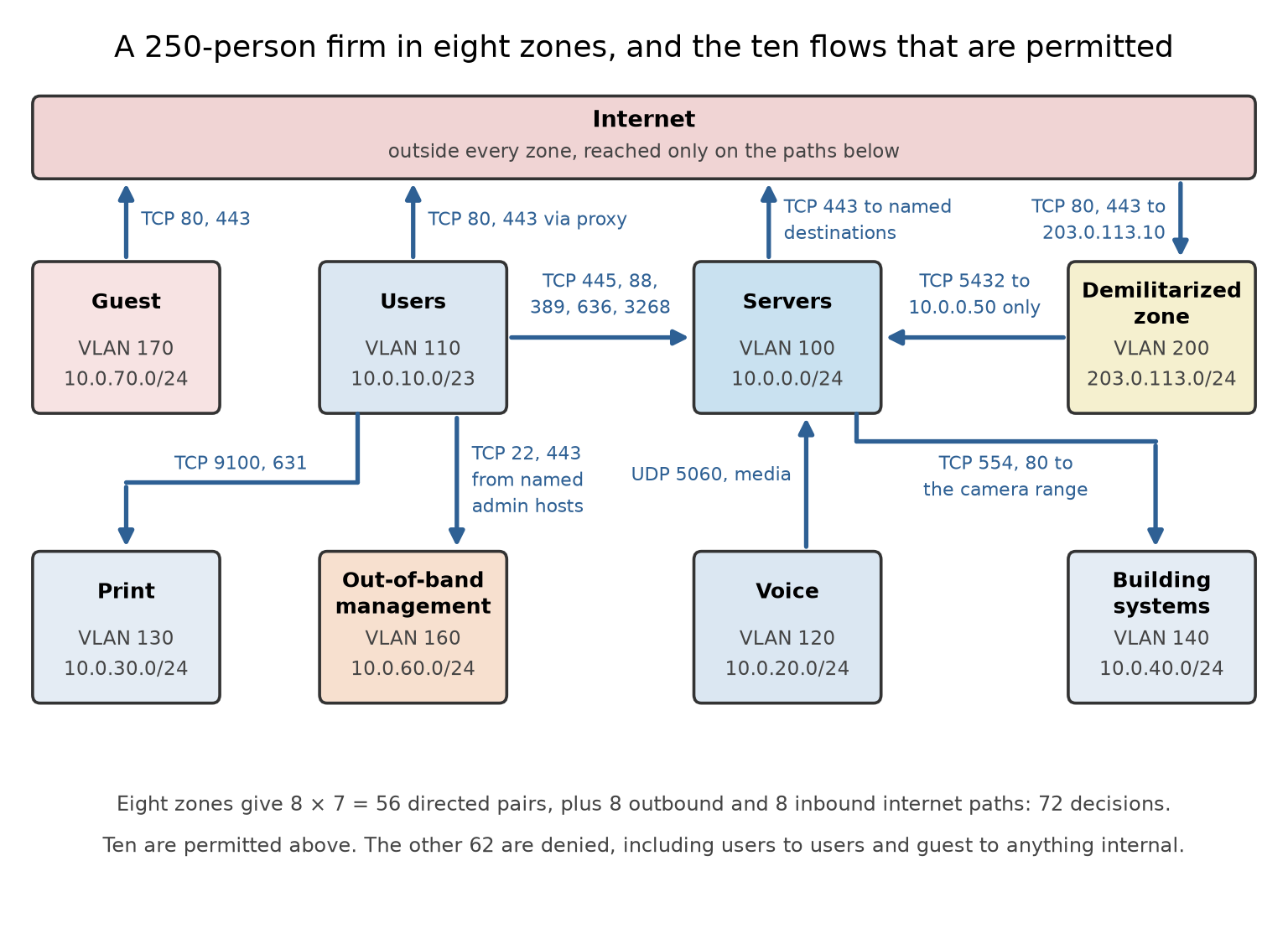
Two entries deserve a second look. Building systems appear nowhere as a source, because a camera has no reason to start a conversation; the video management server polls them, so the flow runs server to camera and not the other way. And the management zone is reachable only from named administrative hosts, the control that turns a compromised laptop into an inconvenience rather than an estate-wide event.
Step five: micro-segmentation, and why it is a different kind of problem#
The matrix above stops at the zone boundary. Inside the server zone, twelve servers give
directed pairs, and the interesting attacks live there. Writing 132 decisions as VLAN and access-list configuration is not practical, and every new server changes the count. This is why micro-segmentation is implemented with workload identity or labels rather than addresses, so that policy reads “build servers may reach the artifact repository” and stays true when the build server is rebuilt with a new address. Enforcement moves to the hypervisor, the host firewall, or the cloud security group (Section 11.17 and Chapter 3), and policy becomes an attribute of the workload rather than of the wire.
Exercises#
The facilities team asks for a rule permitting the HVAC vendor’s laptop, connected to guest wireless, to reach the building controllers on VLAN 140. Give two alternatives that meet the business need without adding a guest-to-building-systems flow.
A twelve-zone design is proposed instead of eight. How many directed zone pairs must be decided, and what is the practical argument for and against the larger number?
Why is the database flow written as demilitarized zone to 10.0.0.50 on TCP 5432 rather than demilitarized zone to the server zone?
Answer Key#
Either broker the access, so the vendor connects to a jump host in a controlled zone that holds the only path to VLAN 140 and logs the session, or give vendor devices their own zone with a single conduit to the specific controllers and no path anywhere else. Both keep guest wireless as a zone with exactly one permitted direction.
\(12 \times 11 = 132\) directed pairs plus 24 internet directions, so 156 decisions. Smaller zones contain a compromise more tightly, but each new zone adds decisions, exceptions, and a place for a permanent temporary rule to hide, so zone count should follow risk, not tidiness.
Because the flow the application needs is to one database on one port. Writing it to the whole zone permits the web server to reach the directory and the build servers as well, which is exactly the path an attacker who compromises the web server would use.
11.24 The 802.1Q Tag, and the Two Ways Out of a VLAN#
Section 11.16 listed disabling Dynamic Trunking Protocol and changing the native VLAN as switch hardening, without saying what those commands defend against. VLAN hopping is a small family of attacks, and like most protocol attacks it stops being memorized trivia the moment you have seen the frame format they abuse. So the tag first, then the two ways out.
The building of Section 11.3 is the picture; this is how someone cuts a keycard that opens another floor.
What a VLAN is, on the wire#
A switch with one VLAN is one broadcast domain: a frame for an unknown destination goes everywhere. A VLAN splits that switch into several logical switches, so a frame in VLAN 110 is never forwarded to a port in VLAN 140 even though both ports are on the same chassis. Within one switch that works because the switch remembers which port belongs to which VLAN. Between switches it does not, because one cable carries several VLANs and the receiving switch cannot tell them apart. IEEE 802.1Q inserts a 4-byte tag into the frame, between the source address and the type or length field, after which the transmitting device recomputes the frame check sequence, because the frame it altered is no longer the one the sender’s checksum covered.
Here is the tag as it appears on the wire, for a frame in VLAN 100 at priority 1:
... | SA (6 bytes) | 81 00 | 20 64 | Type/Length | payload | FCS
                     TPID     TCI
The same four bytes again, this time in the frame they are inserted into:
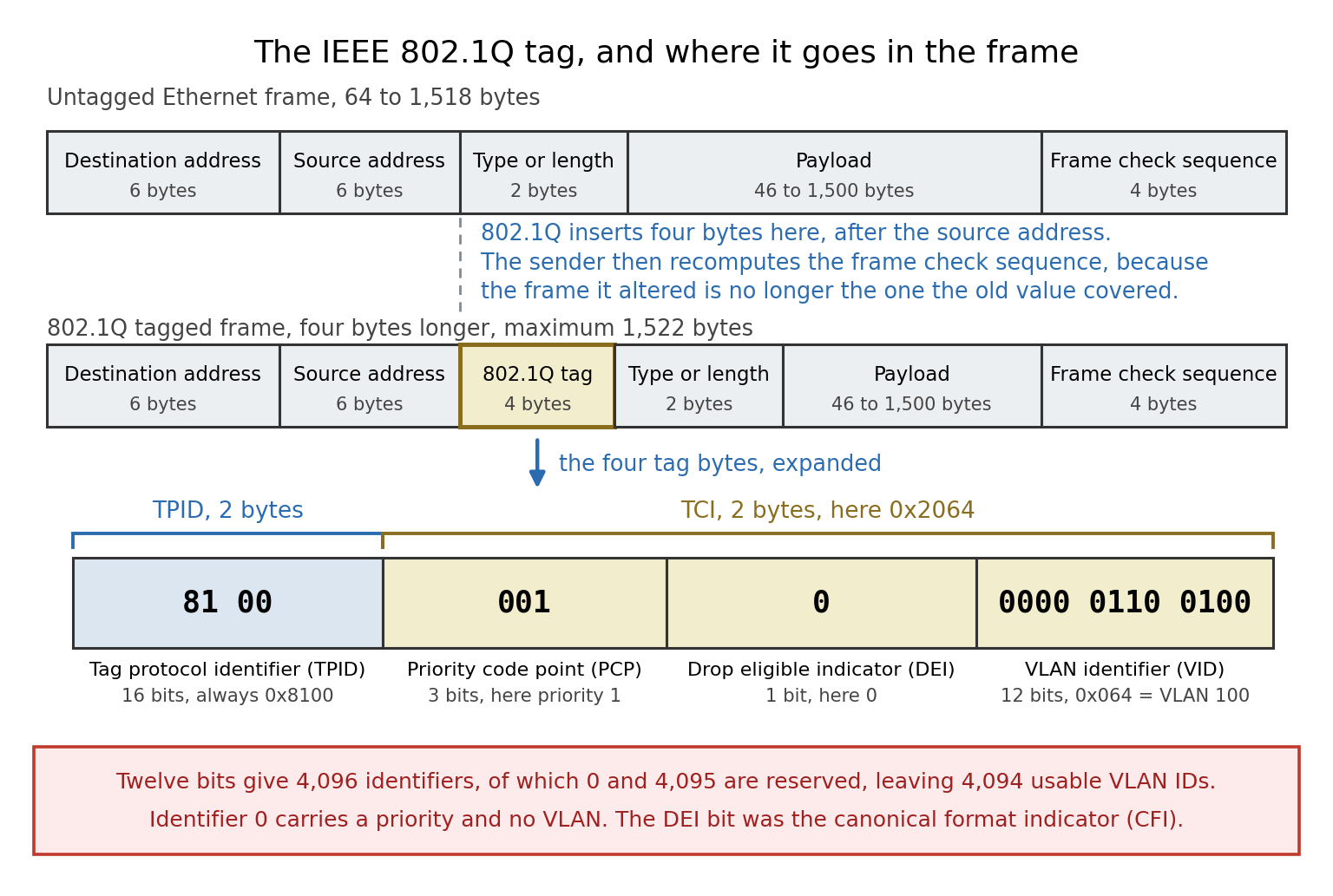
81 00is the tag protocol identifier, a 16-bit field fixed at 0x8100. It sits where the type or length field would be in an untagged frame, which is how a receiver tells tagged frames from untagged ones.20 64is the tag control information, and it splits into three fields. The top 3 bits are the priority code point, the IEEE 802.1p class of service, here001, priority 1. The next single bit is the drop eligible indicator, called the canonical format indicator in the original standard, here 0. The bottom 12 bits are the VLAN identifier, here0000 0110 0100, which is 100 decimal.
Twelve bits give 4,096 values, of which 0 and 4,095 are reserved, leaving 4,094 usable VLAN IDs. Identifier 0 means the tag carries a priority and no VLAN, which is called a priority tag. The tagged frame is four bytes longer, so the maximum Ethernet frame becomes 1,522 bytes.
The native VLAN, which is the exception that the attacks live in#
On an 802.1Q trunk, one VLAN is designated the native VLAN and its frames are sent untagged; every other VLAN’s frames are tagged. This exists for compatibility with devices that cannot read tags, and it means both ends of a trunk must be configured with the same native VLAN or frames land in the wrong place. Untagged frames arriving on a trunk are assumed to belong to the native VLAN. That assumption is the whole vulnerability.
Way out one: become a trunk#
Cisco’s Dynamic Trunking Protocol negotiates whether a link is an access port or a trunk. A port in
dynamic desirable asks to trunk; a port in dynamic auto agrees if asked. The protocol carries no
authentication, so a host that sends the negotiation frames can ask to be a trunk and a port willing to
negotiate will agree. The attacker’s port is now a trunk, and every VLAN permitted on it arrives at the
attacker’s network card, tagged and readable. No frame was forged and no bug was exploited: a
convenience feature was used exactly as designed, by the wrong device.
The configuration that closes both#
! User-facing access port: never negotiates, never becomes a trunk
interface GigabitEthernet1/0/5
 description User access port
 switchport mode access
 switchport access vlan 110
 switchport nonegotiate
 spanning-tree portfast
 spanning-tree bpduguard enable
!
! Uplink: static trunk, unused native VLAN, explicit allowed list
interface GigabitEthernet1/0/49
 description Uplink to distribution
 switchport mode trunk
 switchport nonegotiate
 switchport trunk native vlan 999
 switchport trunk allowed vlan 100,110,120,130,140
!
! Belt and braces: tag the native VLAN too, so nothing on a trunk is untagged
vlan dot1q tag native
Each line does one job. switchport mode access with switchport nonegotiate stops Dynamic Trunking
Protocol frames from being sent or acted on, closing the first attack. switchport trunk native vlan 999, pointing at a VLAN that exists with no ports in it, breaks the precondition of the second,
because no attacker sits in the native VLAN any more. switchport trunk allowed vlan prunes the trunk
so a successful hop reaches less. And vlan dot1q tag native removes the untagged case altogether: a
trunk then tags everything it sends and drops untagged data traffic it receives, so the strip the
second attack depends on never happens. Platforms that also support Inter-Switch Link need
switchport trunk encapsulation dot1q as well.
One habit is worth more than any of these commands: do not use VLAN 1 for anything. It is the default access VLAN, the default native VLAN, and the default management VLAN on many switches, so one mistake lines up all three.
Exercises#
A frame carries the tag bytes
81 00 60 0A. What are the priority code point, the drop eligible indicator, and the VLAN identifier?Why does double tagging fail if the attacker’s access port is in VLAN 110 while the trunk’s native VLAN is 999?
An auditor finds
switchport mode accesson every user port but noswitchport nonegotiate. Is the switch-spoofing attack still possible? Explain.Give one reason a network team might resist
vlan dot1q tag native, and how to test for the problem before deploying it.
Answer Key#
60 0Ais0110 0000 0000 1010. The top 3 bits011give priority 3; the next bit is 0, so the frame is not drop eligible; the bottom 12 bits0000 0000 1010give VLAN 10.The attack depends on the first switch forwarding the frame onto the trunk untagged, which happens only for the native VLAN. An access port in VLAN 110 associates the frame with VLAN 110 whatever tags it carries, so the frame leaves the trunk tagged for VLAN 110 and the attacker’s inner tag stays buried in the payload, where the second switch never reads it as a VLAN tag.
Not through negotiation: a port explicitly configured as an access port does not become a trunk.
switchport nonegotiateis still worth adding, because it stops the port sending Dynamic Trunking Protocol frames at all and removes any dependence on a future change leaving the port dynamic.Any device on a trunk that expects untagged frames, including some older access points, hypervisor uplinks, and appliances, stops working, because the trunk now tags everything and drops untagged data traffic. Test by listing every trunk and confirming the far end tags, before changing the setting.
11.25 Egress Filtering, and the Price of Seeing Inside TLS#
Almost every ruleset in this chapter is careful about what comes in and vague about what goes out. That
is arithmetic rather than carelessness: inbound destinations are a handful of servers the organization
owns, and outbound destinations are the whole internet. NIST SP 800-41 Revision 1 says so plainly, that
less stringent policies are generally used for outgoing traffic because most organizations permit their
users to reach a wide range of external applications. The result is the rule every firewall has,
permit tcp any any eq 443, and it stops nothing an attacker does, because exfiltration and
command-and-control are outbound connections to port 443.
There are two ways out, and organizations normally end up doing some of each.
Restrict the destinations#
Egress filtering is simply the filtering of outgoing traffic, and the same NIST publication recommends permitting outbound traffic only from source addresses the organization actually uses, which stops spoofed traffic from leaking onto other networks. That is the enterprise half of RFC 2827, better known as BCP 38. It costs one access list and is the least controversial control in this section.
Destination restriction is the harder half. A server zone can be made genuinely restrictive, because servers talk to a knowable set of places: name resolution only to the internal resolver, updates only to named mirrors, everything else through a logging proxy. A user zone cannot be enumerated that way, so it is handled by forcing traffic through a proxy instead. The reason almost nobody does either is maintenance, the “named destinations” burden of Section 11.23. The reason to do it anyway is that an egress policy is the only control here that acts after every preventive control has already failed.
Or inspect the contents, and pay for it#
The alternative is to decrypt. TLS interception, the decrypt-inspect-re-encrypt feature listed in Section 11.1, terminates the client’s connection at the middlebox, which presents a certificate it mints on the spot from a private certificate authority installed in the trust store of every managed endpoint, inspects the plaintext, and opens a second connection to the real server. There are now two connections and two certificate validations, and the one that matters has moved from the browser to the middlebox.
That transfer is where the evidence gets uncomfortable. Durumeric and colleagues analyzed nearly eight billion handshakes at Firefox update servers, a set of e-commerce sites, and the Cloudflare content delivery network (NDSS 2017) and found interception rates of 4.0, 6.2, and 10.9 percent respectively. Of the intercepted connections, 97 percent at Firefox, 32 percent at the e-commerce sites, and 54 percent at Cloudflare became less secure than the browser’s own handshake, and 10 to 40 percent advertised support for known-broken ciphers. Default settings on eleven of the twelve corporate middleboxes they tested exposed connections to known attacks, and five validated certificates incorrectly. US-CERT alert TA17-075A, issued in March 2017, made the operational version of the point: some interception products validate upstream certificates incompletely and others validate correctly but never convey the result to the client, so the padlock in the address bar stops being evidence of anything.
Two further costs are structural rather than bugs. Interception cannot proxy what it cannot impersonate, so certificate pinning and mutual TLS client authentication break by design. And the middlebox now holds the plaintext of every employee’s banking, medical, and legal traffic, which is why serious deployments carry category-based exemption lists, and why in some jurisdictions this is a legal question before it is a technical one (Chapter 18).
The choice is not between inspection and blindness. Flow records, DNS query logs, the server name indication and certificate metadata visible in the handshake itself, and the endpoint agents of Chapter 12 answer many of the same questions without anyone holding a copy of the plaintext.
11.26 SMB File Sharing on Windows and macOS, and How to Secure It#
Server Message Block (SMB) is the protocol behind a mapped network drive, a folder shared from one laptop to another, and most network-attached storage (NAS) appliances. Microsoft describes it as a network file sharing protocol that lets applications read, create, and update files on a remote server; the SMB server shares files, printers, and named pipes, and the protocol’s longer history includes serial ports as well. Section 3.5 listed its port and warned that it must never face the internet, Section 8.10 showed how it is enumerated, and Section 15.29 told how a flaw in its first version became the WannaCry worm. This section covers the everyday case those sections skip: turning sharing on in Windows and macOS, and the settings that decide whether the resulting share is safe.
One correction to a common description comes first. SMB is often called a local area network (LAN) protocol, but nothing in it is limited to a LAN. It runs over any IP network, Microsoft describes SMB 3 improvements for branch-office users reaching data across wide area network (WAN) links, and SMB over QUIC carries it across the internet. What keeps SMB on the local network is firewall policy, not the protocol.
How SMB works#
SMB is a client-server protocol. The server is the component that shares resources and answers requests;
the client connects to a share and sends them. Windows names a share with a Universal Naming Convention
(UNC) path such as \\fileserver\projects or \\192.168.1.20\projects, and macOS with a URL such as
smb://fileserver/projects. An application then opens and edits the remote file in place, reading and
writing over the network instead of downloading the whole file first.
Since Windows 2000, SMB has run directly over TCP port 445. The older NetBIOS over TCP/IP transport used UDP ports 137 and 138 and TCP port 139, and Microsoft now states that shares made with SMB 2 or later do not use those ports at all; only an SMB 1 server needs them. SMB over QUIC replaces TCP 445 with UDP 443 inside a TLS 1.3 tunnel.
The protocol has been revised many times, and a connection runs at the highest dialect both ends support.
Dialect |
First shipped in |
|---|---|
SMB 1 (also called CIFS, the Common Internet File System) |
The original protocol; not installed by default in current Windows |
SMB 2.0.2 |
Windows Vista with Service Pack 1, and Windows Server 2008 |
SMB 2.1 |
Windows 7 and Windows Server 2008 R2 |
SMB 3.0 |
Windows 8 and Windows Server 2012 |
SMB 3.0.2 |
Windows 8.1 and Windows Server 2012 R2 |
SMB 3.1.1 |
Windows 10 and Windows Server 2016 |
Two security milestones sit in that list. SMB 3.0 introduced encryption. SMB 3.1.1 made preauthentication integrity mandatory, a cryptographic hash over the negotiation and session setup messages that detects an attacker trying to downgrade the dialect or its capabilities; Microsoft notes that it cannot prevent a downgrade to SMB 1, which is one more reason to remove SMB 1 entirely. SMB 3.1.1 also negotiates AES-128-GCM encryption by default, and Windows 11 and Windows Server 2022 added AES-256-GCM and AES-256-CCM.
Every major desktop system speaks SMB, though not with the same defaults. Windows has a built-in client and server. Apple replaced Samba with its own SMB implementation in OS X 10.7 and moved its default file sharing from the Apple Filing Protocol to SMB 2 in OS X 10.9. On Linux, the Samba suite provides SMB server support and tools, and the kernel adds its own SMB client and an in-kernel server, ksmbd. Samba has refused SMB 1 by default since version 4.11, when its client and server minimum protocols both changed to SMB2_02. Interoperable, then, but not identical: the platform differences below are where most weak shares come from.
Turning sharing on in Windows#
On Windows 11 the setup has three steps.
Enable sharing on trusted networks only. Search Settings for Manage advanced sharing settings, and under Private networks turn on Network discovery and File and printer sharing. Leave the Public profile alone: Microsoft’s description is that on a Public network the PC is hidden from other devices and cannot be used for file and printer sharing. On Wi-Fi, mark only the network you trust as Private.
Share the folder with named accounts. Right-click the folder, choose Properties, then the Sharing tab and Advanced Sharing, select Share this folder, and open Permissions. Remove the Everyone group, add the specific users or groups, and grant Read unless they must change files. The Security tab on the same Properties sheet sets the folder’s NTFS permissions.
Connect from the other computer with
\\computer-name\share-nameor\\IP-address\share-name, signing in with an account that exists on the sharing computer.
Three details in those steps decide most outcomes.
Leave password-protected sharing on. With it on, Microsoft explains, people on the network cannot reach shared folders unless they have a user name and password on the sharing device. Microsoft’s consumer troubleshooting page for file sharing nonetheless tells users to turn it off, with no warning attached, and Microsoft’s own instructions for sharing with it off are to share with the Guest or Everyone account, the old Windows XP simple-sharing model. Windows 11 Pro, Enterprise, and Education, and Windows Server 2019 and later, refuse insecure guest logons as clients by default, so the shortcut increasingly fails anyway. The correct fix is an account on the sharing computer, not a guest.
Two permission layers both apply. A share has share permissions, and the folder beneath it has NTFS permissions. Windows checks both, so a user receives only what both allow, which is why Microsoft’s guidance for access-denied errors is to verify both. Use share permissions as the outer funnel and NTFS permissions for precise control.
A hidden share is not a protected share. Ending a share name with $ keeps it out of browse lists, but
anyone who types the path still meets only the permissions above.
Turning sharing on in macOS#
Apple’s steps for the current release, macOS 27 Golden Gate, are these.
Choose Apple menu, then System Settings, then General in the sidebar, then Sharing.
Under Content & Media, click the Info button next to File Sharing and turn File Sharing on.
Click Options and turn on Share files and folders using SMB.
Under Windows File Sharing, select On next to each account that will connect from Windows, enter that account’s password, and click Done.
Apple adds a warning to these steps: because the passwords of some Windows users may be stored less securely, deselect the On checkbox next to each account when it is not in use, and do it before turning file sharing off, because otherwise the password stays active and stored in a less secure manner. Two further settings belong next to it. In System Settings, Users & Groups, the Info button next to Guest User holds Allow guest users to connect to shared folders, which should stay off. And in System Settings, Network, Firewall, the Options button holds Block all incoming connections, which stops sharing services entirely, and Enable stealth mode, which keeps the Mac from answering probes.
To connect from a Mac, choose Go, then Connect to Server in the Finder (Command-K), and enter
smb://server/share or smb://IP-address/share.
What the defaults do not protect: a measured example#
Names and checkboxes say little about what crosses the wire. A lab run made it visible: a Samba 4.19.5
server bound to the loopback interface, one share, one ordinary account, and the server’s own smbstatus
report of each session. Samba’s defaults in that version include server min protocol = SMB2_02 and
restrict anonymous = 0.
Configuration tested |
What the server reported |
|---|---|
Defaults, authenticated user |
Dialect SMB3_11; encryption none; signing only |
Client forced to SMB 1 |
Refused: |
Anonymous share listing, defaults |
|
Anonymous share listing, |
|
|
SMB3_11 with AES-128-GCM encryption and AES-128-GMAC signing, for the session and the share |
Same server, client run with |
Still AES-128-GCM and AES-128-GMAC |
Same server, client limited to SMB 2.1 |
|
Three lessons follow. A modern dialect is not a protected session: SMB 3.1.1 was negotiated with every
default, yet the data was neither encrypted nor fully signed until the server required it. The stricter side
wins: a server that requires protection imposed it even on a client run with --client-protection=off,
which matches Microsoft’s rule for SMB 2 and later that traffic is signed if either end requires signing and
unsigned only when neither does. And requiring encryption doubles as a protocol floor, because a client too
old to encrypt is turned away. The configuration tested was:
[global]
   restrict anonymous = 2          # no share listing without credentials
   server signing = mandatory      # every session signed
   server smb encrypt = required   # every session encrypted; non-encrypting clients refused
What attackers do with SMB#
The attacks map onto the defaults above, which is why the hardening that follows is not arbitrary.
Exploit the server. Microsoft Security Bulletin MS17-010, released March 14, 2017, fixed six vulnerabilities in the SMB 1 server, CVE-2017-0143 through CVE-2017-0148; one of them, CVE-2017-0144, is the EternalBlue flaw behind WannaCry (Section 15.29). SMB 3 is not immune: CVE-2020-0796, published March 12, 2020, was a remote code execution flaw in how SMB 3.1.1 handled certain requests on both clients and servers, scored 10.0 under CVSS 3.1 and later added to CISA’s Known Exploited Vulnerabilities catalog. Patching comes before every setting in this section.
Find the shares. MITRE ATT&CK records network share discovery as technique T1135, a precursor to collection and lateral movement. The anonymous listing in the lab is that technique at its cheapest.
Move with stolen credentials. Technique T1021.002, SMB/Windows Admin Shares, is lateral movement with valid accounts over SMB. Signing and encryption do nothing against a correct password, which is why segmentation matters (Section 11.23).
Steal or relay credentials. In forced authentication, technique T1187, a document, shortcut, or link carrying a UNC path to an attacker’s server makes Windows try to authenticate there, handing over NT LAN Manager (NTLM) credential material for offline cracking. In technique T1557.001, Name Resolution Poisoning and SMB Relay, an attacker answers local name lookups and relays the authentication it receives. Microsoft states that SMB signing protects against relay and spoofing, and its guidance is to block outbound SMB to devices outside the network at a minimum, because attackers lure users to malicious endpoints disguised as friendly links or shortcuts. MITRE adds that Windows typically falls back to Web Distributed Authoring and Versioning (WebDAV) over TCP ports 80 and 443 when SMB is blocked, so its mitigation filters WebDAV leaving the network too, and Microsoft notes that clients that do not use WebDAV can disable the WebClient service that provides it. Blocking NTLM in the SMB client stops that client from sending the material at all.
Lure users to a fake server. Microsoft’s reason for disabling guest logons is that they let an attacker deceive a user into connecting to a spoofed malicious server without any credential errors or prompts, and that guest sessions support neither signing nor encryption.
Reach the print path. A shared printer is served by the Windows Print Spooler service, and CVE-2021-34527, PrintNightmare, let an attacker run code with SYSTEM privileges through it (CVSS 3.1 score 8.8, on CISA’s Known Exploited Vulnerabilities catalog since November 3, 2021). Share a printer only from a computer that must serve one, and keep it patched.
Hardening Windows#
Microsoft’s defaults moved sharply with Windows 11 version 24H2 and Windows Server 2025, so the first task is knowing which defaults a given machine has.
Confirm SMB 1 is absent. A clean installation of Windows 11 or Windows Server 2019 and later does not include SMB 1. On Windows 10 the SMB 1 server has not been installed by default since version 1709, but the SMB 1 client may still be present on Home and Pro editions, where it removes itself after 15 days without use, and an in-place upgrade does not always remove SMB 1, so check rather than assume.
Get-SmbServerConfiguration | Select EnableSMB1Protocolshows whether the server accepts SMB 1, andGet-WindowsOptionalFeature -Online -FeatureName SMB1Protocolshows whether the SMB 1 feature is installed. If something still uses SMB 1, find it first:Set-SmbServerConfiguration -AuditSmb1Access $truelogs event ID 3000 in the Microsoft-Windows-SMBServer/Audit log for each SMB 1 connection, and Microsoft’s advice is to update the device that needs SMB 1 rather than reinstall it.Require signing where the default does not. Windows 11 version 24H2 Enterprise, Pro, and Education require signing for both outbound and inbound connections; Windows 11 Home requires neither; Windows Server 2025 requires it only for outbound connections. A Windows Server 2025 file server therefore needs
Set-SmbServerConfiguration -RequireSecuritySignature $true, or the Group Policy setting Microsoft network server: Digitally sign communications (always). Requiring signing also disables guest access.Encrypt shares that hold sensitive data.
Set-SmbShare -Name Finance -EncryptData $trueencrypts one share andSet-SmbServerConfiguration -EncryptData $truethe whole server; the server’s RejectUnencryptedAccess setting then turns away clients that cannot encrypt. Microsoft notes that encrypted shares are integrity-protected regardless of the signing settings.Set a dialect floor. From Windows 11 version 24H2 and Windows Server 2025,
Set-SmbServerConfiguration -Smb2DialectMin SMB311(and the matchingSet-SmbClientConfiguration) refuses older dialects. Test before enforcing, because an old NAS or printer may be the client being refused.Keep guest logons off. Microsoft disables them by default in Windows 11 Pro, Enterprise, and Education, in Windows 10 Enterprise, Education, and Pro for Workstations, and in Windows Server 2019 and later, while Windows 10 Home and Pro still allow them; a refusal is logged as event ID 31017. The fix for a device that needs guest access is an account, not the Enable insecure guest logons policy.
Shrink NTLM. Microsoft deprecated every version of NTLM in June 2024 and removed NTLMv1 starting with Windows 11 version 24H2 and Windows Server 2025. On those releases the SMB client can refuse NTLM for outbound connections, through the Group Policy setting Block NTLM (LM, NTLM, NTLMv2) or
NET USE \\server\share /BLOCKNTLM, and the SMB server’s authentication rate limiter, on by default, inserts a 2-second delay after each failed NTLM authentication to slow guessing. Microsoft’s stated target, in a September 2026 frequently asked questions post, is to disable NTLM by default in the next major release of Windows and Windows Server, subject to change.Filter the ports. Microsoft recommends blocking TCP 445 inbound from the internet and outbound to the internet at the corporate firewall, apart from cloud file services that need it, and allowing SMB inside the network only to the file servers and domain controllers that need it (Sections 11.23 and 11.25). Since Windows 11 version 24H2 and Windows Server 2025, the built-in firewall rules for sharing no longer open the NetBIOS ports at all.
Use SMB over QUIC for remote access instead of exposing TCP 445. It runs on any edition of Windows Server 2025 and on Windows Server 2022 Datacenter: Azure Edition, with Windows 11 clients, and Microsoft presents it as an SMB VPN for remote workers.
Check what was negotiated.
Get-SmbConnectionlists each connection the client holds, with its Dialect.
Hardening macOS#
Turn File Sharing off when it is not needed, deselecting every Windows File Sharing account first, and when it is on, share specific folders with specific accounts.
Keep Windows File Sharing switched on per account only while needed, following Apple’s warning about password storage, and keep guest access to shared folders off.
Know the client defaults. Apple states that when a Mac makes outbound connections, SMB 1 and NetBIOS are enabled by default to improve compatibility with third-party products, and that since macOS 10.13.4 packet signing is off by default. Because an SMB 2 or later connection is signed whenever either end requires it, a Mac still signs with a server that requires signing, such as a Windows 11 version 24H2 Pro, Enterprise, or Education computer sharing a folder, but by default nothing makes the Mac insist. All three behaviors are set in
/etc/nsmb.conf:[default] protocol_vers_map=6 port445=no_netbios signing_required=yes
The first two lines are Apple’s own instructions for disabling SMB 1 and NetBIOS, where 6 selects SMB 2 and SMB 3 only. The third uses the key that Apple’s packet-signing article sets and that the nsmb.conf manual page documents, with a default of no. Keys change between releases, so read
man nsmb.confon the Mac being configured. For the Mac’s own file server, Apple documents a ProtocolVersionMap value of 6, set withscutil, that turns off SMB 1 for incoming connections.Verify mounted shares with
smbutil statshares -a, which prints the attributes of every mounted share.Keep the firewall on, and turn on stealth mode on networks you do not control.
Exercises#
A colleague argues that SMB is a LAN-only protocol, so file shares do not need encryption. Give two facts from this section that contradict the premise, and one that contradicts the conclusion.
Microsoft’s consumer troubleshooting steps for file sharing say to turn off password-protected sharing. What does that change, and what is the better fix on a network of Windows 11 Pro computers?
A user’s share permission on a folder is Change and the folder’s NTFS permission for that user is Read. What can the user do through the share, and why?
In the lab, SMB 3.1.1 was negotiated with all defaults, yet the server reported no encryption and only partial signing. Explain why, and name the two settings that changed it.
Windows 11 version 24H2 Pro laptops connect to a Windows Server 2025 file server left at its defaults. Is the traffic signed? Answer again for a Windows 11 Home laptop connecting to the same server.
A Mac user mounts an old NAS that speaks only SMB 1. What happens with macOS defaults, and what changes after
protocol_vers_map=6is added to/etc/nsmb.conf?Why does Microsoft recommend blocking outbound TCP 445 to the internet, and which ATT&CK technique does that blunt?
Name the Windows feature that lets remote workers reach a file server without exposing TCP 445, and give its transport and port.
Answer Key#
Premise: SMB runs over any IP network, Microsoft describes SMB 3 improvements for branch-office users reaching data over WAN links, and SMB over QUIC carries it across the internet. Conclusion: even on a LAN, the lab showed that an SMB 3.1.1 session at default settings was neither encrypted nor fully signed, and relay attacks (T1557.001) and forced authentication (T1187) work from inside the network.
Turning it off is meant to let people without an account on the sharing computer reach its shares, and Microsoft’s instructions for sharing in that mode are to share with the Guest or Everyone account. Windows 11 Pro computers refuse insecure guest logons by default anyway, so the better fix is to create an account on the sharing computer, grant it share and NTFS permissions, and connect with those credentials.
Read only. Access through a share is limited by both the share permissions and the NTFS permissions, so the user receives only what both allow, and the NTFS Read is the stricter of the two.
Samba’s defaults leave both encryption and signing to negotiation, and neither end required them, so only the session setup was signed. Setting
server signing = mandatoryandserver smb encrypt = requiredmade the server demand both, and the session and share then reported AES-128-GCM encryption and AES-128-GMAC signing.Yes for the Pro laptops: Windows 11 version 24H2 Pro requires signing for outbound connections, and for SMB 2 and later a connection is signed if either end requires it. For the Home laptop, no: Windows 11 Home does not require signing, and Windows Server 2025 requires signing only for its own outbound connections, so neither end requires it unless an administrator sets RequireSecuritySignature on the server.
With defaults the Mac connects, because Apple enables SMB 1 for outbound connections to improve compatibility. With
protocol_vers_map=6the Mac allows only SMB 2 and SMB 3, so the connection fails until the NAS is updated or replaced, which is the intended outcome.Outbound SMB to the internet is rarely needed, apart from cloud file services that require it, and blocking it stops a user who opens a document or link carrying a UNC path from authenticating over SMB to an attacker’s server on the internet. That blunts forced authentication, technique T1187, though not completely: Windows can fall back to WebDAV over TCP 80 or 443, which is why MITRE’s mitigation also filters WebDAV leaving the network.
SMB over QUIC, which runs SMB inside a TLS 1.3 tunnel over UDP port 443 instead of TCP port 445. It runs on any edition of Windows Server 2025 and on Windows Server 2022 Datacenter: Azure Edition, with Windows 11 clients.
Chapter Summary#
This chapter assembled the defensive architecture of a network. It covered firewalls and their types and topologies, network segmentation, and zero-trust architecture, then DNS security, VPNs and remote access, and the relationship among proxies, VPNs, and Tor. It addressed network access control and 802.1X, DDoS mitigation, and authentication, identity, and access, before moving to monitoring and visibility, deception with honeypots, honeynets, and honeytokens, and network forensics in defense. A CVE case study on a firewall vulnerability and a set of capstone and group project ideas grounded the material in practice. It then went below the level of the diagram: how a first-match ruleset evaluates a packet and the anomalies that hide in one, what a connection state table costs in entries and seconds, what address translation does and does not provide, a worked segmentation of a small enterprise, the 802.1Q tag and the two ways out of a VLAN, and the choice between restricting outbound destinations and decrypting outbound traffic to inspect it. The recurring lesson is that resilient defense comes from layered, identity-aware controls and continuous visibility rather than from any single device at the edge, and that every control in this chapter is a set of specific decisions rather than a product.
Why This Matters#
Network defense is the layer that contains damage once a host is compromised. A firewall that limits outbound traffic prevents data exfiltration. A DMZ limits blast radius when a web server is compromised. A NAC-enforced network prevents an unpatched guest device from spreading malware to corporate assets. Zero-trust architecture means a compromised credential does not automatically grant access to every resource. These controls work together to shorten the attacker’s kill chain.
News in Focus: Flat Networks and Nation-State Lateral Movement#
Several nation-state intrusion campaigns achieved network-wide compromise specifically because east-west traffic was unfiltered: once the attacker gained a foothold in one workload, they could reach any other workload on the same flat network using standard protocols (SMB, RDP, WMI). The entire subsequent kill chain depended on the absence of micro-segmentation. Post-incident recommendations universally included implementing east-west filtering and zero-trust principles for workload communication.
# Chapter 11 -- Firewall rule evaluator and network segment model

from dataclasses import dataclass
from typing import Optional

@dataclass
class FirewallRule:
    action: str           # PERMIT or DENY
    src_ip: str           # CIDR or "any"
    dst_ip: str           # CIDR or "any"
    protocol: str         # tcp, udp, icmp, any
    dst_port: Optional[int]  # None for "any"
    description: str

def ip_in_cidr(ip, cidr):
    if cidr == "any":
        return True
    if "/" not in cidr:
        return ip == cidr
    base, prefix = cidr.split("/")
    prefix = int(prefix)
    def to_int(addr):
        parts = list(map(int, addr.split(".")))
        return (parts[0]<<24)|(parts[1]<<16)|(parts[2]<<8)|parts[3]
    mask = (0xFFFFFFFF << (32-prefix)) & 0xFFFFFFFF
    return (to_int(ip) & mask) == (to_int(base) & mask)

def evaluate(rules, pkt):
    for i, r in enumerate(rules):
        if not ip_in_cidr(pkt["src"], r.src_ip):
            continue
        if not ip_in_cidr(pkt["dst"], r.dst_ip):
            continue
        if r.protocol != "any" and r.protocol != pkt["proto"]:
            continue
        if r.dst_port is not None and r.dst_port != pkt["port"]:
            continue
        return r.action, i+1, r.description
    return "DENY", 0, "Implicit deny (no rule matched)"

# DMZ firewall rule set
rules = [
    FirewallRule("PERMIT","0.0.0.0/0","203.0.113.10","tcp",443,"Allow HTTPS to web server"),
    FirewallRule("PERMIT","0.0.0.0/0","203.0.113.10","tcp",80, "Allow HTTP to web server"),
    FirewallRule("PERMIT","203.0.113.10","10.0.0.50","tcp",5432,"Web -> DB on port 5432 only"),
    FirewallRule("DENY",  "203.0.113.10","10.0.0.0/8","any",None,"Block DMZ to internal except DB"),
    FirewallRule("PERMIT","10.0.0.0/8","any","any",None,"Allow internal outbound"),
    FirewallRule("DENY",  "any","any","any",None,"Explicit deny all"),
]

packets = [
    dict(src="1.2.3.4",      dst="203.0.113.10", proto="tcp", port=443, label="Internet -> Web HTTPS"),
    dict(src="203.0.113.10", dst="10.0.0.50",    proto="tcp", port=5432,label="Web -> DB query"),
    dict(src="203.0.113.10", dst="10.0.0.1",     proto="tcp", port=22,  label="Web -> Internal SSH (lateral)"),
    dict(src="10.0.0.5",     dst="8.8.8.8",      proto="udp", port=53,  label="Internal -> Internet DNS"),
    dict(src="5.5.5.5",      dst="10.0.0.1",     proto="tcp", port=3389,label="Internet -> Internal RDP (attack)"),
]

print(f"{'Packet':<40} {'Action':<8} {'Rule#':<7} {'Note'}")
print("-" * 90)
for p in packets:
    action, rnum, desc = evaluate(rules, p)
    print(f"{p['label']:<40} {action:<8} {rnum:<7} {desc}")
Packet                                   Action   Rule#   Note
------------------------------------------------------------------------------------------
Internet -> Web HTTPS                    PERMIT   1       Allow HTTPS to web server
Web -> DB query                          PERMIT   3       Web -> DB on port 5432 only
Web -> Internal SSH (lateral)            DENY     4       Block DMZ to internal except DB
Internal -> Internet DNS                 PERMIT   5       Allow internal outbound
Internet -> Internal RDP (attack)        DENY     6       Explicit deny all
Review Questions (MCQ)#
Q1. The implicit deny principle means: A. All traffic is denied until a user logs in B. Any traffic not explicitly permitted by a rule is blocked C. Deny rules take precedence over permit rules D. All outbound traffic is denied by default
Q2. A DMZ is placed between: A. Two internal switches B. The internet-facing and internal-facing firewalls C. The VPN and the corporate network D. The RADIUS server and the switch
Q3. In zero-trust architecture, the primary trust boundary is: A. The firewall B. The corporate office network C. Verified identity with device posture D. The VPN
Q4. DNSSEC protects against: A. DNS query eavesdropping B. Cache poisoning by signing resource records C. DDoS against name servers D. Subdomain takeover
Q5. A DNS sinkhole primarily helps defenders: A. Speed up DNS resolution B. Identify infected hosts attempting to reach malicious C2 domains C. Prevent DNSSEC failures D. Enforce DoT
Q6. Split-tunnel VPN poses a security risk because: A. It is slower than full-tunnel B. Internet traffic bypasses corporate visibility and security controls C. It requires 802.1X D. It uses insecure protocols
Q7. In 802.1X, the switch acts as the: A. Supplicant B. Authentication server C. Authenticator D. Certificate Authority
Q8. A SYN flood attack targets which resource? A. Disk I/O B. The server’s TCP connection-state table C. SSL certificate validity D. DNS cache
Q9. Anycast routing is used in DDoS mitigation to: A. Encrypt attack traffic B. Distribute attack traffic across a global network of scrubbing nodes C. Block UDP amplification D. Rate-limit HTTP requests
Q10. Micro-segmentation primarily limits: A. Internet-facing attack surface B. East-west (lateral) movement within the network C. DDoS impact D. DNS poisoning
Answers: Q1 B, Q2 B, Q3 C, Q4 B, Q5 B, Q6 B, Q7 C, Q8 B, Q9 B, Q10 B.
Lab Assignment#
Part A – Firewall rule audit: Using the evaluator above, add three additional test packets that expose a gap or misconfiguration in the existing rule set. For each packet, explain what attack scenario it represents and what rule change would prevent it.
Part B – DMZ design: Draw (or describe in table form) a three-tier DMZ architecture for a company that hosts a public web application, an internal HR system, and a database server. Specify the firewall rules between each zone.
Part C – Zero-trust gap analysis: For an organization that currently uses a traditional VPN model, identify five specific changes needed to implement zero-trust principles. For each, specify the technology or process change and the risk it addresses.
Part D – DNS security audit: Run dig +dnssec example.com and dig +dnssec google.com. Check whether DNSSEC is enabled (look for RRSIG records). Then check whether your local resolver enforces DNSSEC validation. Document your findings and any differences between sites.
References#
Practical Computer Security (Course 3): lecture on Types of Firewalls and Configurations (packet, circuit, stateful, application, multilayer; host/bastion/DMZ/distributed/WAF).
Neuman, B. C., and Ts’o, T. (1994). Kerberos: An Authentication Service for Computer Networks. IEEE Communications.
FIDO Alliance / W3C. FIDO2 and Web Authentication (WebAuthn); Hardt, D. (2012). The OAuth 2.0 Authorization Framework, RFC 6749.
Palo Alto Networks; Volexity; CISA (2024). CVE-2024-3400, PAN-OS GlobalProtect command injection (Operation MidnightEclipse). https://security.paloaltonetworks.com/CVE-2024-3400
CISA (2023). CVE-2023-4966 (Citrix Bleed) guidance. https://www.cisa.gov/
Cisco Systems. Security Configuration Guide: Access Control Lists (sequential evaluation, first match, implicit deny) and Inter-Switch Link and IEEE 802.1Q Frame Format, document 17056.
Netfilter project.
iptables(8)manual page: chain traversal, targets, and chain policy.Linux kernel documentation. Netfilter Conntrack Sysfs Variables (
nf_conntrack_buckets,nf_conntrack_max, per-state timeouts). https://www.kernel.org/doc/Documentation/networking/nf_conntrack-sysctl.rstEddy, W. (2007). TCP SYN Flooding Attacks and Common Mitigations. RFC 4987, Section 3.6.
Srisuresh, P., and Holdrege, M. (1999). RFC 2663; Srisuresh, P., and Egevang, K. (2001). RFC 3022 (NAT terminology and traditional NAT).
Audet, F., and Jennings, C. (2007). NAT Behavioral Requirements for Unicast UDP. RFC 4787 (BCP 127), Section 4.1 and REQ-1, REQ-9.
Van de Velde, G., Hain, T., Droms, R., Carpenter, B., and Klein, E. (2007). Local Network Protection for IPv6. RFC 4864, Sections 2.2 and 7.
Perreault, S., et al. (2013). Common Requirements for Carrier-Grade NATs. RFC 6888 (BCP 127), REQ-4, REQ-12, REQ-13.
Ferguson, P., and Senie, D. (2000). Network Ingress Filtering. RFC 2827 (BCP 38).
Scarfone, K., and Hoffman, P. (2009). Guidelines on Firewalls and Firewall Policy. NIST SP 800-41 Revision 1.
Al-Shaer, E., and Hamed, H. (2004). Discovery of policy anomalies in distributed firewalls. IEEE INFOCOM 2004.
Durumeric, Z., Ma, Z., Springall, D., Barnes, R., Sullivan, N., Bursztein, E., Bailey, M., Halderman, J. A., and Paxson, V. (2017). The Security Impact of HTTPS Interception. NDSS 2017.
US-CERT (2017). Alert TA17-075A, HTTPS Interception Weakens TLS Security. https://www.cisa.gov/news-events/alerts/2017/03/16/https-interception-weakens-tls-security
Cisco Systems. Configure Catalyst Switched Port Analyzer (SPAN): Example, document 10570-41.
National Institute of Standards and Technology (2025). NIST SP 800-63-4: Digital Identity Guidelines. Temoshok, D., Choong, Y., Galluzzo, R., LaSalle, C., Regenscheid, A., Proud-Madruga, D., Gupta, S., and Lefkovitz, N. https://doi.org/10.6028/NIST.SP.800-63-4 (supersedes SP 800-63-3)
OASIS (2005). Assertions and Protocols for the OASIS Security Assertion Markup Language (SAML) V2.0. OASIS Standard, 15 March 2005.
Hardt, D., ed. (2012). The OAuth 2.0 Authorization Framework. RFC 6749, IETF. https://doi.org/10.17487/RFC6749
Hunt, P., Grizzle, K., Ansari, M., Wahlstroem, E., and Mortimore, C. (2015). System for Cross-domain Identity Management: Definitions, Overview, Concepts, and Requirements. RFC 7642, IETF.
Hunt, P., Grizzle, K., Wahlstroem, E., and Mortimore, C. (2015). System for Cross-domain Identity Management: Core Schema. RFC 7643, IETF.
Hunt, P., Grizzle, K., Ansari, M., Wahlstroem, E., and Mortimore, C. (2015). System for Cross-domain Identity Management: Protocol. RFC 7644, IETF.
Souppaya, M., Scarfone, K., and Dodson, D. (2023). Guidelines for Managing the Security of Mobile Devices in the Enterprise. NIST Special Publication 800-124 Revision 2. https://doi.org/10.6028/NIST.SP.800-124r2
Microsoft. What is SMB File Sharing for Windows and Windows Server? Microsoft Learn, updated November 27, 2025. https://learn.microsoft.com/en-us/windows-server/storage/file-server/file-server-smb-overview
Microsoft. File sharing over a network in Windows, Microsoft Support, including the troubleshooting step that turns off password protected sharing. https://support.microsoft.com/en-us/windows/experience/connectivity-networking/file-sharing-over-a-network-in-windows
Microsoft. Essential Network Settings and Tasks in Windows, Microsoft Support (a PC on a Public network is hidden and cannot be used for file and printer sharing), https://support.microsoft.com/en-us/windows/experience/connectivity-networking/essential-network-settings-and-tasks-in-windows ; Set up your small business network (password-protected sharing) and Error when you try to access an administrative share on a Windows-based computer from another Windows-based computer that’s a member of a workgroup (Guest or Everyone when password protected sharing is disabled). Microsoft Learn. https://learn.microsoft.com/en-us/troubleshoot/windows-client/networking/set-up-your-small-business-network and https://learn.microsoft.com/en-us/troubleshoot/windows-client/networking/cannot-logon-access-administrative-share
Microsoft. Access Denied when you access an SMB file share in Windows (verify both share and NTFS permissions), Microsoft Learn, https://learn.microsoft.com/en-us/troubleshoot/windows-client/networking/access-denied-access-smb-file-share ; and Oliver, W. Share and NTFS Permissions, Internet Information Services documentation (Advanced Sharing steps and hidden shares ending in $), https://learn.microsoft.com/en-us/iis/web-hosting/configuring-servers-in-the-windows-web-platform/configuring-share-and-ntfs-permissions
Microsoft. Detect, enable, and disable SMBv1, SMBv2, and SMBv3 in Windows, Microsoft Learn, updated March 11, 2025. https://learn.microsoft.com/en-us/windows-server/storage/file-server/troubleshoot/detect-enable-and-disable-smbv1-v2-v3
Microsoft. Control SMB signing behavior, Microsoft Learn, updated August 13, 2025, and Overview of Server Message Block signing (signing policies and the rule that a connection is signed if either end requires it). https://learn.microsoft.com/en-us/windows-server/storage/file-server/smb-signing and https://learn.microsoft.com/en-us/troubleshoot/windows-server/networking/overview-server-message-block-signing
Microsoft. SMB security enhancements, Microsoft Learn, updated July 1, 2025 (encryption, cipher suites, preauthentication integrity). https://learn.microsoft.com/en-us/windows-server/storage/file-server/smb-security
Microsoft. Enable insecure guest logons in SMB2 and SMB3 for Windows client and Windows Server, Microsoft Learn, updated August 13, 2025. https://learn.microsoft.com/en-us/windows-server/storage/file-server/enable-insecure-guest-logons-smb2-and-smb3
Microsoft. SMB over QUIC, Microsoft Learn, updated July 24, 2025. https://learn.microsoft.com/en-us/windows-server/storage/file-server/smb-over-quic
Microsoft. Block NTLM connections on SMB in Windows Server 2025, Configure SMB authentication rate limiter for Windows, and Manage SMB dialects in Windows and Windows Server 2025, Microsoft Learn, accessed October 5, 2026. https://learn.microsoft.com/en-us/windows-server/storage/file-server/smb-ntlm-blocking , https://learn.microsoft.com/en-us/windows-server/storage/file-server/configure-smb-authentication-rate-limiter and https://learn.microsoft.com/en-us/windows-server/storage/file-server/manage-smb-dialects
Microsoft. Secure SMB traffic in Windows Server, Microsoft Learn, updated November 1, 2024 (perimeter and outbound TCP 445 blocking, NetBIOS firewall rule change). https://learn.microsoft.com/en-us/windows-server/storage/file-server/smb-secure-traffic
Microsoft. Deprecated features for Windows client (NTLM deprecated June 2024; NTLMv1 removed in Windows 11 version 24H2 and Windows Server 2025), https://learn.microsoft.com/en-us/windows/whats-new/deprecated-features ; and Windows IT Pro Blog, Retiring NTLM: Frequently asked questions, September 9, 2026, https://techcommunity.microsoft.com/blog/windows-itpro-blog/retiring-ntlm-frequently-asked-questions/4550522
Microsoft. Set-SmbServerConfiguration and Get-SmbConnection, SmbShare module reference for PowerShell. https://learn.microsoft.com/en-us/powershell/module/smbshare/set-smbserverconfiguration and https://learn.microsoft.com/en-us/powershell/module/smbshare/get-smbconnection
Microsoft. Microsoft Security Bulletin MS17-010: Security Update for Microsoft Windows SMB Server, March 14, 2017. https://learn.microsoft.com/en-us/security-updates/securitybulletins/2017/ms17-010
National Institute of Standards and Technology, National Vulnerability Database. CVE-2020-0796 (published March 12, 2020) and CVE-2021-34527 (published July 2, 2021), with CVSS 3.1 scores and the dates each was added to CISA’s Known Exploited Vulnerabilities catalog. https://nvd.nist.gov/vuln/detail/CVE-2020-0796 and https://nvd.nist.gov/vuln/detail/CVE-2021-34527
Apple. Mac User Guide, macOS 27 Golden Gate: Set up SMB file sharing on Mac, Connect your Mac to shared computers and servers, Servers and shared computers you can connect to on Mac, Change Guest User settings on Mac, and Change Firewall settings on Mac; and Mac keyboard shortcuts (Command-K opens the Connect to Server window). https://support.apple.com/guide/mac-help/mh14107/mac , https://support.apple.com/guide/mac-help/mchlp1140/mac , https://support.apple.com/guide/mac-help/mchlp3015/mac , https://support.apple.com/guide/mac-help/mh15600/mac , https://support.apple.com/guide/mac-help/mh11783/mac and https://support.apple.com/en-us/102650
Apple. How to disable SMB 1 or NetBIOS in macOS, March 21, 2025, https://support.apple.com/en-us/102050 ; and Turn off packet signing for SMB 2 and SMB 3 connections, January 2, 2024, archived by Apple and no longer updated, https://support.apple.com/en-us/101442
Apple. nsmb.conf(5) and smbutil(1) manual pages, macOS 15.2, as rendered at leancrew.com. https://leancrew.com/all-this/man/man5/nsmb.conf.html and https://leancrew.com/all-this/man/man1/smbutil.html
The Samba Team. Samba 4.11.0 release notes (SMB1 disabled by default; client and server minimum protocols changed to SMB2_02). https://www.samba.org/samba/history/samba-4.11.0.html
The MITRE Corporation. ATT&CK techniques T1135 Network Share Discovery, T1021.002 SMB/Windows Admin Shares, T1187 Forced Authentication, and T1557.001 Name Resolution Poisoning and SMB Relay. https://attack.mitre.org/techniques/T1135/ , https://attack.mitre.org/techniques/T1021/002/ , https://attack.mitre.org/techniques/T1187/ and https://attack.mitre.org/techniques/T1557/001/
Wikipedia contributors. Server Message Block (dialect history, NetBIOS ports, and Apple’s move from Samba to its own implementation), accessed October 5, 2026. https://en.wikipedia.org/wiki/Server_Message_Block
Microsoft. [MS-SMB2]: Server Message Block (SMB) Protocol Versions 2 and 3, Appendix A, Product Behavior (dialects supported by each Windows version; Windows Vista RTM’s obsolete dialect 2.000). https://learn.microsoft.com/en-us/openspecs/windows_protocols/ms-smb2/a64e55aa-1152-48e4-8206-edd96444e7f7
Microsoft. Protect SMB traffic from interception, Microsoft Learn, updated December 13, 2022 (blocking outbound SMB, and disabling the WebClient service where WebDAV is not used). https://learn.microsoft.com/en-us/windows-server/storage/file-server/smb-interception-defense
Microsoft. SMB security hardening in Windows Server and Windows Client, Microsoft Learn (Windows 11 Pro no longer permits SMB client guest connections). https://learn.microsoft.com/en-us/windows-server/storage/file-server/smb-security-hardening
Microsoft. SMBv1 Not Installed by Default in Windows Server and Windows, Microsoft Learn, updated June 18, 2025 (Windows 10 edition and version details, the 15-day automatic removal, and in-place upgrades). https://learn.microsoft.com/en-us/windows-server/storage/file-server/troubleshoot/smbv1-not-installed-by-default-in-windows
The Linux kernel documentation. Introduction to the CIFS client module (the client for SMB3 and older dialects; Samba provides server support and tools) and the documentation page for ksmbd, the in-kernel SMB3 server. https://docs.kernel.org/admin-guide/cifs/introduction.html and https://docs.kernel.org/filesystems/smb/ksmbd.html